22
Operation
Adjusting the speaker settings
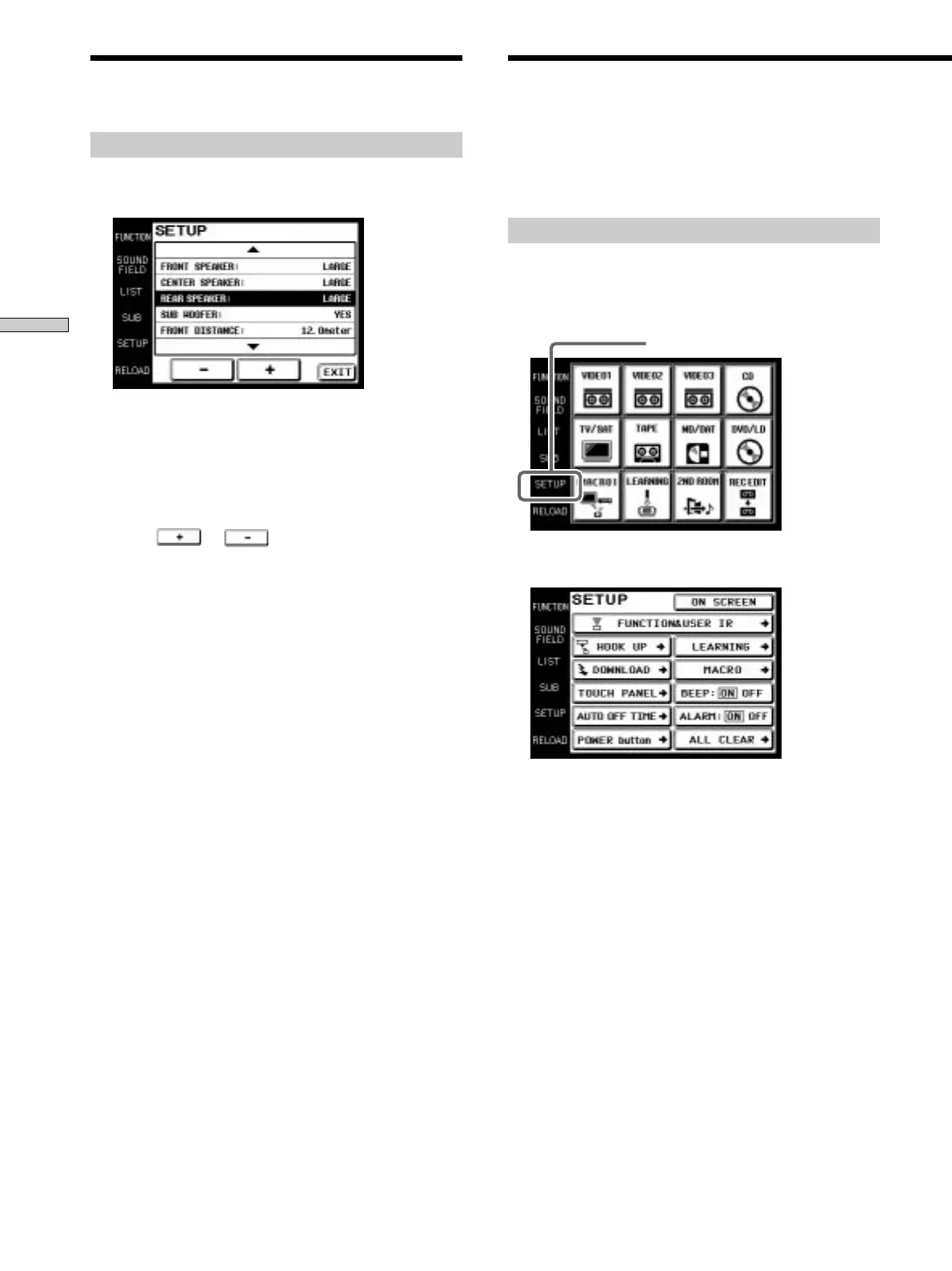
1 Touch SETUP on the SOUND FIELD screen.
The SETUP screen appears.
2 Use the JOG DIAL or touch 4 or $ to scroll through
the list.
3 Scroll JOG DIAL to select a parameter or touch the
parameter you want to adjust.
4 Touch or to adjust to the desired
setting.
5 Repeat steps 2 through 4 when there is more than
one parameter that you wish to adjust.
6 Touch EXIT when speaker setup is finished.
Notes
• Items that cannot be adjusted due to the current speaker
settings or sound field mode are grayed out.
• If the alarm sounds, or all items appear to be grayed out, touch
RELOAD.
The following explanations allow you to adjust various
settings and customize the commander’s operating
environment.
Displaying the SETUP screen
To adjust the operating environment, first display the
SETUP screen.
Touch SETUP.
The SETUP screen appears.
Adjusting the Commander’s
Operating Environment
SETUP
Adjusting Sound Fields











 To Next Page