EasyManua.ls Logo

Sony RM-V301 - Component-Specific Operations and Specifications; Operating Specific Components; Product Specifications

Sony RM-V301
8 pages
Print Icon
To Next Page IconTo Next Page
To Previous Page IconTo Previous Page
Loading...
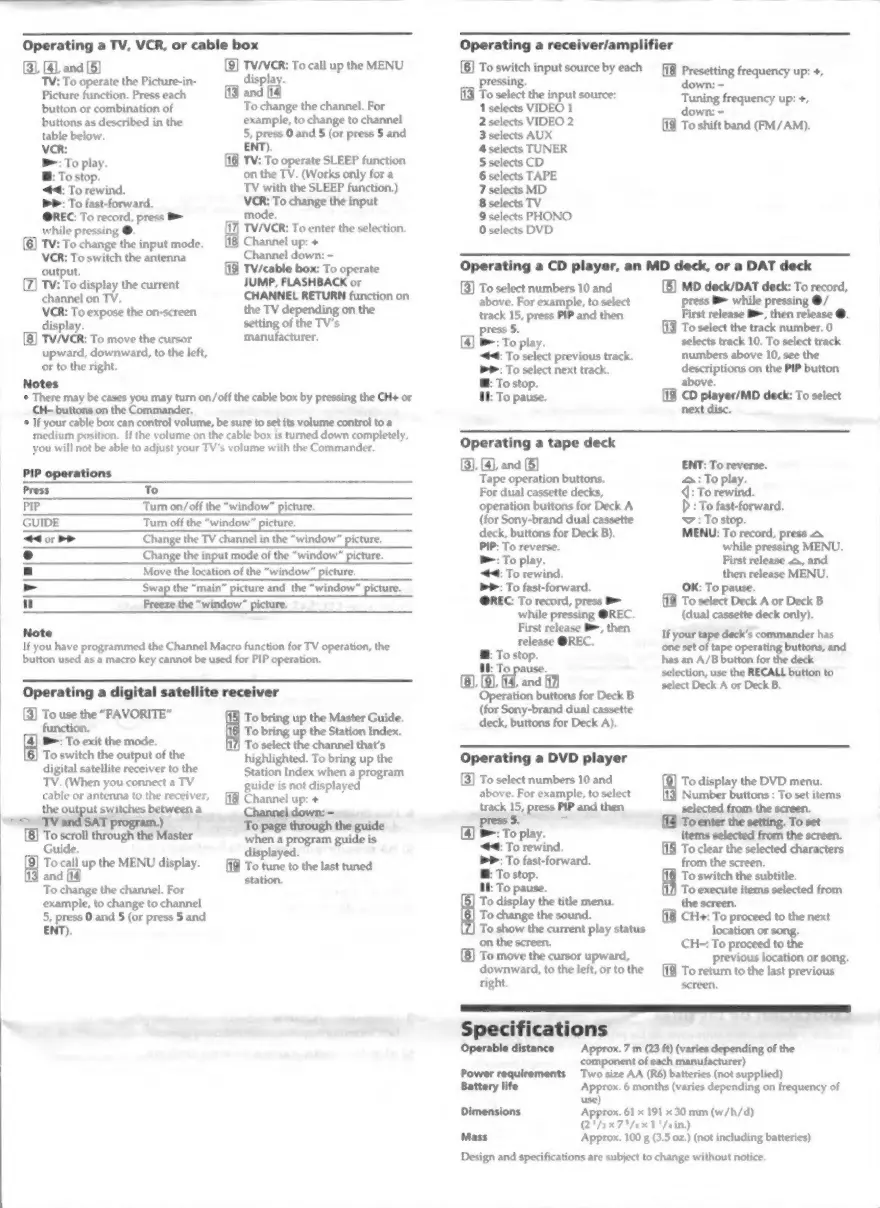
Operating
a
TV,
VCR,
or
cable
box
(3), (4),
and
(5)
TV:
To
operate
the
Picture-in-
Picture
function.
Press
each
button
or
combination
of
buttons
as
described
in
the
table
below.
>>:
To
fast-forward.
@REC:
To
record,
press
B=
while
pressing
@.
TV:
To
change
the
input
mode.
VCR:
To
switch
the
antenna
output.
TV:
To
display
the
current
TV/VCR:
To
call
up
the
MENU
display.
T
and
(18
To
change
the
channel.
For
example,
to
change
to
channel
5,
press
O
and
5
(or
press
5
and
ENT).
[18
TV:
To
operate
SLEEP
function
on
the
TV.
(Works
only
for
a
TV
with
the
SLEEP
function.)
VCR:
To
change
the
input
mode.
TV/VCR:
To
enter
the
selection.
Channel
up:
+
Channel
down:
-
TV/cable
box:
To
operate
JUMP,
FLASHBACK
or
Operating
a
receiver/amplifier
[8]
cis
input
source
byeach
fg
cta
frequency
up:
+,
[13
To
select
the
input
source:
1
selects
VIDEO
1
2
selects
VIDEO
2
3
selects
AUX
4
selects
TUNER
5
selects
CD
6
selects
TAPE
7
selects
MD
8
selects
TV
9
selects
PHONO
0
selects
DVD
Tuning
frequency
up:
+,
down:
-
To
shift
band
(FM/AM).
Operating
a
CD
player,
an
MD
deck,
or
a
DAT
deck
(3)
To
select
numbers
10
and
[5]
MD
deck/DAT
deck:
To
record,
above.
For
example,
to
select
press
B>
while
pressing
@/
track
15,
press
PIP
and
then
First
release
B,
then
release
@.
channel
on
TV.
CHANNEL
RETURN
function
on
VCR:
To
expose
the
on-screen
the
TV
depending
on
the
display.
setting
of
the
TV's
[8]
TV/VCR:
To
move
the
cursor
manufacturer.
upward,
downward,
to
the
left,
or
to
the
right.
Notes
+
There
may
be
cases
you
may
turn
on/off
the
cable
box
by
pressing
the CH+
or
CH-
buttons
on
the
Commander.
+
If
your
cable
box
can
control
volume,
be
sure
to
set
its
volume
control
to
a
medium
position.
If
the
volume
on
the
cable
box
is
turned
down
completely,
you
will
not
be
able
to
adjust
your
TV's
volume
with
the
Commander.
PIP
operations
Press
To
PIP
Turn
on/off
the
“window”
picture.
GUIDE
Turn
off
the
“window”
picture.
44
or
>>
Change
the
TV
channel
in
the
“window”
picture.
o
Change
the
input
mode
of
the
“window”
picture.
a
Move
the
location
of
the
“window”
picture.
»
Swap
the
“main”
picture
and
the
“window”
picture.
"
Freeze
the
“window”
picture.
Note
If
you
have
programmed
the
Channel
Macro
function
for
TV
operation,
the
button
used
as
a
macro
key
cannot
be
used
for
PIP
operation.
Operating
a
digital
satellite
receiver
[3]
To
use
the
“FAVORITE”
18]
To
bring
up
the
Master
Guide.
function.
16
To
bring
up
the
Station
Index.
B:
To
exit
the
mode.
(17)
To
select
the
channel
that’s
To
switch
the
output
of
the
digital
satellite
receiver
to
the
highlighted.
To
bring
up
the
Station
Index
when
a
program
TV.
(When
you
connect
a
TV
guide
is
not
displayed
cable
or
antenna
to
the
receiver,
58
Channel
up:
+
the
out
u
lead
re
a
Channel
down:
=
-mA
TV
program.
To
the
[8]
To
scroll
through
the
Master
entree
pate
Guide.
f
displayed.
To
call
up
the
MENU
display.
To
tune
to
the
last
tuned
and
fia
station.
To
change
the
channel.
For
example,
to
change
to
channel
5,
press
0
and
5
(or
press
5
and
ENT).
press
5.
To
select
the
track
number,
0
[4]
B-:
To
play.
selects
track
10.
To
select
track
4:
To
select
previous
track.
numbers
above
10,
see
the
PP:
To
select
next
track.
descriptions
on
the
PIP
button
B:
To
stop.
above.
MM:
To
pause.
CD
player/MD
deck:
To
select
next
disc.
Operating
a
tape
deck
(3),
(4),
and
(5)
ENT:
To
reverse.
Tape
operation
buttons.
A:
To
play.
For
dual
cassette
decks,
4:
To
rewind.
operation
buttons
for
Deck
A
D
:
To
fast-forward.
(for
Sony-brand
dual
cassette
Y
:
To
stop.
deck,
buttons
for
Deck
B).
MENU:
To
record,
press
Aa
PIP:
To
reverse.
while
pressing
MENU.
w=:
To
play.
First
release
A,
and
44:
To
rewind.
then
release
MENU.
PP:
To
fast-forward.
OK:
To
pause.
REC:
To
record,
press
B=
[9
To
select
Deck
A
or
Deck
B
while
pressing
OREC.
(dual
cassette
deck
only).
First
release
B,
then
P
mlae
REC.
on
EMER
coco
pe
opera
ttons,
and
@:
To
stop.
has
an
A/B
button
for
the
deck
aie
1B
Ad
and
selection,
use
the
RECALL
button
to
and
(12
select
Deck
A
or
Deck
B.
ba
wg
buttons
for
Deck
B
(for
Sony-brand
dual
cassette
deck,
buttons
for
Deck
A).
Operating
a
DVD
player
To
select
numbers
10
and
To
display
the
DVD
menu.
above.
For
example,
to
select
Number
buttons
:
To
set
items
track
15,
press
PIP
and
then
selected
from
the
screen.
press
5.
:
[A
To
enter
the
setting.
To
set
[4]
B:
To
play.
items
selected
from
the
screen.
44:
To
rewind.
To
clear
the
selected
characters
PP:
To
fast-forward.
from
the
screen.
E:
To
stop.
16
To
switch
the
subtitle.
IE:
To
pause.
117)
To
execute
items
selected
from
[5]
To
display
the
title
menu.
the
screen.
16)
To
change
the
sound.
CH+:
To
proceed
to
the
next
[Z]
To
show
the
current
play
status
location
or
song.
on
the
screen.
CH=:
To
proceed
to
the
(8]
To
move
the
cursor
upward,
downward,
to
the
left,
or
to
the
right.
previous
location
or
song.
[19
To
return
to
the
last
previous
screen.
ceras
dieran
Approx.
7
m
(23
ft)
(varies
depending
of
the
component
of
each
manufacturer)
Power
requirements
Two
size
AA
(R6)
batteries
(not
supplied)
Battery
life
Dimensions
use)
Approx.
6
months
(varies
depending
on
frequency
of
Approx.
61
x
191
x
30
mm
(w/h/d)
(2*/2x75/sx
1
'/4in.)
Mass
Approx.
100
g
(3.5
oz.)
(not
including
batteries)
Design
and
specifications
are
subject
to
change
without
notice.

Other manuals for Sony RM-V301

Related product manuals