Help Guide
Wearable Thermo Device Kit/Wearable Thermo Device Sensing Kit/Wearable Thermo Device
RNPK-4/RNPK-4T/RNP-3
Using MY MODE
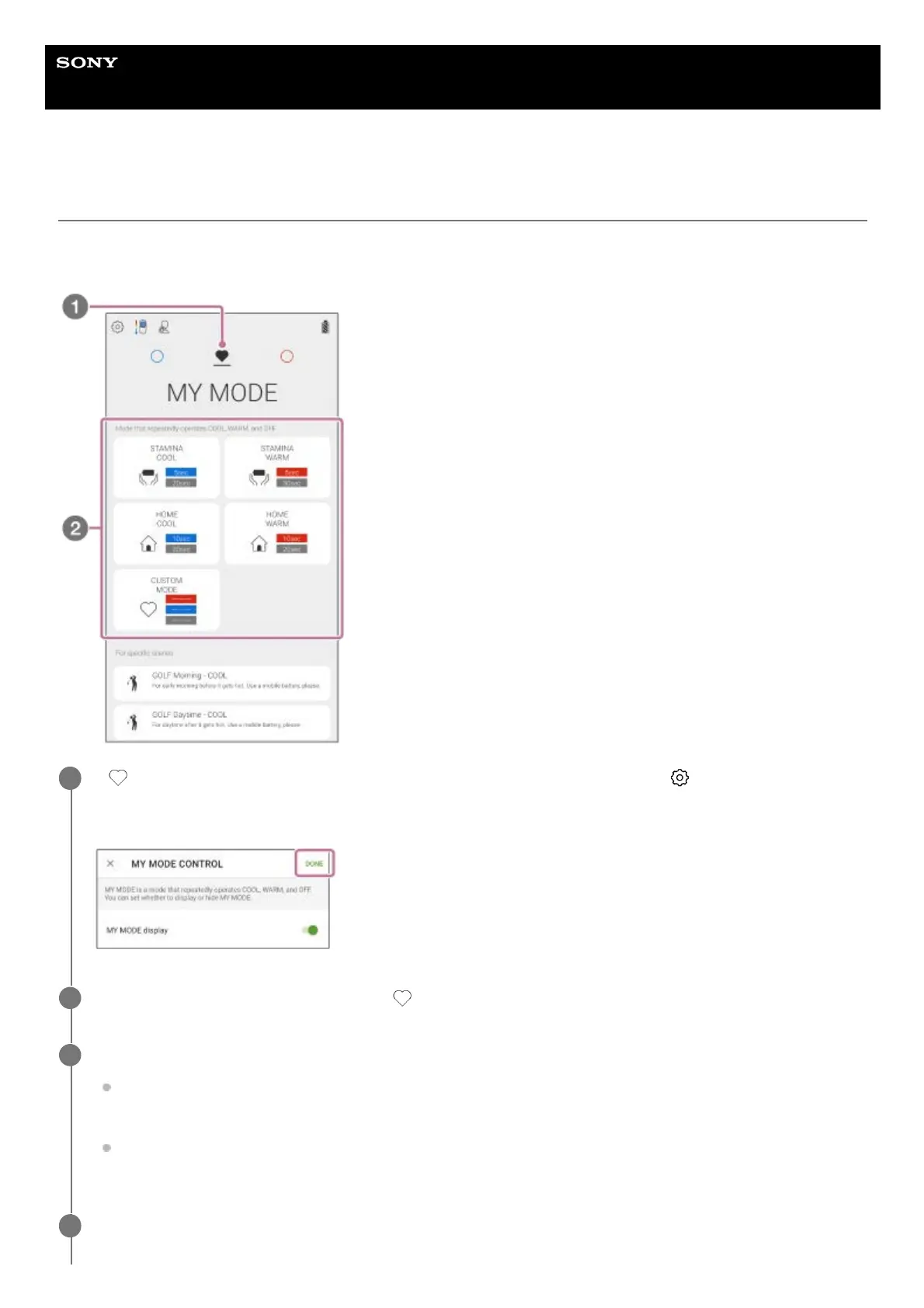
In MY MODE, you can set a series of actions such as “WARM → Interval → COOL → Interval → WARM → …” by
setting each temperature level and operating time. You can also select a recommended preset pattern.
If (MY MODE icon) is not displayed on the “REON POCKET” app screen, tap (Settings icon) - [MY
MODE CONTROL] - [MY MODE display] switch, and then tap [Done] on the upper right corner of the
screen.
1
On the “REON POCKET” app screen, tap
(MY MODE icon).
2
Tap [CUSTOM MODE] or a desired preset.
When you use [CUSTOM MODE]:
Set a series of action as you like. Tap [CUSTOM MODE] and proceed to step 3 and step 4.
When you select a preset:
Tap the desired pattern from the presets to start operation.
3
When you tap [CUSTOM MODE], set the temperature level and duration for [COOL] and [WARM], and also
set the interval and continuous running duration.
4



 To Next Page