I
=tiPJ
tm
ti
rn
Attaching and Detaching
the
,-----------------
Lens
This
instruction
manual
explains
how
to
use
lenses. Precautions
common
to
all lenses such
To
attach the lens
as
notes
on use are
found
in
the
separate
(See illustration
m-rn.)
Iii
Adjusting
the
Exposure
When
you
align
"A" on
the
aperture
scale
to
the
aperture
index,
the
exposure
is set
by
the
camera.
And
you
can
adjust
the
amount
of
light
between
f/2.5
and
f/22
by
rotating
the
aperture
ring.
"Precautions
before
using".
Be
sure
to
read
both
documents
before
using
your
lens. 1
Remove
the
rear lens cap
and
the
camera Adjust the amount
of
light manually
c__
_________________
__J
This lens
is
designed
for
Sony a camera system
E-mount
cameras. You
cannot
use
it
on
A-mount
cameras.
The
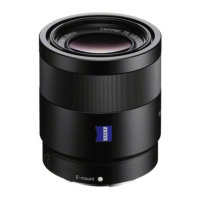
FE
40mm
F2.5 G is
compatible
with
the
range
of
a
35mm
format
image
sensor.
A camera
equipped
with
a
35mm
format
image
sensor can also
be
set
to
shoot
at APS-C size.
For
details
on
how
to
set
your
camera, refer
to
its
instruction
manual.
For
further
information
on
compatibility,
visit
the
web
site
of
Sony in
your
area,
or
consult
your
dealer
of
Sony
or
local
authorized
service
facility
of
Sony.
For
Customers
in
the U.S.A.
For
question
regarding
your
product
or
for
the
Sony
Service Center
nearest
you,
call 1-800-222-SONY (7669).
Supplier's Declaration of Conformity
Trade
Name
: SONY
Model
: SEL40F25G
2
body
cap.
Align the white index
on
the lens barrel
with the white index
on
the camera
(mounting index), then insert the lens
into the camera mount and rotate
it
clockwise until
it
locks.
•
Do
not press the lens release button on the
camera when
mounting
the lens.
•
Do
not
mount
the lens at
an
angle.
3 Remove the front lens cap.
• You
can
attach/detach the front lens cap
in
two
ways,
(1)
and
(2).
To
detach the lens
1
2
Attach the front lens cap.
While holding down the lens release
button
on
the camera, rotate the lens
counterclockwise until
it
stops, then
detach the lens. (See illustration
IEJ-[2].)
Responsible Party : Sony Electronics Inc.
Address:
16535 Via Esprillo, San Diego,
CA
92127 [!) Attaching
the
Lens Hood
U.S.A.
It
is
recommended
that
you
use a lens
hood
to
Telephone
Number:
858-942-2230
reduce flare
and
ensure
maximum
image
quality.
This device
complies
with
part
15
of
the
FCC
rules.
Operation
is
subject
to
the
following
two
conditions:
Align the red line
on
the lens hood with the
(1)
This device
may
not
cause
harmful
interference,
red line
on
the lens {lens hood index), then
and
(2)
this
device
must
accept
any
interference
insert the lens hood into the lens mount and
received,
including
interference
that
may
cause rotate
it
clockwise until
it
clicks
into place
undesired
operation.
Notes on Use
•
Do
not
leave the lens exposed
to
the sun or a bright
light source. Internal malfunction
of
the camera body
and lens, smoke, or a fire may result due
to
the effect
of
light focusing.
If
circumstances necessitate leaving
the lens in sunlight, be sure
to
attach the lens caps.
• When shooting against the sun, keep the sun
completely
out
of
the angle
of
view. Otherwise, solar
rays
may
be
concentrated at a focal point inside
the camera, causing smoke
or
a fire. Keeping the
sun slightly
out
of
the angle
of
view may also cause
smoke or a fire.
• When carrying a camera with the lens attached,
always firmly hold both the camera and the lens.
• This lens
is
not water-proof, although designed
with
dust-proofness and splash-proofness
in
mind.
If
using
in
the rain etc., keep water drops away from the lens.
•
If
the lens alone
is
shaken or
if
a camera with the lens
attached
is
shaken while the camera
is
turned off,
an
internal component
of
the lens may rattle. This,
however, does not indicate a malfunction.
and the red dot
on
the lens hood
is
aligned
with the
red
line
on
the lens.
•
Be
sure
to
rotate the lens hood until
it
clicks into place
to
prevent its disengagement from the lens.
• When using a built-in camera flash
or
an
external flash
(sold separately) attached to the camera, remove the
lens hood to avoid blocking the flash light.
• When using the lens hood, attach the
front
lens cap
over the lens hood.
• You
can
attach a filter over the lens hood. Depending
on the type
of
filters, you can attach the lens hood
after attaching a filter over the lens
as
well.
I!] Focusing
• The focus mode switch
of
this lens does not function
with some camera models.
For further information on compatibility, visit the web
site
of
Sony
in
your area,
or
consult your dealer
of
Sony or local authorized service facility
of
Sony.
To
switch
AF
(auto focus)/
MF (manual focus)
In
addition, while you carry around the lens, your The focus
mode
can
be
switched
between
AF
and
movement may cause the internal lens groups
to
MF
on
the
lens.
shake. This, however, does not affect the performance For
AF
photography,
both
the
camera
and
lens
of
the l~ns groups. .
should
be set
to
AF.
For MF
photography,
either
or
Precautions on using a flash
both
the
camera
or
lens
should
be set
to
MF.
• When using a flash, always remove the lens hood and
shoot at least 1 m
(3.3
feet) away from your subject. To set
the
focus
mode
on
the
lens
• With certain combinations
of
lens and flash, the lens Slide the focus mode switch to the
may partially block the light
of
the flash, resulting in a appropriate mode,
AF
or
MF
(1).
shadow at the
bottom
of
the picture.
In
such a
case,
adjust the shooting distance before shooting.
Vignetting
• When using the lens, the corners
of
the screen
become darker than the center.
To
reduce this
phenomena (called vignetting), close the aperture by
1
to
2 stops.
m Identifying
the
Parts
1 Lens
hood
index
2 Focusing
ring
3
Aperture
ring
4
Aperture
scale
5
Aperture
index
6
Mounting
index
7 Focus
mode
switch
8 Focus
hold
button
9 Lens
hood
10
Aperture
click
switch
11
Lens
contacts*
12
Lens
mount
rubber
ring
* Do
not
touch
the
lens contacts.
• Refer
to
the camera manuals to set the focus mode
of
the camera.
•
In
MF,
turn the focusing ring
to
adjust the focus
(2)
while looking through the viewfinder, etc.
To use a camera equipped with an
AF/MF
control button
•
By
pressing the AF/MF control button during
AF
operation, you
can
temporarily switch to
MF.
• Pressing the AF/MF control button during
MF
operation lets you temporarily switch
to
AF
if
the lens
is
set to
AF
and the camera to
MF.
(El
Using
the
Focus Hold Buttons
• The focus hold button
of
this lens does not function
with some camera models.
For
further information on compatibility, visit the web
site
of
Sony
in
your area,
or
consult your dealer
of
Sony or local authorized service facility
of
Sony.
Press
the
focus
hold
button
in
AF
to
cancel
AF.
The focus is
fixed
and
you
can release
the
shutter
on
the
fixed
focus. Release
the
focus
hold
button
while
pressing
the
shutter
button
halfway
to
start
--------------------
AF
again.
Rotate the aperture ring to the desired
exposure (f-stop) when the camera
is
set to
the M mode or A mode.
Notes
Set
the
aperture
click
switch
to
"OFF"
when
shooting
movies. (See
illustration
[ii-a.)
When
the
aperture
click
switch
is
set
to
"OFF,"
the
sound
of
the
aperture
ring is
reduced.
(For
movie
recording)
If
you
change
the
aperture
value
while
shooting
a
movie
with
the
aperture
click
switch
set
to
"ON,"
the
sound
of
the
aperture
ring
will
be recorded.
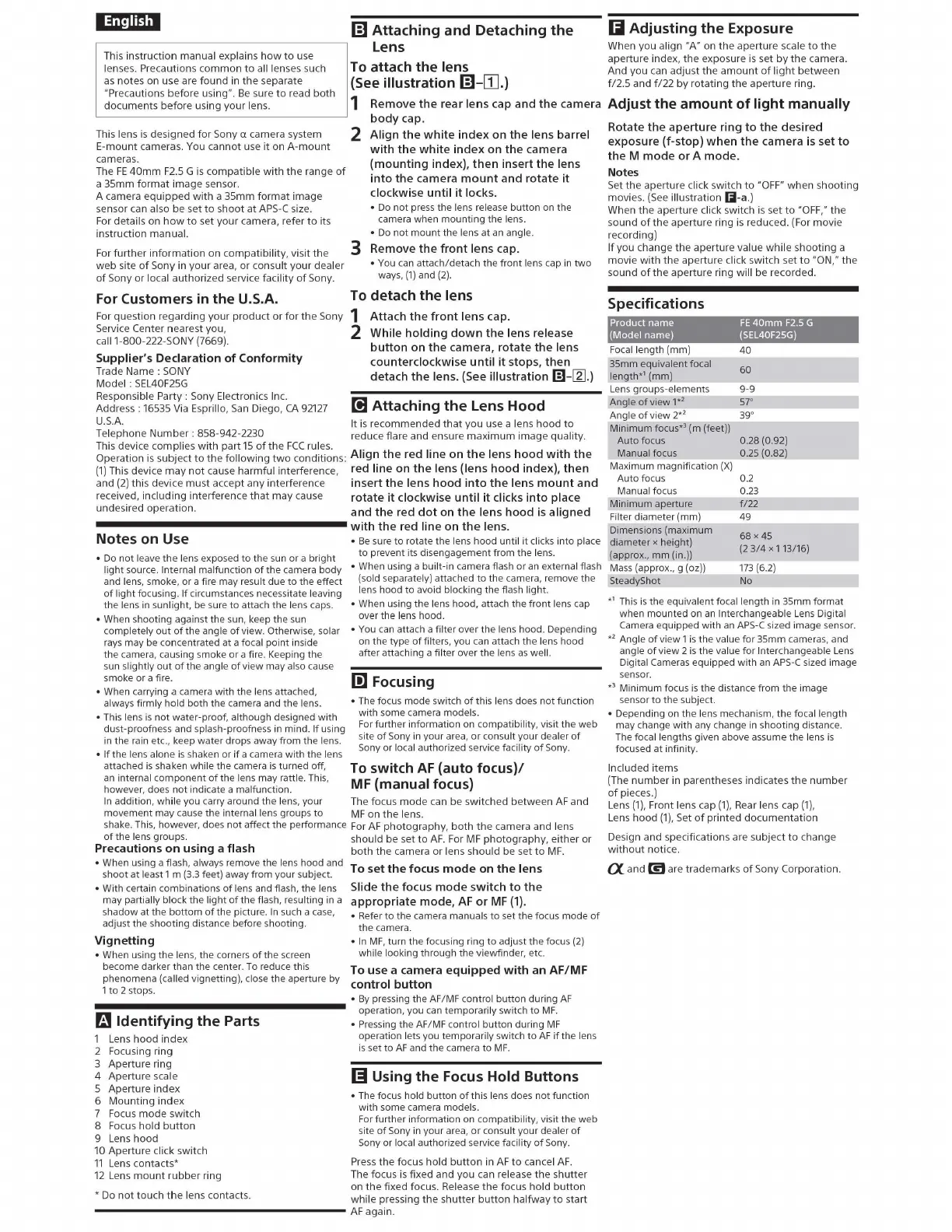
Specifications
Product name
FE
40mm
F2.5
G
(Model name) (SEL40F25G)
Focal length (mm)
40
35mm equivalent focal
60
length*' (mm)
Lens
groups-elements 9-9
Angle
of
view
1*
2
57°
Angle
of
view
2*
2
39
°
Minimum focus*' (m (feet))
Auto focus 0.28 (0.92)
Manual focus 0.25 (0.82)
Maximum magnification
(X)
Auto focus 0.2
Manual focus 0.23
Minimum aperture
f/22
Filter diameter (mm) 49
Dimensions (maximum
68
x45
diameter x height)
(2
3/4
X 113/16)
(approx.,
mm
(in.))
Mass
(approx., g (oz))
173
(6.2)
SteadyShot No
*
1
This
is
the equivalent focal length
in
35mm format
when mounted on
an
Interchangeable
Lens
Digital
Camera equipped
with
an
APS-C
sized image sensor.
*
2
Angle
of
view 1
is
the value
for
35mm cameras, and
angle
of
view 2
is
the value for Interchangeable
Lens
Digital Cameras equipped
with
an
APS-C
sized image
sensor.
*'
Minimum focus
is
the distance from the image
sensor
to
the subject.
• Depending on the lens mechanism, the focal length
may change
with
any change
in
shooting distance.
The focal lengths given above assume the lens
is
focused at infinity.
Included
items
(The
number
in
parentheses
indicates
the
number
of
pieces.)
Lens
(1),
Front lens cap
(1),
Rear lens cap
(1),
Lens
hood
(1),
Set
of
printed
documentation
Design
and
specifications
are
subject
to
change
without
notice.
CX.
and
mare
trademarks
of
Sony Corporation.



 To Next Page
 Loading...