EasyManua.ls Logo

Sony SRF-HM55 - Page 5

Sony SRF-HM55
6 pages
Print Icon
To Next Page IconTo Next Page
To Previous Page IconTo Previous Page
Loading...
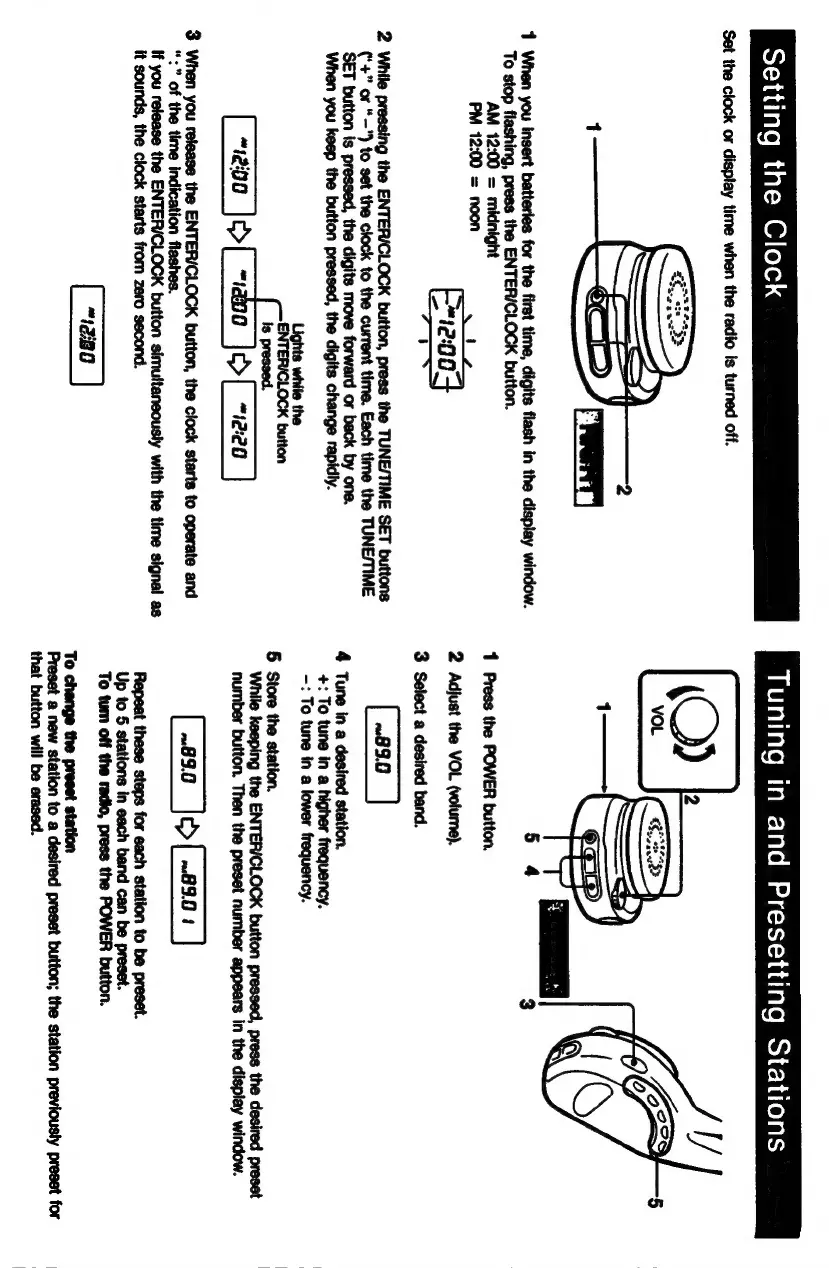
Setting
the
Clock
Set
the
clock
or
display
time
when
the
radio
is
turned
off.
1
When
you
insert
batteries
for the
first
time,
digits
flash
in
the
display
window.
To
stop
flashing,
press
the
ENTER/CLOCK
button.
AM
12:00
=
midnight
æocq
ĩ
PM
12:00
=
noon
2
While
pressing
the
ENTER/CLOCK
button,
press
the
TUNE/TIME
SET
buttons
(‘+”
or
“—")
to
set
the
clock
to
the
current
time.
Each
time
the
TUNE/TIME
SET
button
is
pressed,
the
digits
move
forward
or
back
by
one.
When
you
keep
the
button
pressed,
the
digits
change
rapidly.
is
pressed.
[200
}q>[_=ao0_|e>(_-2e0
]
3
When
you
release
the
ENTER/CLOCK
button,
the
clock
starts
to
operate
and
“:"
of
the
time
indication
flashes.
if
you
release
the
ENTER/CLOCK
button
simultaneously
with
the
time
signal
as
it
sounds,
the
clock
starts
from
zero
second.
Tuning
in
and
Presetting
Stations
1
Press
the
POWER
button.
2
Adjust
the
VOL
(volume).
3
Select
a
desired
band.
4
Tune
in
a
desired
station.
+:
To
tune
in
a
higher
frequency.
-:
To
tune
in
a
lower
frequency.
5
Store
the
station.
While
keeping
the
ENTER/CLOCK
button
pressed,
press
the
desired
preset
number
button.
Then
the
preset
number
appears
in
the
display
window.
[~830
}o>[
230
|
Repeat
these steps
for
each
station
to be
preset.
Up
to
5
stations
in
each
band
can
be
preset.
To
tum
off
the
radio,
press
the
POWER
button.
To
change
the
preset
station
Preset
a
new
station
to
a
desired
preset
button;
the
station
previously
preset
for
that
button
will
be
erased.

Related product manuals