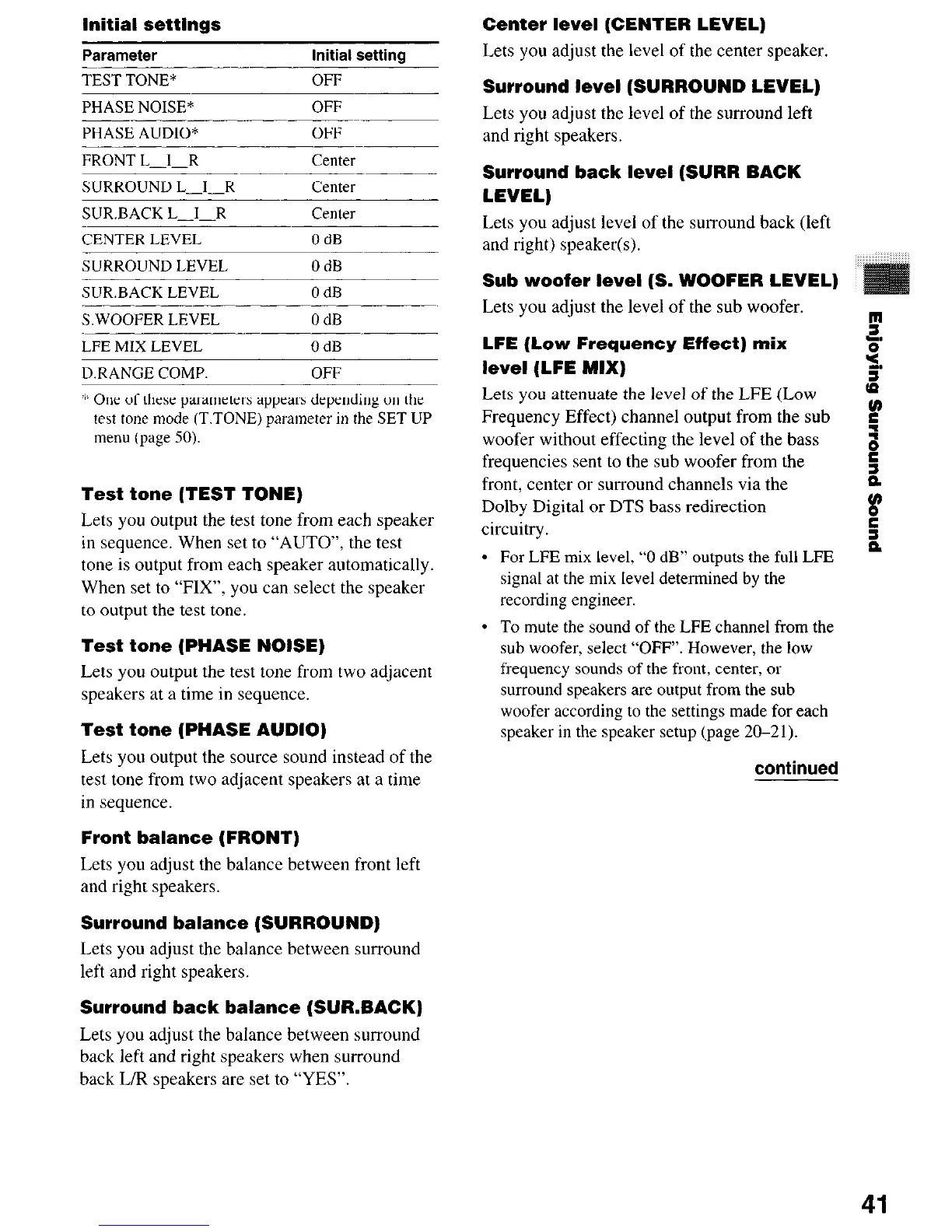
Initial settings
Parameter
Initial setting
TEST TONE*
PHASE NOISE*
OFF
OFF
PHASE AUDIO* OFF
FRONT L-1-R center
SURROUND L-I-R
center
SUR.BACK L-1-R center
CENTER LEVEL OdB
SURROUND LEVEL
SUR.BACK LEVEL
OdB
OdB
SWOOFER LEVEL OdB
LFE MIX LEVEL OdB
D.RANGE COMP. OFF
‘k One of these parameters appears depending on the
tebt tone mode (T.TONE) parameter in the SET UP
menu (page 50).
Test tone (TEST TONE)
Lets you output the test tone from each speaker
in sequence. When set to “AUTO”, the test
tone is output from each speaker automatically.
When set to “FIX”, you can select the speaker
to output the test tone.
Test tone (PHASE NOISE)
Lets you output the test tone from two adjacent
speakers at a time in sequence.
Test tone (PHASE AUDIO)
Lets you output the source sound instead of the
test tone from two adjacent speakers at a time
in sequence.
Front balance (FRONT)
Lets you adjust the balance between front left
and right speakers.
Surround balance (SURROUND)
Lets you adjust the balance between surround
left and right speakers.
Surround back balance (SURBACK)
Lets you adjust the balance between surround
back left and right speakers when surround
back L/R speakers are set to “YES”.
Center level (CENTER LEVEL)
Lets you adjust the level of the center speaker.
Surround level (SURROUND LEVEL)
Lets you adjust the level of the surround left
and right speakers.
Surround back level (SURR BACK
LEVEL)
Lets you adjust level of the surround back (left
and right) speaker(s).
Sub woofer level (S. WOOFER LEVEL)
Lets you adjust the level of the sub woofer.
B
LFE (Low Frequency Effect) mix
level (LFE MIX)
Lets you attenuate the level of the LFE (Low p
Frequency Effect) channel output from the sub
r
woofer without effecting the level of the bass
:
frequencies sent to the sub woofer from the
r”
front, center or surround channels via the
z
Dolby Digital or DTS bass redirection
u,
circuitry.
e
2
l
For LFE mix level, “0 dB” outputs the full LFE
signal at the mix level determined by the
recording engineer.
l
To mute the sound of the LFE channel from the
sub woofer, select “OFF”. However, the low
frequency sounds of the front, center, or
surround speakers are output from the sub
woofer according to the settings made for each
speaker in the speaker setup (page 20-21).
continued
41













 To Next Page