Using the RM-US105 remote
(continued)
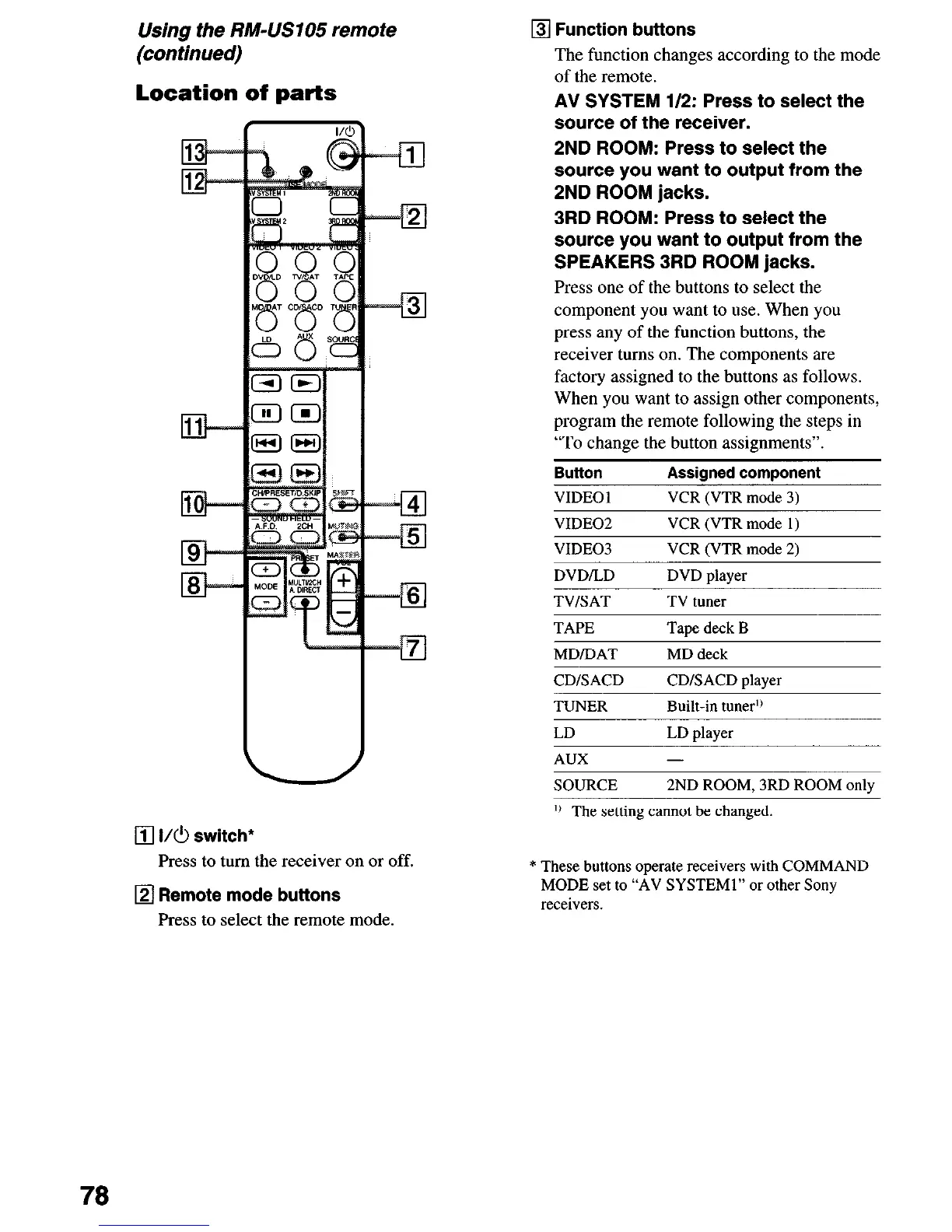
Location of parts
q
I/C!l switch*
Press to turn the receiver on or off.
q
Remote mode buttons
Press to select the remote mode.
q
Function buttons
The function changes according to the mode
of the remote.
AV SYSTEM 112: Press to select the
source of the receiver.
2ND ROOM: Press to select the
source you want to output from the
2ND ROOM jacks.
3RD ROOM: Press to select the
source you want to output from the
SPEAKERS 3RD ROOM jacks.
Press one of the buttons to select the
component you want to use. When you
press any of the function buttons, the
receiver turns on. The components are
factory assigned to the buttons as follows.
When you want to assign other components,
program the remote following the steps in
“To change the button assignments”.
Button
Assigned component
VIDEO 1
VCR (VTR mode 3)
VIDEO2 VCR (VTR mode 1)
VIDEO3
VCR (VTR mode 2)
DVDILD
TV/SAT
DVD player
TV tuner
TAPE
Taoe deck B
MD/DAT
MD deck
CDISACD
TUNER
CDISACD player
Built-in tunerI)
LD
LD slaver
AUX
-
SOURCE 2ND ROOM, 3RD ROOM only
I) The setting cannot be changed
* These buttons operate receivers with COMMAND
MODE set to “AV SYSTEMI” or other Sony
receivers.
78













 To Next Page