EasyManua.ls Logo

Sony TA-E1000ESD - Page 15

Sony TA-E1000ESD
48 pages
Print Icon
To Next Page IconTo Next Page
To Previous Page IconTo Previous Page
Loading...
Selecting
the
Pro
Logic
Mode
(for
Dolby
Surround
Mode)
in
the
Dolby
surround
mode,
a
speaker
operation
mode
can
Press
PRO
LOGIC
MODE
to
select
the
appropriate
mode:
be
selected
to
match
your
speaker
system.
NORMAL
Select
this
mode
if
you
use
a
small
center
speaker.
The
bass
sound
of
the
center
channel
is
output
from
the
front
speakers,
as
a
small
speaker
cannot
produce
enough
bass.
WIDE
Select
this
mode
if
you
use
a
medium
to
big
center
speaker.
PHANTOM
Select
this
mode
when
you
play
back
a
Dolby
surround
program
source
without
using
a
center
speaker.
3ch
LOGIC
Select
this
mode
when
you
playback
a
Dolby
surround
program
source
only
with
the
front
and
center
speakers.
CENTER
OFF
This
mode
is
only
used
for
adjusting
the
input
balance
in
Dolby
surround
mode
(refer
to
page
18).
Adjusting
the
Speaker
Volume
To
enjoy
the
surround
sound
to
the
maximum
on
playing
surround
mode,
but
the
level
once
adjusted
can
be
used
for
any
program
sources,
adjust
the
front,
rear,
and
center
(if
all
surround
modes.
connected)
speakers
to
the
same
volume
level.
The
You
can
adjust
the
volume
level
from
your
listening
position
adjustment
must
be
done
with
a
test
tone
in
the
Dolby
if
you
use
the
remote
commander.
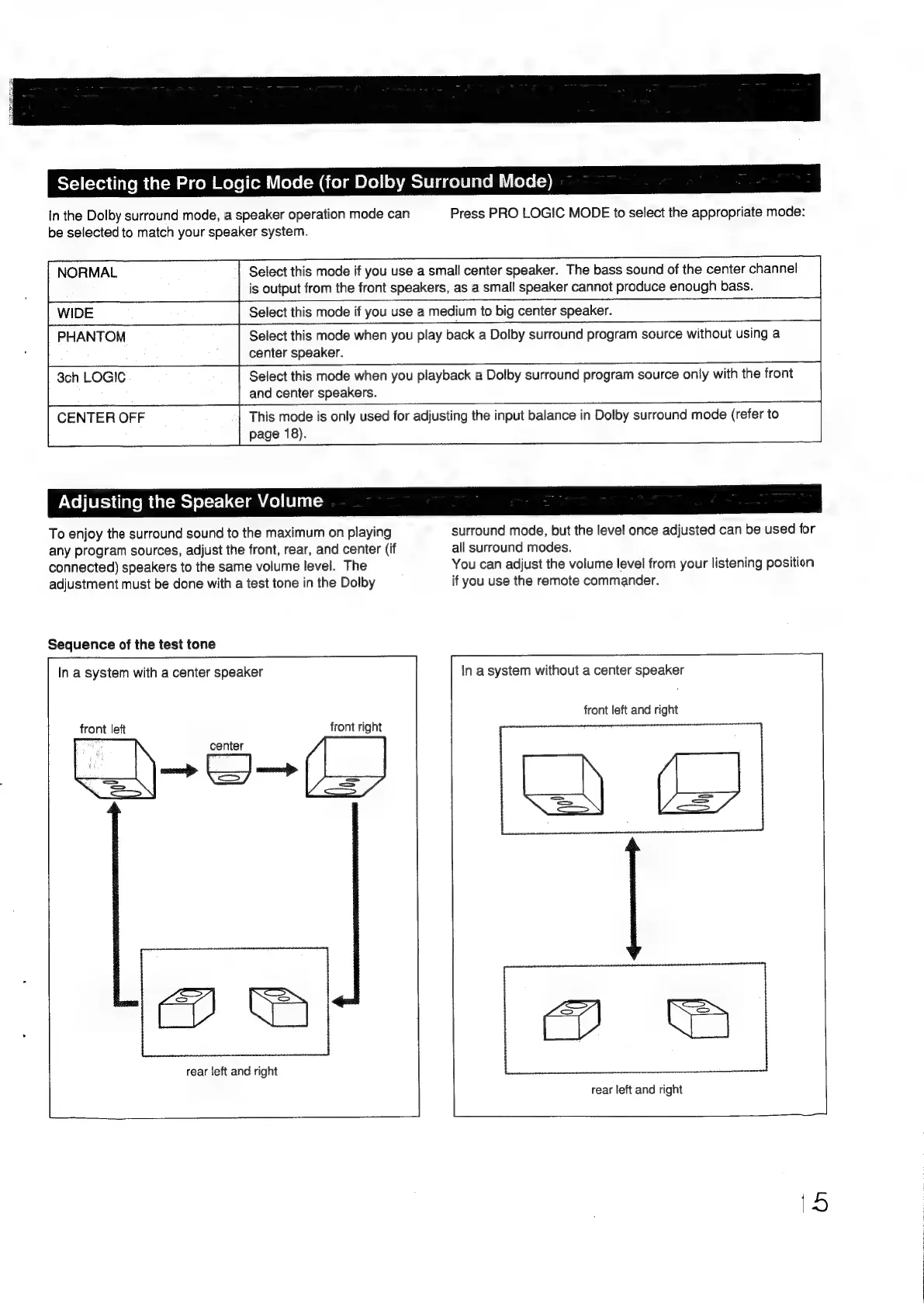
Sequence
of
the
test
tone
In
a
system
with
a
center
speaker
In
a
system
without
a
center
speaker
front
left
and
right
cs)
be
|
front
left
front
right
center
naseonna
>
rear
left
and
right
rear
left
and
right

Other manuals for Sony TA-E1000ESD

Related product manuals