EasyManua.ls Logo

Sony TA-E1000ESD - Page 16

Sony TA-E1000ESD
48 pages
Print Icon
To Next Page IconTo Next Page
To Previous Page IconTo Previous Page
Loading...
Le
T=1t
tlie
atzr-leVmCom
malo)
Molelegelelnremerele
lire,
Ea
Sieeepeos
=p
9
6250),
G1
Opry
Ee
Main
unit
Remote
commander
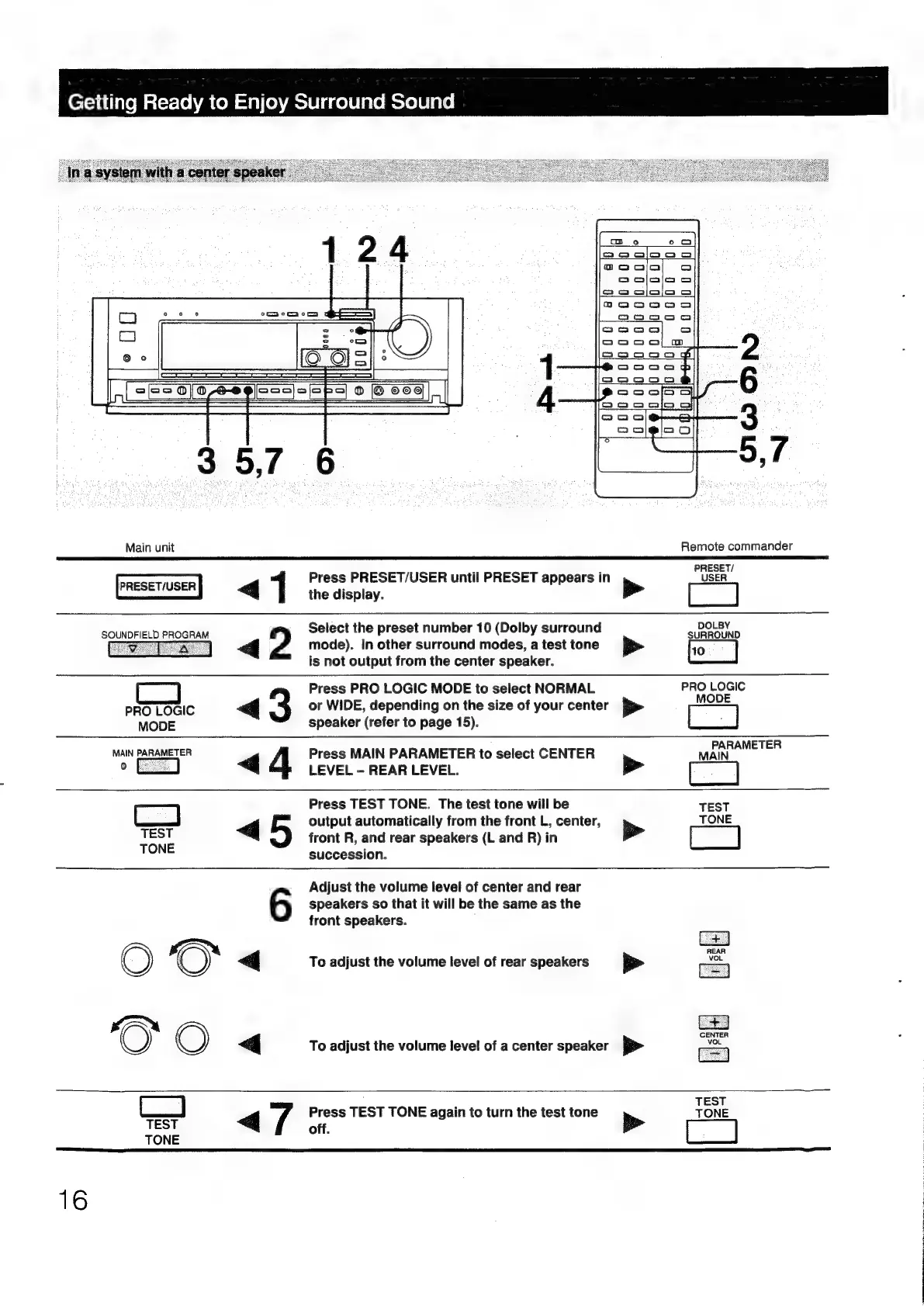
Press
PRESET/USER
until
PRESET
appears
in
POSER
4.1
trecisptay
PC
Select
the
preset
number
10
(Dolby
surround
DOLBY
SOUNDFIELD
PROGRAM
SURROUND
=
a
«<4
2
mode).
In
other
surround
modes,
a
test
tone
p>
:
is
not
output
from
the
center
speaker.
Press
PRO
LOGIC
MODE
to
select
NORMAL
prpeene
PRO
LOGIC
@
3
or
WIDE,
depending
on
the
size
of
your
center
»
MoD
MODE
speaker
(refer
to
page
15).
MAIN
PARAMETER
Press
MAIN
PARAMETER
to
select
CENTER
yeaa
of
<q
LEVEL
-
REAR
LEVEL.
>
Press
TEST
TONE.
The
test
tone
will
be
TEST
>
|
output
automatically
from
the
front
L,
center,
>
TONE
TEST
front
R,
and
rear
speakers
(L
and
R)
in
TONE
succession.
speakers
so
that
it
will
be
the
same
as
the
6
Adjust
the
volume
level
of
center
and
rear
front
speakers.
CENTER
VoL
<j
To
adjust
the
volume
level
of
rear
speakers
>
G
To
adjust
the
volume
level
of
a
center
speaker
pe
TEST
L_j
Press
TEST
TONE
again
to
turn
the
test
tone
TONE
em
40s
Pe
ed
TONE
16