EasyManua.ls Logo

Sony TA-E1000ESD - Page 24

Sony TA-E1000ESD
48 pages
Print Icon
To Next Page IconTo Next Page
To Previous Page IconTo Previous Page
Loading...
Listening
to
/
Watching
Program
Sources
aUiatiie
MM
AoLeLmOl
tm
m-lol-|Melem-lamialoleim@
mela
team
=lilacele
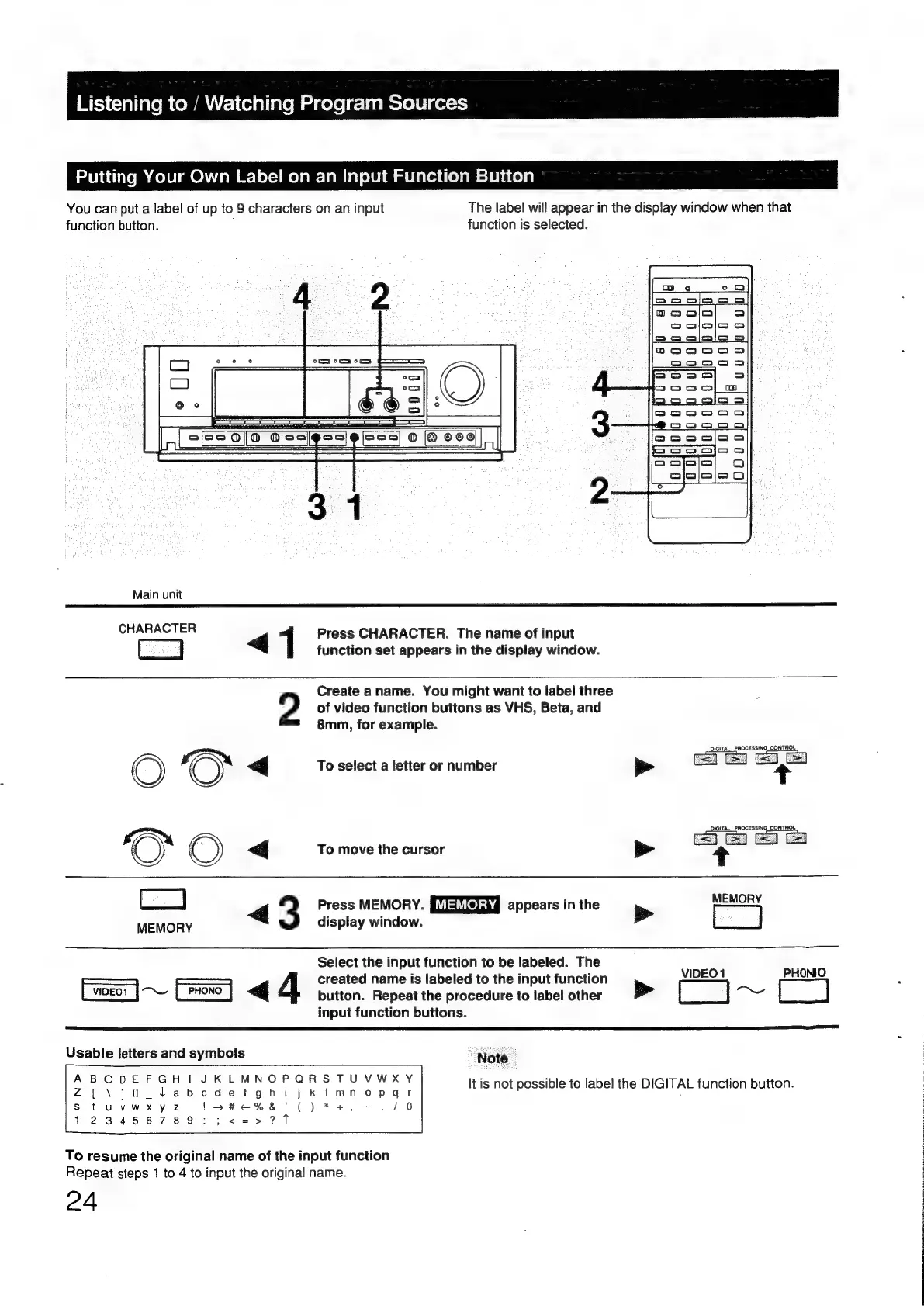
You
can
put
a
label
of
up
to
9
characters
on
an
input
The
label
will
appear
in
the
display
window
when
that
function
button.
function
is
selected.
=
een
ee
CI
co
®@
o
Oa
a
———
SS
SP/22
0/0
Oso
oo
[Ss5]
©
[@
O00
|
eS
SEY
Main
unit
CHARACTER
4
Press
CHARACTER.
The
name
of
input
Cj
function
set
appears
in
the
display
window.
of
video
function
buttons
as
VHS,
Beta,
and
9
Create
aname.
You
might
want
to
label
three
8mm,
for
example.
DIGITAL
PROCESSING
CONTROL,
«<j
To
select
a
letter
or
number
DIGITAL_PROCESSING
CONTROL
©)
<q
To
move
the
cursor
>
<t
=
am
4
3
Press
MEMORY.
appears
in
the
>
mel
display
window.
Select
the
input
function
to
be
labeled.
The
amen
Biioie
————
——
created
name
is
labeled
to
the
input
function
[woe
|
~
>
|
4
button.
Repeat
the
procedure
to
label
other
>
a
are
input
function
buttons.
Note
It
is
not
possible
to
label
the
DIGITAL
function
button.
To
resume
the
original
name
of
the
input
function
Repeat
steps
1
to
4
to
input
the
original
name.
24

Other manuals for Sony TA-E1000ESD

Related product manuals