EasyManua.ls Logo

Sony TA-E1000ESD - Exploded Views; Chassis and Main Board Assembly

Sony TA-E1000ESD
48 pages
Print Icon
To Next Page IconTo Next Page
To Previous Page IconTo Previous Page
Loading...
Using
the
Digital
Surround
System
Adjusting
the
Main
Parameters
Before
adjusting
parameters,
play
back
the
program
source,
You
can
adjust
parameters
while
listening
to
the
actual
and
press
SURROUND
to
turn
on
the
surround
function.
sound.
To
turn
off
the
surround
function,
press
SURROUND
again
to
turn
off
the
indicator.
Simulating
the
Room
Size
The
sound
emitted
from
a
sound
source
is
reflected
many
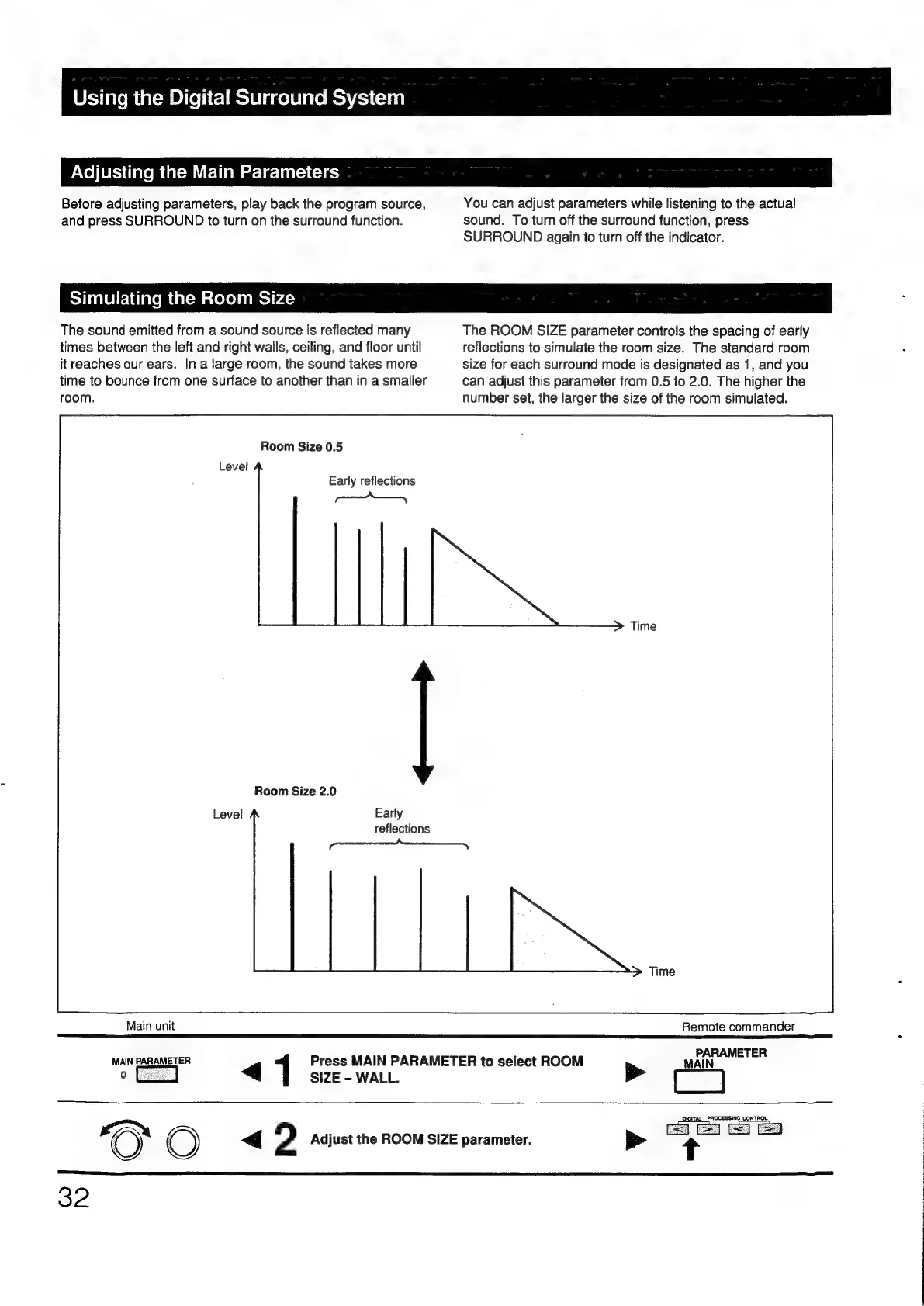
The
ROOM
SIZE
parameter
controls
the
spacing
of
early
times
between
the
left
and
right
walls,
ceiling,
and
floor
until
reflections
to
simulate
the
room
size.
The
standard
room
it
reaches
our
ears.
In
a
large
room,
the
sound
takes
more
size
for
each
surround
mode
is
designated
as
1,
and
you
time
to
bounce
from
one
surface
to
another
than
in
a
smaller
can
adjust
this
parameter
from
0.5
to
2.0.
The
higher
the
room.
number
set,
the
larger
the
size
of
the
room
simulated.
Room
Size
0.5
Early
reflections
i
Room
Size
2.0
Early
reflections
|
Main
unit
Remote
commander
PARAMETER
MAIN
MAIN
PARAMETER
Press
MAIN
PARAMETER
to
select
ROOM
o
2
<q
SIZE
-
WALL.
<4
2
Adjust
the
ROOM
SIZE
parameter.
32

Other manuals for Sony TA-E1000ESD

Related product manuals