EasyManua.ls Logo

Sony TA-E1000ESD - Front Panel Assembly

Sony TA-E1000ESD
48 pages
Print Icon
To Next Page IconTo Next Page
To Previous Page IconTo Previous Page
Loading...
Using
the
Digital
Surround
System
Simulating
the
Seat
Position
When
you
sit
in
the
front
of
a
room,
you
will
hear
more
direct
sound
from
the
front
speakers,
and
the
component
of
reflected
sounds
from
the
front
speakers
grows
as
you
move
forward
to
rear.
Similarly,
the
component
of
reflected
sound
changes
when
you
move
from
left
to
right,
and
vice
versa.
The
SEAT
POSITION
parameter
controls
the
balance
of
the
direct
and
reflected
sound
and
other
components
of
sound
to
simulate
your
listening position.
HALL
2
and
STADIUM
modes
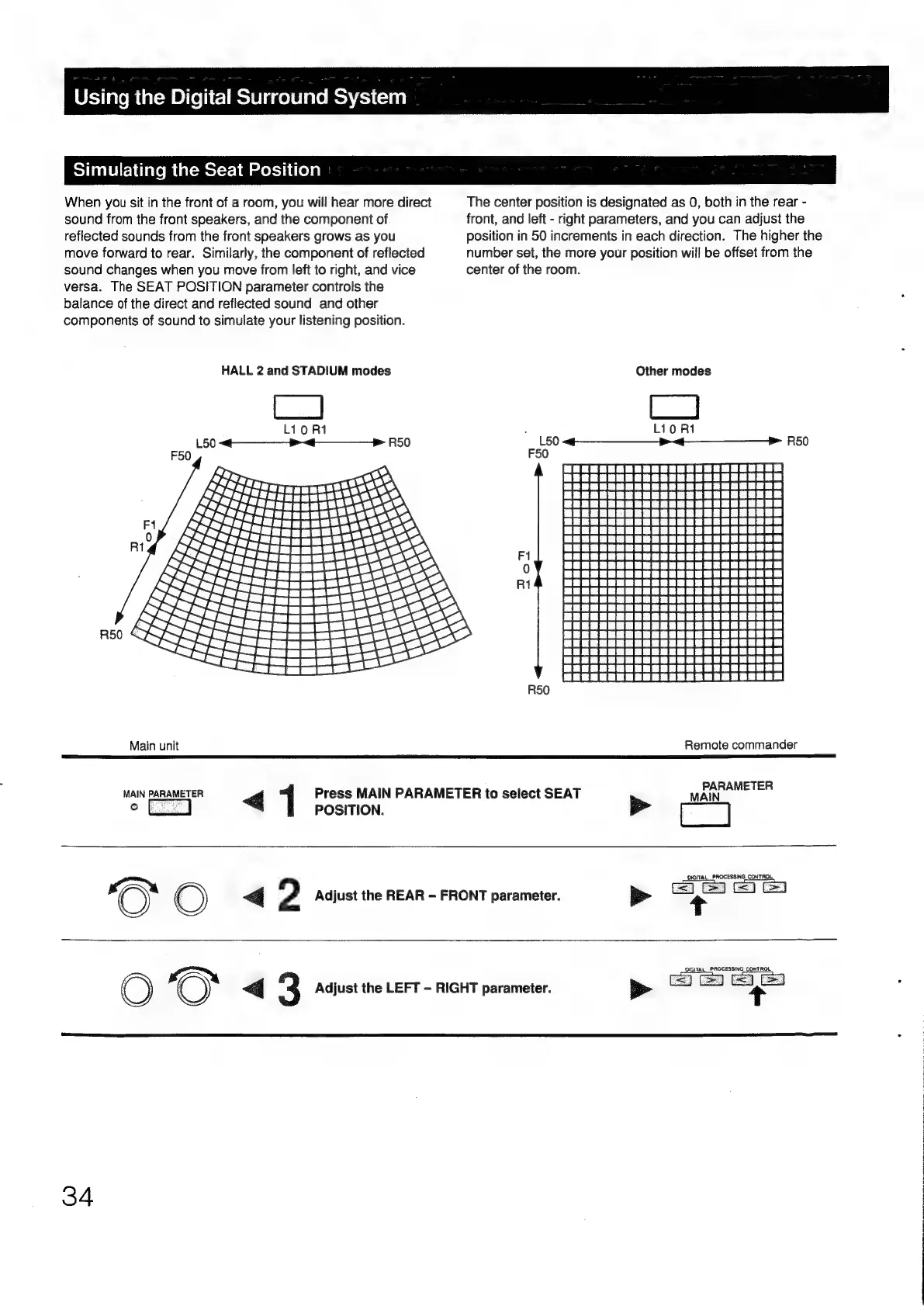
The
center
position
is
designated
as
0,
both
in
the
rear
-
front,
and
left
-
right
parameters,
and
you
can
adjust
the
position
in
50
increments
in
each
direction.
The
higher
the
number
set,
the
more
your
position
will
be
offset
from
the
center
of
the
room.
Other
modes
R50
Main
unit
Remote
commander
MAIN
ARAMETER
1
Press
MAIN
PARAMETER
to
select
SEAT
Ma
°
POSITION.
>
ee
?
Adjust
the
REAR
-
FRONT
parameter.
:
+
1O)
G
3
Adjust
the
LEFT
-
RIGHT
parameter.
DIGITAL_PROCESSING
CONTROL,
QIGITAL
PROCESSING
CONTROL
>
34

Other manuals for Sony TA-E1000ESD

Related product manuals