EasyManua.ls Logo

Sony TA-E1000ESD - Page 39

Sony TA-E1000ESD
48 pages
Print Icon
To Next Page IconTo Next Page
To Previous Page IconTo Previous Page
Loading...
Using
the
Digital
Parametric
Equalizer
Understanding
the
Digital
Parametric
Equalizer
The
parametric
equalizer
is
a
tone
control
system
with
adjustable
center
frequency
and
slope(Q).
The
TA-E1000ESD
provides
flexible
equalization
using
a
3-band
parametric
equalizer
with
independent
control
of
level,
center
frequency,
and
slope.
Because
those
parameters
Before
adjusting
the
parameters,
play
back
the
program
source,
and
press
PARAMETRIC
EQ
to
turn
on
the
parametric
equalizer.
You
can
adjust
parameters
while
Adjusting
the
Digital
Parametric
Equalizer
and
equalization
curve
are
displayed
in
the
display
window,
you
can
accurately
adjust
the
sound
quality
by
referring
them.
The
parametric
equalizer
effects
all
line
output
signals
including
REAR,
CENTER,
and
SUBWOOFER
outputs.
listening
to
the
actual
sound.
To
turn
off
the
parametric
equalizer,
press
PARAMETRIC
EQ
again
to
turn
off
the
indicator.
°Rmomoma
ears,
Te)
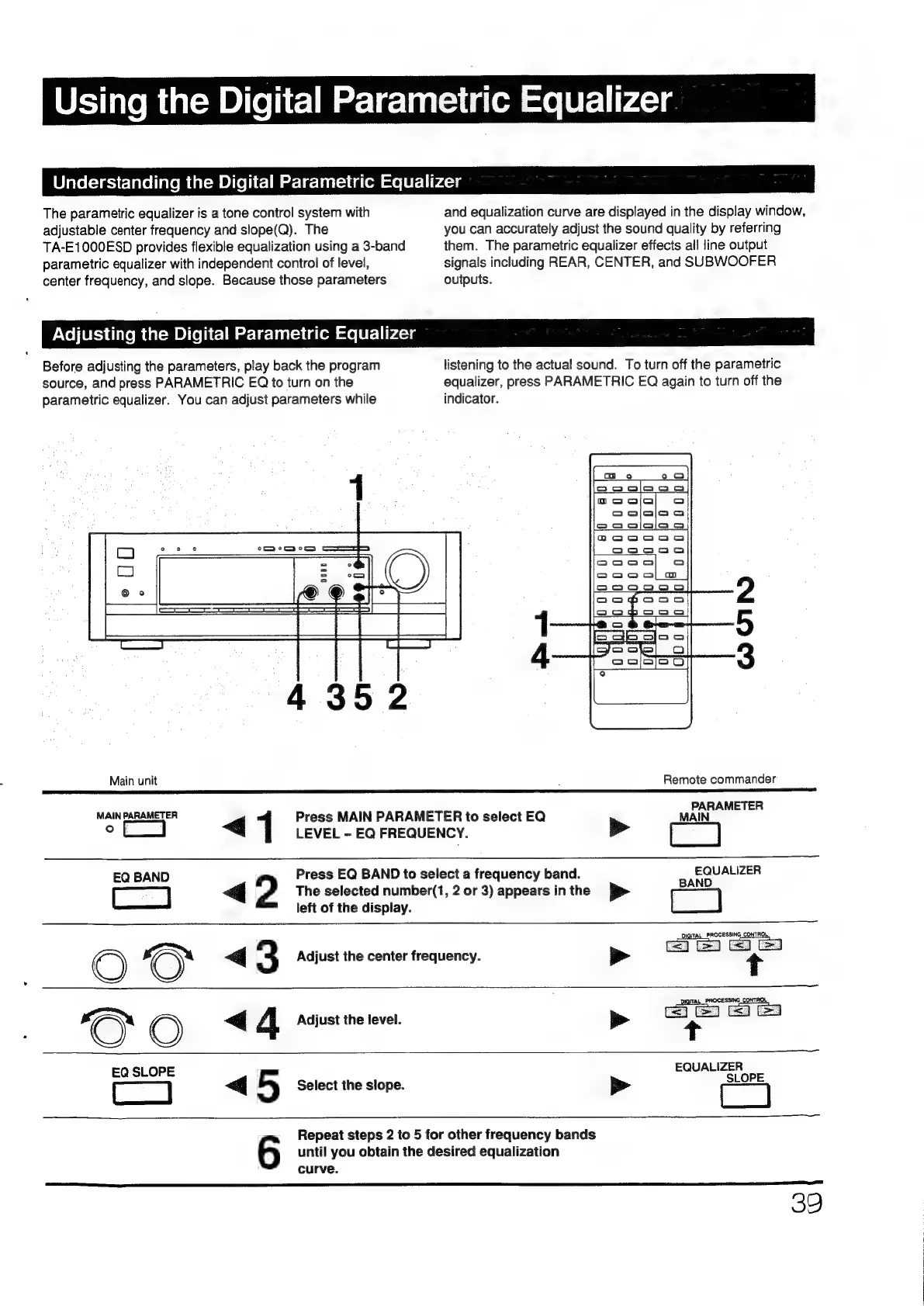
Main
unit
:
Remote
commander
R
MAIN
PARAMETER
<q
Press
MAIN
PARAMETER
to
select
EQ
‘eat
2
LEVEL
-
EQ
FREQUENCY.
>
EQ
BAND
Press
EQ
BAND
to
select
a
frequency
band.
aos
ores
|
2
The
selected
number(1,
2
or
3)
appears
in
the
p-
left
of
the
display.
DIGITAL
PROCESSING
CONTROL
<q
3
Adjust
the
center
frequency.
p>
<
4
Adjust
the
level.
>
EQ
SLOPE
<q
5
Select
the
slope.
>
EQUALIZER
SL
until
you
obtain
the
desired
equalization
6
Repeat
steps
2
to
5
for
other
frequency
bands
curve.
39

Other manuals for Sony TA-E1000ESD

Related product manuals