EasyManua.ls Logo

Sony TA-E1000ESD - Page 40

Sony TA-E1000ESD
48 pages
Print Icon
To Next Page IconTo Next Page
To Previous Page IconTo Previous Page
Loading...
Using
the
Digital
Parametric
Equalizer
if
the
[6Q7Zaa}
indicator
appears
in
the
display
window
When
listening
to
a
program
source
connected
to
the
digital
input
jacks:
Press
DIGITAL
input
button
(-)
until
the
does
not
glow
at
the
highest
level.
When
listening
to
a
program
source
connected
to
the
analog
input
jacks:
Turn
ANALOG
input
knob
counterclockwise
until
the
does
not
glow
at
the
highest
level.
When
listening
to
a
Dolby
sutround
program
source:
Turn
INPUT
LEVEL
counterclockwise
until
the
does
not
glow
at
the
highest
level.
To
create
a
new
equalization
curve
from
flat
condition
1
Press
PARAMETRIC
EQ
to
turn
off
the
indicator.
The
displayed
curve
will
be
flattened.
2
Create
a
new
equalization
curve
(refer
to
the
steps
1
to
6
on
page
39).
40
When
the
same
center
frequency
is
selected
for
more
than
two
frequency
bands
The
setting
level
of
each
band
will
be
accumulated.
By
using
this
character,
when
you
select
the
sharpest
slope
(20.0)
and
set
the
all
frequency
band
to
the
same
desired
center
frequency,
you
can
adjust
the
level
from
-36
dB
to
+36
dB
to
eliminate
or
pick-up
the
signal
of
the
specified
frequency(notch
or
peaking
function).
The
equalization
curve
between
+12dB
is
displayed
even
if
the
accumulated
level
becomes
beyond
the
+12dB.
The
parametric
equalizer
has
no
effects
in
the
Dolby
surround
mode.
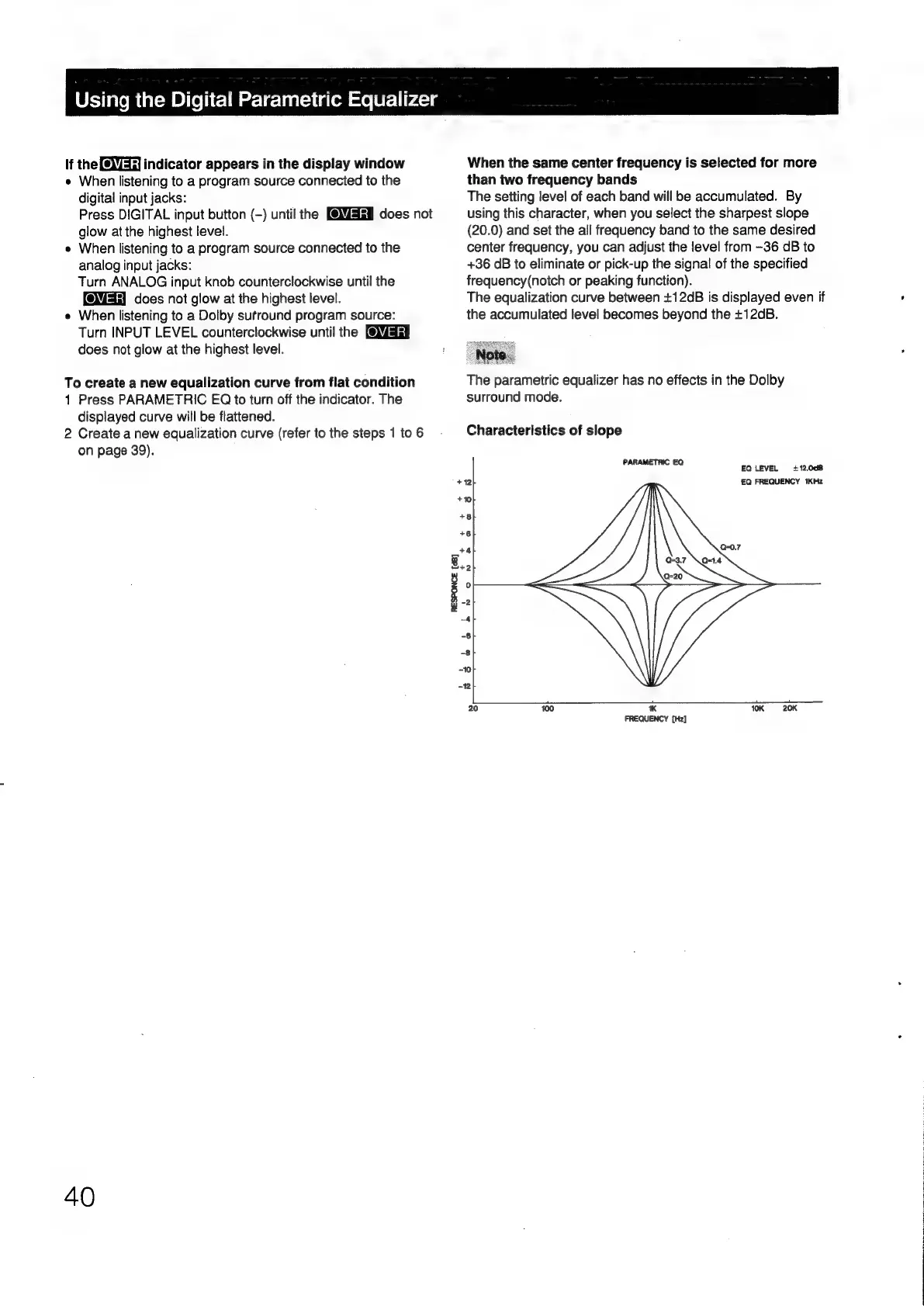
Characteristics
of
slope
PARAMETRIC
Et
2
EQ
LEVEL
+12.008
+12
£Q
FREQUENCY
1KHz
+10
+8
+6
_t4
Q-0.7
3.2
w
i
°
-2
#
~4
-6
-8
~10
12
f
le
eer
20
100
*
10K
—-20K
FREQUENCY
[Hz]

Other manuals for Sony TA-E1000ESD

Related product manuals