EasyManua.ls Logo

Sony TA-E1000ESD - Page 41

Sony TA-E1000ESD
48 pages
Print Icon
To Next Page IconTo Next Page
To Previous Page IconTo Previous Page
Loading...
Using
the
Digital
Dynamics
Controller
Understanding
the
Digital
Dynamics
Controller
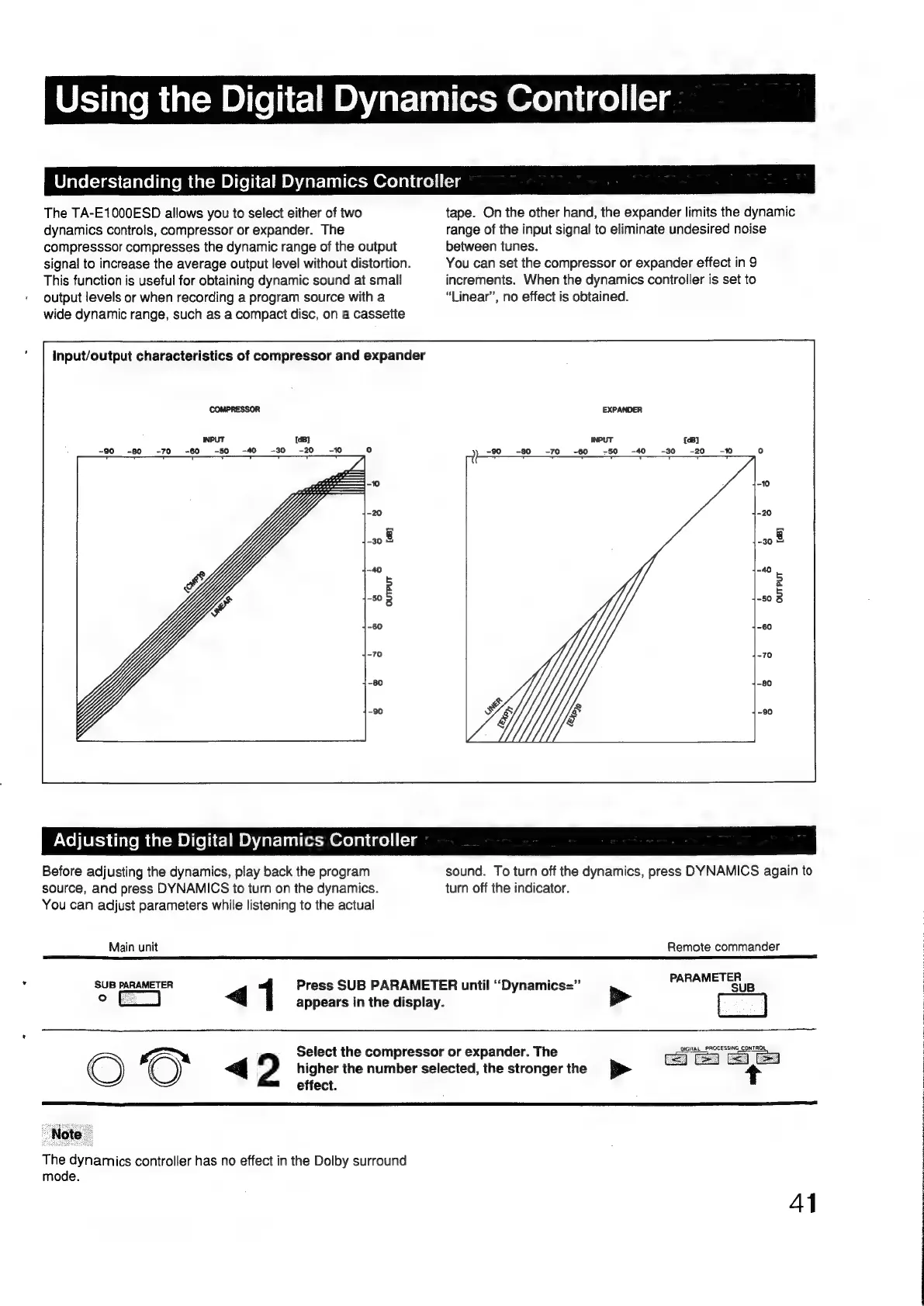
The
TA-E1000ESD
allows
you
to
select
either
of
two
tape.
On
the
other
hand,
the
expander
limits
the
dynamic
dynamics
controls,
compressor
or
expander.
The
range
of
the
input
signal
to
eliminate
undesired
noise
compresssor
compresses
the
dynamic
range
of
the
output
between
tunes.
signal
to
increase
the
average
output
level
without
distortion.
You
can
set
the
compressor
or
expander
effect
in
9
This
function
is
useful
for
obtaining
dynamic
sound
at
small
increments.
When
the
dynamics
controller
is
set
to
output
levels
or
when
recording
a
program
source
with
a
“Linear”,
no
effect
is
obtained.
wide
dynamic
range,
such
as
a
compact
disc,
on
a
cassette
input/output
characteristics
of
compressor
and
expander
EXPANDER
INPUT
-90
-80
-70
-60
-50
—-40
{dB}
-30
-20
PAVo\(UESS
iivemaat=m
Olle
lit-1m
OA
Zarclial
lem
Orevalige)
i-tg
Before
adjusting
the
dynamics,
play
back
the
program
sound.
To
turn
off
the
dynamics,
press
DYNAMICS
again
to
source,
and
press
DYNAMICS
to
turn
on
the
dynamics.
turn
off
the
indicator.
You
can
adjust
parameters
while
listening
to
the
actual
Main
unit
SUB
PARAMETER
Press
SUB
PARAMETER
until
‘“Dynamics=”
o
ke
<q
appears
in
the
display.
vem
Select
the
compressor
or
expander.
The
O
<q
2
higher
the
number
selected,
the
stronger
the
>
effect.
Note
The
dynamics
controller
has
no
effect
in
the
Dolby
surround
mode.
Remote
commander
PARAMETER
SUB
DIGITAL_PROCESSING_CONTROL,
Ce
Ce
AT

Other manuals for Sony TA-E1000ESD

Related product manuals