EasyManua.ls Logo

Sony TA-E1000ESD - Page 42

Sony TA-E1000ESD
48 pages
Print Icon
To Next Page IconTo Next Page
To Previous Page IconTo Previous Page
Loading...
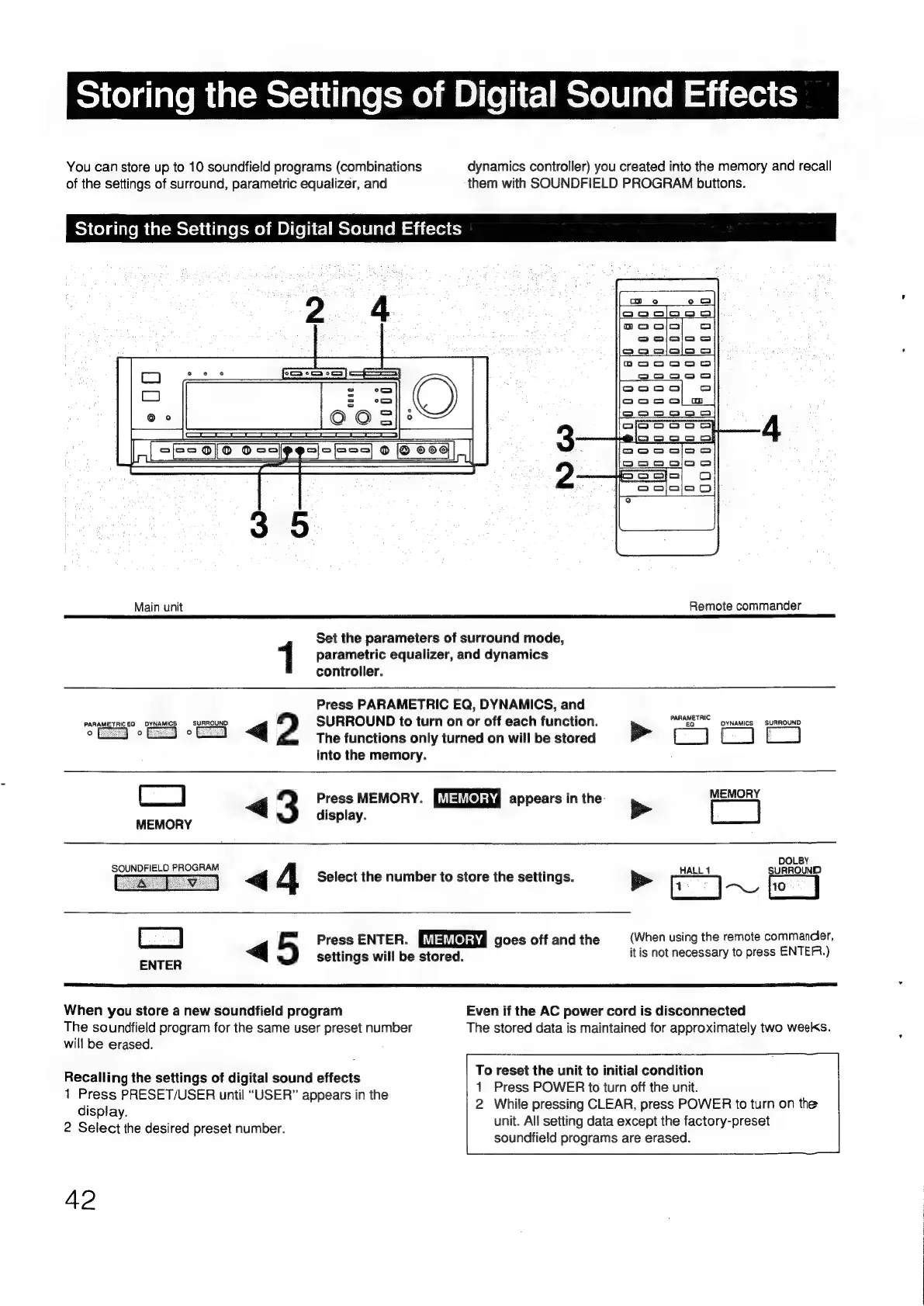
Storing
the
Settings
of
Digital
Sound
Effects
You
can
store
up
to
10
soundfield
programs
(combinations
dynamics
controller)
you
created
into
the
memory
and
recall
of
the
settings
of
surround,
parametric
equalizer,
and
them
with
SOUNDFIELD
PROGRAM
buttons.
Storing
the
Settings
of
Digital
Sound
Effects
2
4
[een
|
oes
0]6
4
scies
ee
pesi-E=5
9
@eed|,,|
Main
unit
Remote
commander
Set
the
parameters
of
surround
mode,
1
parametric
equalizer,
and
dynamics
controller.
Press
PARAMETRIC
EQ,
DYNAMICS,
and
PARAMETRICEO
DYNAMICS
—_
SURROUND
SURROUND
to
turn
on
or
off
each
function.
PARAS”
pyNAMICS
SURROUND
—J
°
-
<q
2
The
functions
only
turned
on
will
be
stored
>
{-_]
—_
into
the
memory.
Cc)
>
|
3
Press
MEMORY.
[Malfelsh4
appears
in
the.
>
MEMORY
MEMORY
display.
DOLBY
SOUNDFIELD
PROGRAM
f
«<q
4
Select
the
number
to
store
the
settings.
rr]
ea
eas
fio
|
ere
4
5
Press
ENTER.
[USYlGNY
goes
off
andthe
(When
using
the
remote
commander,
i i
itis
not
necessary
to
press
ENTER.)
ENTER
settings
will
be
stored.
When
you
store
a
new
soundfield
program
Even
if
the
AC
power
cord
is
disconnected
The
soundfield
program
for
the
same
user
preset
number
The
stored
data
is
maintained
for
approximately
two
weeks.
will
be
erased.
2
:
ei
To
reset
the
unit
to
initial
condition
Recalling
the
settings
of
digital
sound
effects
i
1
Press
PRESET/USER
until
“USER”
appears
in
the
dete
oer
te
en
Or
me
Ue
display.
2
Select
the
desired
preset
number.
2
While
pressing
CLEAR,
press
POWER
to
turn
on
the
unit.
All
setting
data
except
the
factory-preset
soundfield
programs
are
erased.
42

Other manuals for Sony TA-E1000ESD

Related product manuals