EasyManua.ls Logo

Sony TA-E2000ESD - Page 18

Sony TA-E2000ESD
55 pages
Print Icon
To Next Page IconTo Next Page
To Previous Page IconTo Previous Page
Loading...
=
mn
|
w
ete
ia)
va
ee ee
wes
|
howe
G2?
Go
oo
GG
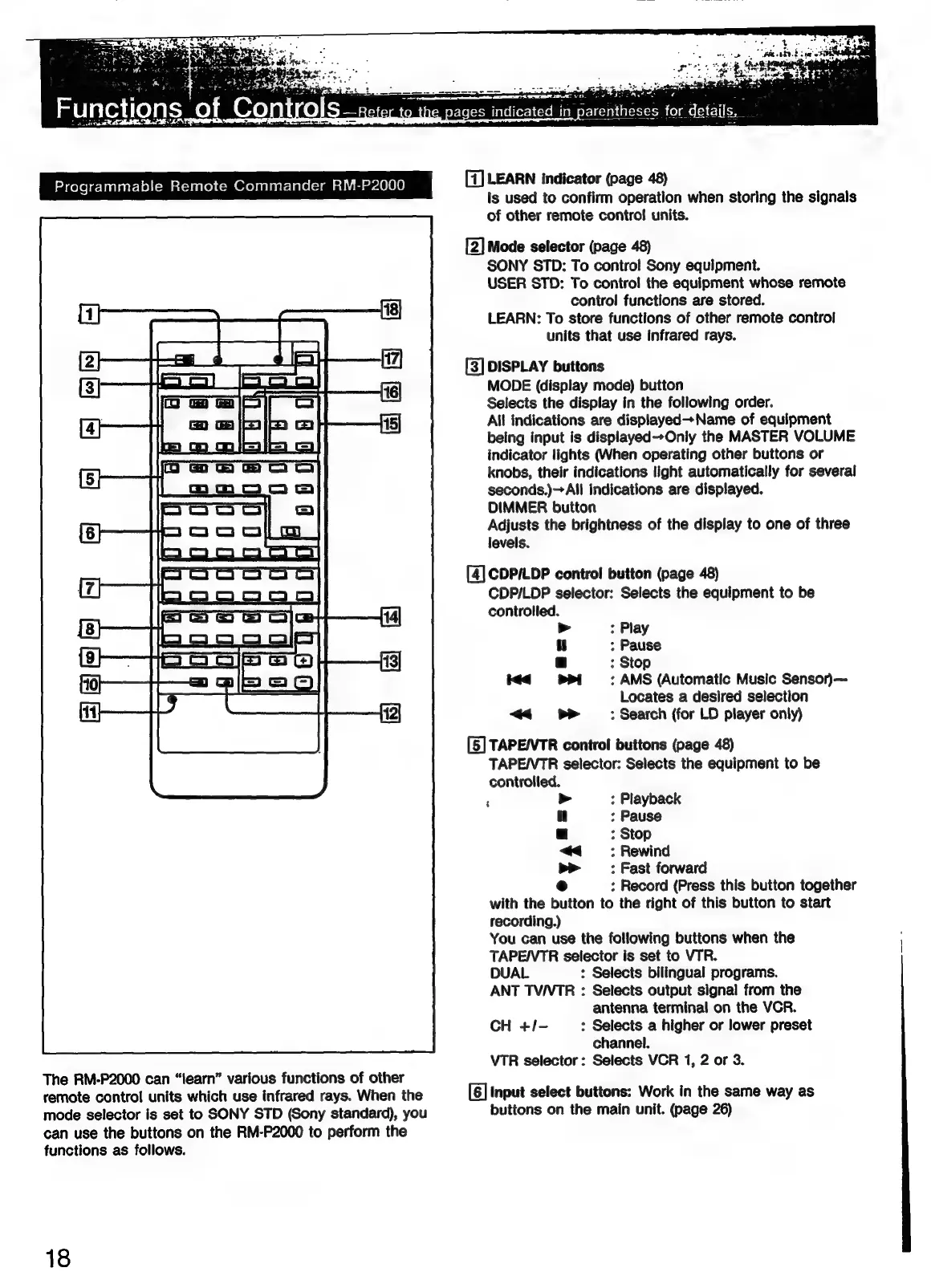
The
RM-P2000
can
“learn”
various
functions
of
other
remote
control
units
which
use
infrared
rays.
When
the
mode
selector
is
set
to
SONY
STD
(Sony
standard),
you
can
use
the
buttons
on
the
RM-P2000
to
perform
the
functions
as
follows.
18
g
pages
indicated
in
parentheses
for
details,
_
[7]
LEARN
indicator
(page
48)
Is
used
to
confirm
operation
when
storing
the
signals
of
other
remote
contro!
units.
[2]
Mode
selector
(page
48)
SONY
STD:
To
contro!
Sony
equipment.
USER
STD:
To
contro!
the
equipment
whose
remote
control
functions
are
stored.
LEARN:
To
store
functions
of
other
remote
control
units
that
use
infrared
rays.
[3]
DISPLAY
buttons
MODE
(display
mode)
button
Selects
the
display
in
the
following
order.
All
indications
are
displayed—Name
of
equipment
being
input
is
displayed--Only
the
MASTER
VOLUME
indicator
lights
(When
operating
other
buttons
or
knobs,
their
indications
light
automatically
for
several
seconds.)
All
indications
are
displayed.
DIMMER
button
Adjusts
the
brightness
of
the
display
to
one
of
three
levels.
[4]
CDP/LDP
control
button
(page
48)
CDP/LDP
selector:
Selects
the
equipment
to
be
controlled.
:
Play
||
;
Pause
a
;
Stop
<q
:
AMS
(Automatic
Music
Senson—
Locates
a
desired
selection
<< b>
:
Search
(for
LD
player
only)
[5]
TAPE/VTR
control
buttons
(page
48)
TAPEI/VTR
selector:
Selects
the
equipment
to
be
controlled.
,
>
:
Playback
il
:
Pause
a
:
Stop
<<
:
Rewind
>>
:
Fast
forward
e
:
Record
(Press
this
button
together
with
the
button
to
the
right
of
this
button
to
start
recording.)
You
can
use
the
following
buttons
when
the
TAPE/VTR
selector
is
set
to
VTR.
DUAL
:
Selects
bilingual
programs.
ANT
TV/VTR
:
Selects
output
signal
from
the
antenna
terminal
on
the
VCR.
CH
+/-
:
Selects
a
higher
or
lower
preset
channel.
VTR
selector:
Selects
VCR
1,
2
or
3.
[6]
Input
select
buttons:
Work
in
the
same
way
as
buttons
on
the
main
unit.
(page
26)

Related product manuals