EasyManua.ls Logo

Sony TA-E2000ESD - Display Indicators and Messages

Sony TA-E2000ESD
55 pages
Print Icon
To Next Page IconTo Next Page
To Previous Page IconTo Previous Page
Loading...
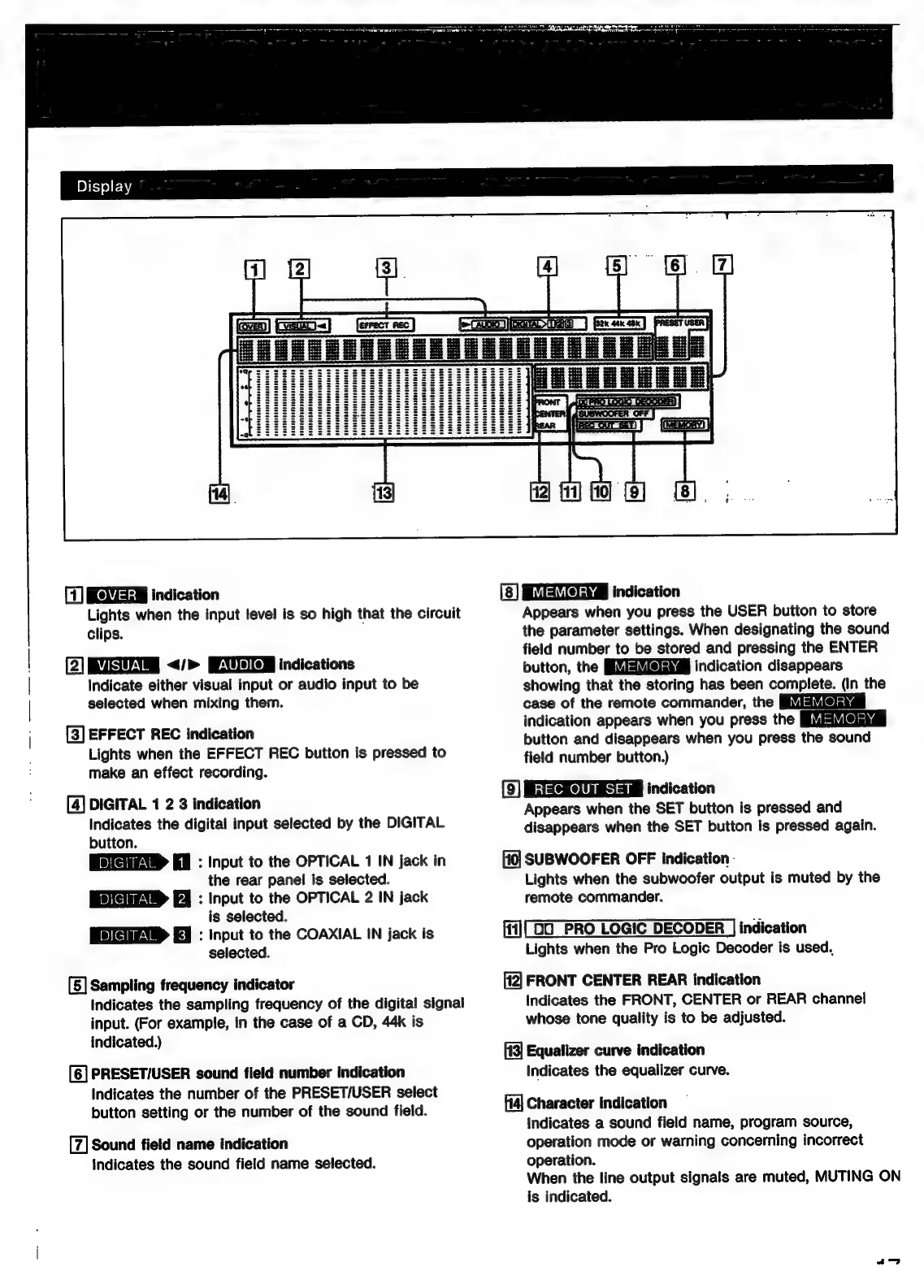
(1)
REMEEW
indication
Lights
when
the
input
level
is
so
high
that
the
circuit
clips.
(2)
SU
</>
indications
Indicate
either
visual
input
or
audio
input
to
be
selected
when
mixing
them.
[3]
EFFECT
REC
indication
Lights
when
the
EFFECT
REC
button
is
pressed
to
make
an
effect
recording.
[4]
DIGITAL
1
2 3
indication
Indicates
the
digital
input
selected
by
the
DIGITAL
button.
:
Input
to
the
OPTICAL
1
IN
jack
in
the
rear
panel
is
selected.
:
Input
to
the
OPTICAL
2
IN
jack
is
selected.
:
Input
to
the
COAXIAL
IN
jack
is
selected.
[5]
Sampling
frequency
indicator
Indicates
the
sampling
frequency
of
the
digital
signal
input.
(For
example,
in
the
case
of
a
CD,
44k
is
indicated.)
[6]
PRESET/USER
sound
field
number
indication
Indicates
the
number
of
the
PRESET/USER
select
button
setting
or
the
number
of
the
sound
field.
[7]
Sound
field
name
indication
indicates
the
sound
field
name
selected.
indication
Appears
when
you
press
the
USER
button
to
store
the
parameter
settings.
When
designating
the
sound
field
number
to
be
stored
and
pressing
the
ENTER
button,
the
indication
disappears
showing
that
the
storing
has
been
complete.
(In
the
case
of
the
remote
commander,
the
indication
appears
when
you
press
the
button
and
disappears
when
you
press
the
sound
field
number
button.)
(9)
RESCUES
indication
Appears
when
the
SET
button
is
pressed
and
disappears
when
the
SET
button
is
pressed
again.
SUBWOOFER
OFF
indication
-
Lights
when
the
subwoofer
output
is
muted
by
the
remote
commander.
ffi)
D0
PRO
LOGIC
DECODER
indication
Lights
when
the
Pro
Logic
Decoder
is
used,
fi2]
FRONT
CENTER
REAR
indication
Indicates
the
FRONT,
CENTER
or
REAR
channel
whose
tone
quality
is
to
be
adjusted.
[43]
Equalizer
curve
indication
Indicates
the
equalizer
curve.
14]
Character
indication
indicates
a
sound
field
name,
program
source,
operation
mode
or
warning
concerning
incorrect
operation.
When
the
line
output
signals
are
muted,
MUTING
ON
is
indicated.
a~—

Related product manuals