EasyManua.ls Logo

Sony TA-E2000ESD - Enjoying Surround Sound Effects; Speaker Placement and Pro Logic Mode

Sony TA-E2000ESD
55 pages
Print Icon
To Next Page IconTo Next Page
To Previous Page IconTo Previous Page
Loading...
BEAN
To
enjoy
the
surround
effect
to
the
utmost,
placement
of
the
speakers
plays
a
very
important
role.
This
section
describes
the
efficient
placement
of
the
speakers
and
how
to
adjust
the
speaker
volume.
tn
Dolby
surround
mode,
adjustment
of
the
volume
of
each
speaker
and
adjustment
of
the
delay
time
of
the
rear
speakers
are
required.
Placement
of
Speakers
and
Selecting
the
Pro
|More)
Tom
i
lotelcy
Where
you
place
the
speakers
depends
on
the
size
and
acoustics
of
the
room
where
the
system
is
to
be
installed.
The
examples
shown
here
only
represent
typical
cases.
We
recommend
that
you
experiment
to
find
the
speaker
direction
or
location
in
which
the
most
effective
acoustics
can
be
obtained.
Then
select
the Pro
Logic
mode
according
to
your
speakers.
Pro
Logic
mode
is
active
only
when
the
indication
appears;
adjust
it
beforehand
to
enjoy
Dolby
surround
mode.
How
to
select
the
Pro
Logic
mode
1
Press
the
PRESET/USER
button.
PRESET
appears
on
the
display.
2
Select
preset
number
10
by
pressing
the
SOUNDFIELD
PROGRAM
button.
(in
the
case
of
the
remote
commander,
press
the
button
number
10.)
3
Press
the
PRO
LOGIC
MODE
button
to
select
the
mode
according
to
your
speakers.
Each
time
you
press
the
PRO
LOGIC
MODE
button,
the
indication
changes
as
follows.
Cc
PHANTOM
3
CH.LOGIC
NORMAL
WIDE
7
20
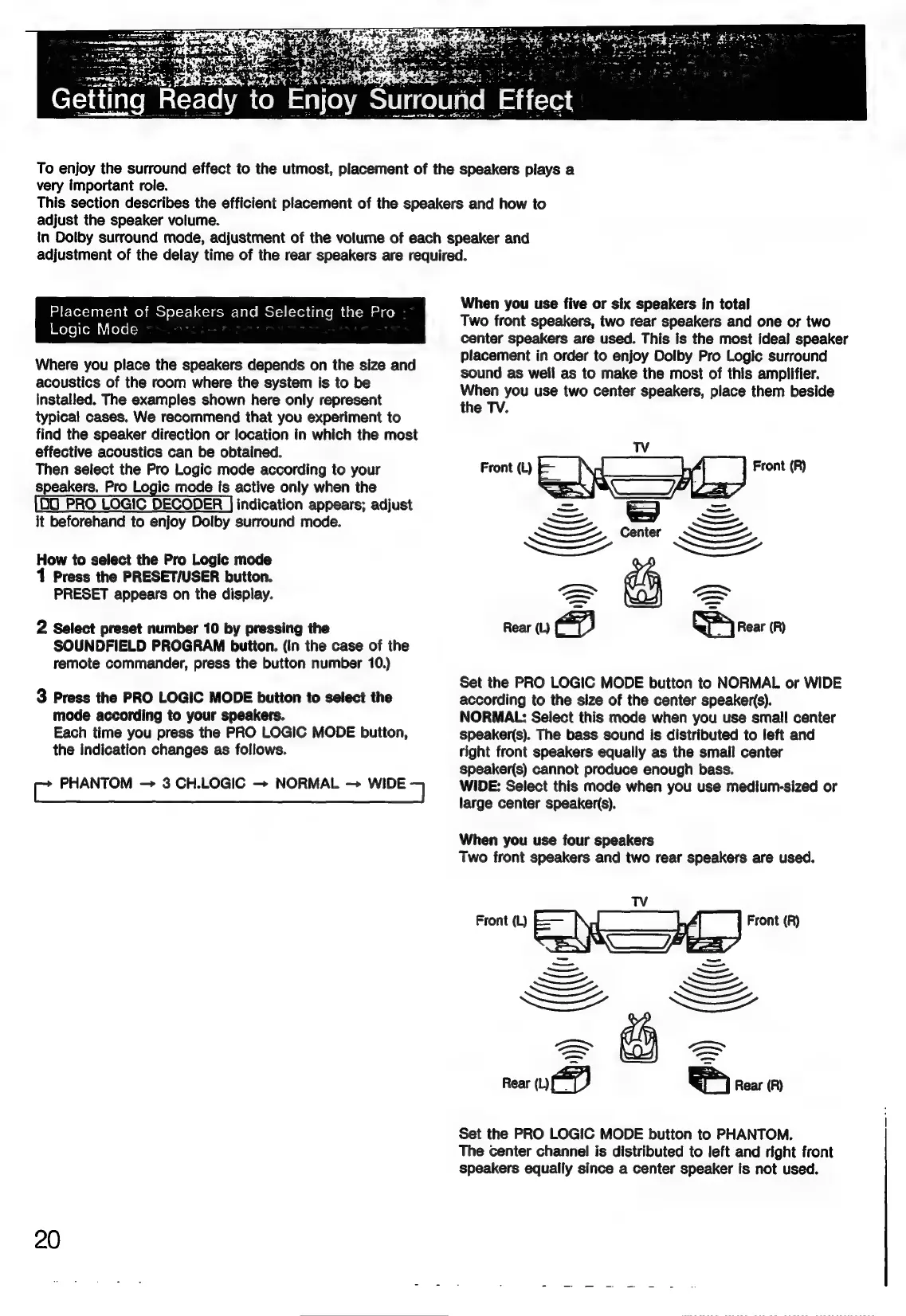
When
you
use
five
or
six
speakers
in
total
Two
front
speakers,
two
rear
speakers
and
one
or
two
center
speakers
are
used.
This
is
the
most
ideal
speaker
placement
in
order
to
enjoy
Dolby
Pro
Logic
surround
sound
as
well
as
to
make
the
most
of
this
amplifier.
When
you
use
two
center
speakers,
place
them
beside
the
TV.
Front
(L)
F
Front
(R)
i)
Rear
(L)
Set
the
PRO
LOGIC
MODE
button
to
NORMAL
or
WIDE
according
to
the
size
of
the
center
speaker(s).
NORMAL:
Select
this
mode
when
you
use
small
center
speaker(s).
The
bass
sound
is
distributed
to
left
and
right
front
speakers
equally
as
the
smail
center
speaker(s)
cannot
produce
enough
bass.
WIDE:
Select
this
mode
when
you
use
medium-sized
or
large
center
speaker(s).
When
you
use
four
speakers
Two
front
speakers
and
two
rear
speakers
are
used.
Set
the
PRO
LOGIC
MODE
button
to
PHANTOM.
The
center
channel
is
distributed
to
left
and
right
front
speakers
equally
since
a
center
speaker
fs
not
used.

Related product manuals