EasyManua.ls Logo

Sony Trinitron KV-13M20 - Step 1: Connecting the TV

Sony Trinitron KV-13M20
18 pages
Print Icon
To Next Page IconTo Next Page
To Previous Page IconTo Previous Page
Loading...
Step
1:
Connecting
the
TV
You
can
use
an
indoor
antenna,
outdoor
antenna,
or
cable
system
with
your
TV.
Outdoor
antennas
or
cable
TV
systems
usually
provide
the
best
picture
quality.
Connecting
an
Indoor,
Outdoor
or
Cable
Antenna
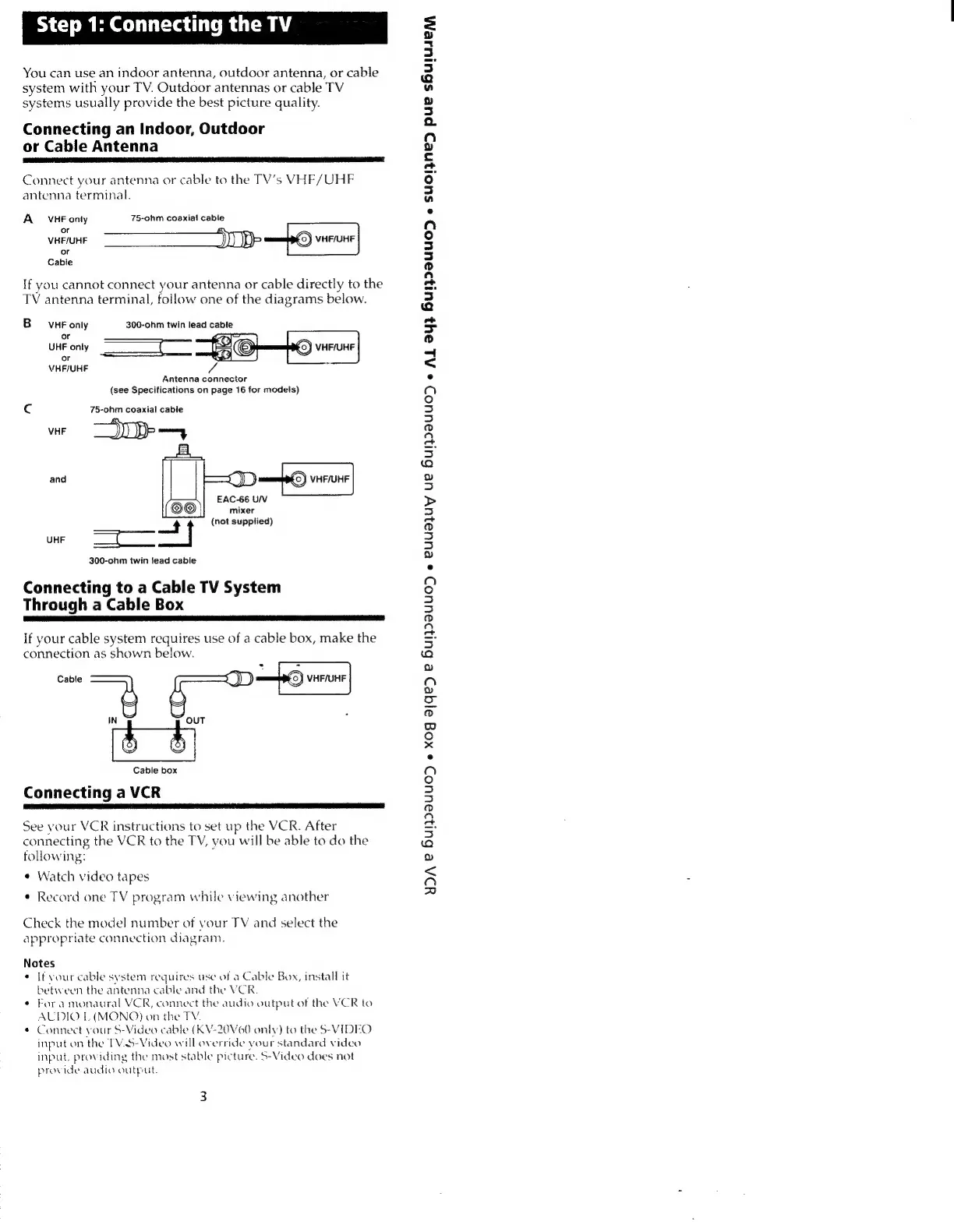
Connect
your
antenna
or
cable
to
the
TV’s
VHF/UHF
antenna
terminal.
A
sVHE
onty
75-ohm
coaxial
cable
or
:
or
Cable
If
you
cannot
connect
your
antenna
or
cable
directly
to
the
TV
antenna
terminal,
follow
one
of
the
diagrams
below.
BsvHFonly
300-ohm
twin
lead
cable
or
UHF
only
or
VHF/UHF
Antenna
connector
(see
Specifications
on
page
16
for
models)
Cc
75-ohm
coaxial
cable
and
EAC-66
U/V
mixer
ft
(not
supplied)
300-ohm
twin
lead
cable
Connecting
to
a
Cable
TV
System
Through
a
Cable
Box
If
your
cable
system
requires
use
of
a
cable
box,
make
the
connection
as
shown
below.
Cable
(6)
VHF/UHF
Cable
box
Connecting
a
VCR
See
your
VCR
instructions
to
set
up
the
VCR.
After
connecting
the
VCR
to
the
TV,
you
will
be
able
to
do
the
folowing:
¢
Watch
video
tapes
¢
Record
one
TV
program
while
viewing
another
Check
the
model
number
of
vour
TV
and
select
the
appropriate
connection
diagram.
Notes
¢
Ifvour
cable
system
requires
use
of
a
Cable
Box,
install
it
between
the
antenna
cable
and
the
VCR.
*
Fora
monaural
VCR,
connect
the
audio
output
of
the
VCR
to
ALDIO
L
(MONO)
on
the
TY.
*
Connect
your
S-Video
cable
(KV-20V60
only)
to
the
S-VIDEO
input
on
the
TV.5-Video
will
override
your
standard
video
input,
providing
the
mast
stable
picture.
S-Video
does
not
provide
audio
output.
YDA
&
BulydaUUOD
e
XOg
ajqe>d
e
BulydaUUOD
e
EUUajUY
Ue
BUIaUUOD
e
AL
24}
HulZz2UUOD
«
suo!Ne>D
pue
sHhulUseEMH

Other manuals for Sony Trinitron KV-13M20

Related product manuals