EasyManua.ls Logo

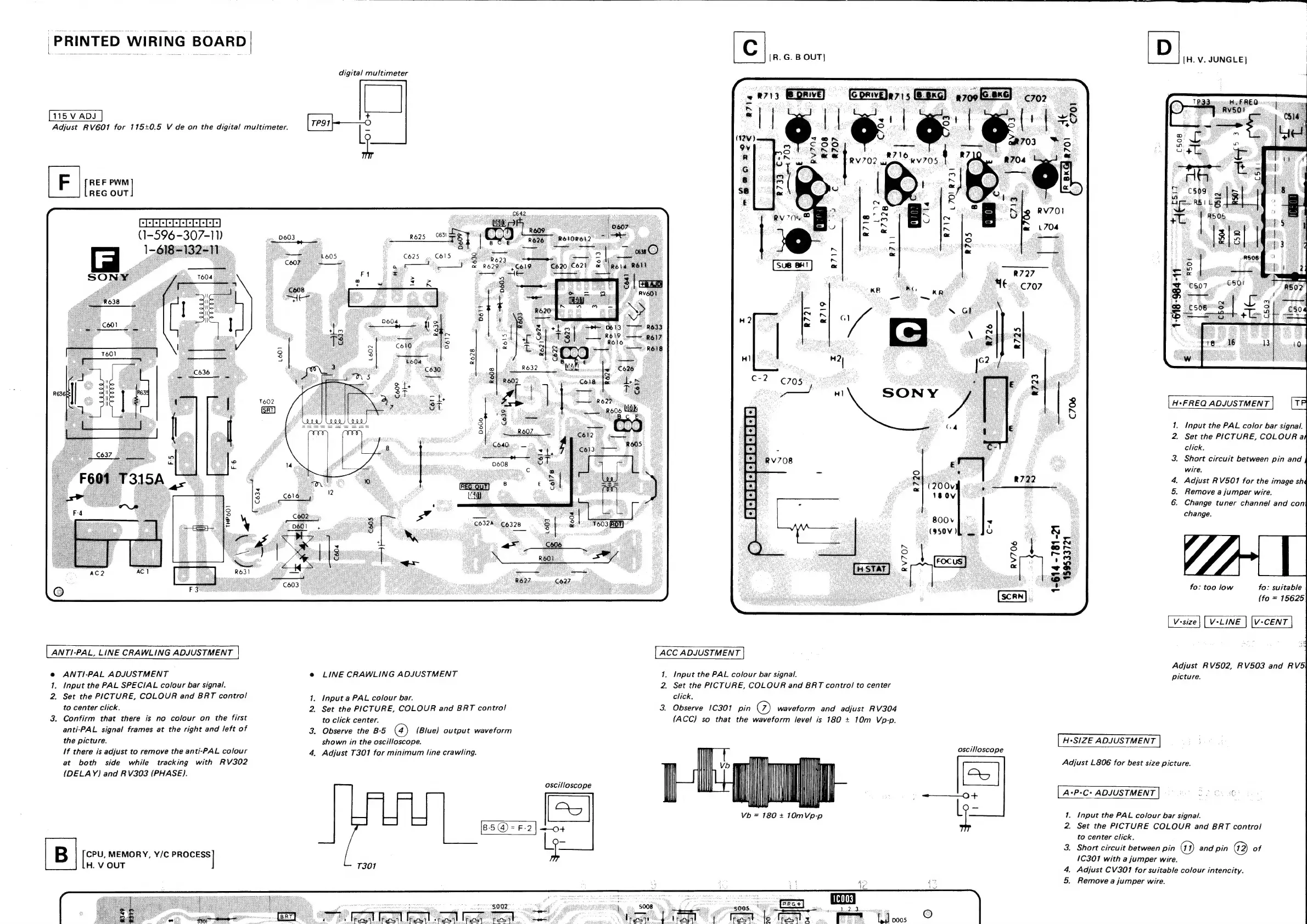
Sony TRINITRON KV-1442 - PRINTED WIRING BOARD ADJUSTMENTS; ANTI-PAL AND LINE CRAWLING ADJUSTMENT; ACC AND A-P-C ADJUSTMENTS; H-SIZE ADJUSTMENT

Sony TRINITRON KV-1442
35 pages
Print Icon
To Next Page IconTo Next Page
To Previous Page IconTo Previous Page
Loading...
PRINTED
WI
RING
BOARD
|
115
V
ADJ
Adjust
RV601
for
115+0.5
V
de
on
the
digital
multimeter.
Vee
ial
REG
OUT
ggoogooooooo
(1-596
-307-11)
1-6
ANTI-PAL,
LINE
CRAWLING
ADJUSTMENT
@
ANTI-PAL
ADJUSTMENT
Input
the
PAL
SPECIAL
colour
bar
signal.
2.
Set
the
PICTURE,
COLOUR
and
BRT
control
to
center
click.
3.
Confirm
that
there
is
no
colour
on
the
first
anti-PAL
signal
frames
at
the
right
and
left
of
the
picture.
If
there
is
adjust
to
remove
the
anti-PAL
colour
at
both
side
while
tracking
with
RV302
(DELAY)
and
RV303
(PHASE).
=
TP91
digital
multimeter
LINE
CRAWLING
ADJUSTMENT
.
Input
a
PAL
colour
bar.
»
Set
the
PICTURE,
COLOUR
and
BRT
control
to
click
center.
.
Observe
the
B-5
(Blue)
output
waveform
shown
in
the
oscilloscope.
|
Adjust
T3017
for
minimum
line
crawling.
[R.
G.
B
OUT]
ACC
ADJUSTMENT
1.
Input
the
PAL
colour
bar
signal.
2
Set
the
PICTURE,
COLOUR
and
BRT
control
to
center
click.
3.
Observe
1C301
pin
%
waveform
and
adjust
RV304
(ACC)
so
that
the
waveform
level
is
180
+
10m
Vp-p.
[H.
V.
JUNGLE]
H+FREQ
ADJUSTMENT
1.
Input
the
PAL
color
bar
signal.
2.
Set
the
PICTURE,
COLOUR
a
click.
3.
Short
circuit
between
pin
and
wire.
.
Adjust
RV501
for
the
image
shé
.
Remove
a
jumper
wire.
.
Change
tuner
channel
and
con
Adjust
RV502,
RV503
and
RV5\
picture.
H-SIZE
ADJUSTMENT
oscilloscope
Adjust
L806
for
best
size
picture.
i]
|
f
‘\
I
‘
|
|
Tl
:
ia
[A-P-C-
ADJUSTMENT
|
SPIES
ell
[5]
Vb
=
180
+
10MVp-p
L
1.
Input
the
PAL
colour
bar
signal.
B-5
@)=
F-2
"4
2.
Set
the
PICTURE
COLOUR
and
BRT
contro!
[
«
in
to
center
click.
@
@
3.
Short
circuit
between
pin
and
pin
of
B
hee
are
Y/C
PROCESS
{
1C301
with
a
jumper
wire.
,
T301
4.
Adjust
CV301
for
suitable
colour
intencity.
5.
Remove
a
jumper
wire.