EasyManua.ls Logo

Sony Trinitron KV-14M1E - Getting Started; Inserting Batteries into Remote Commander; Connecting the Aerial

Sony Trinitron KV-14M1E
13 pages
Print Icon
To Next Page IconTo Next Page
To Previous Page IconTo Previous Page
Loading...
6
Getting
Started
Inserting
the
Batteries
into
the
Remote
Commander
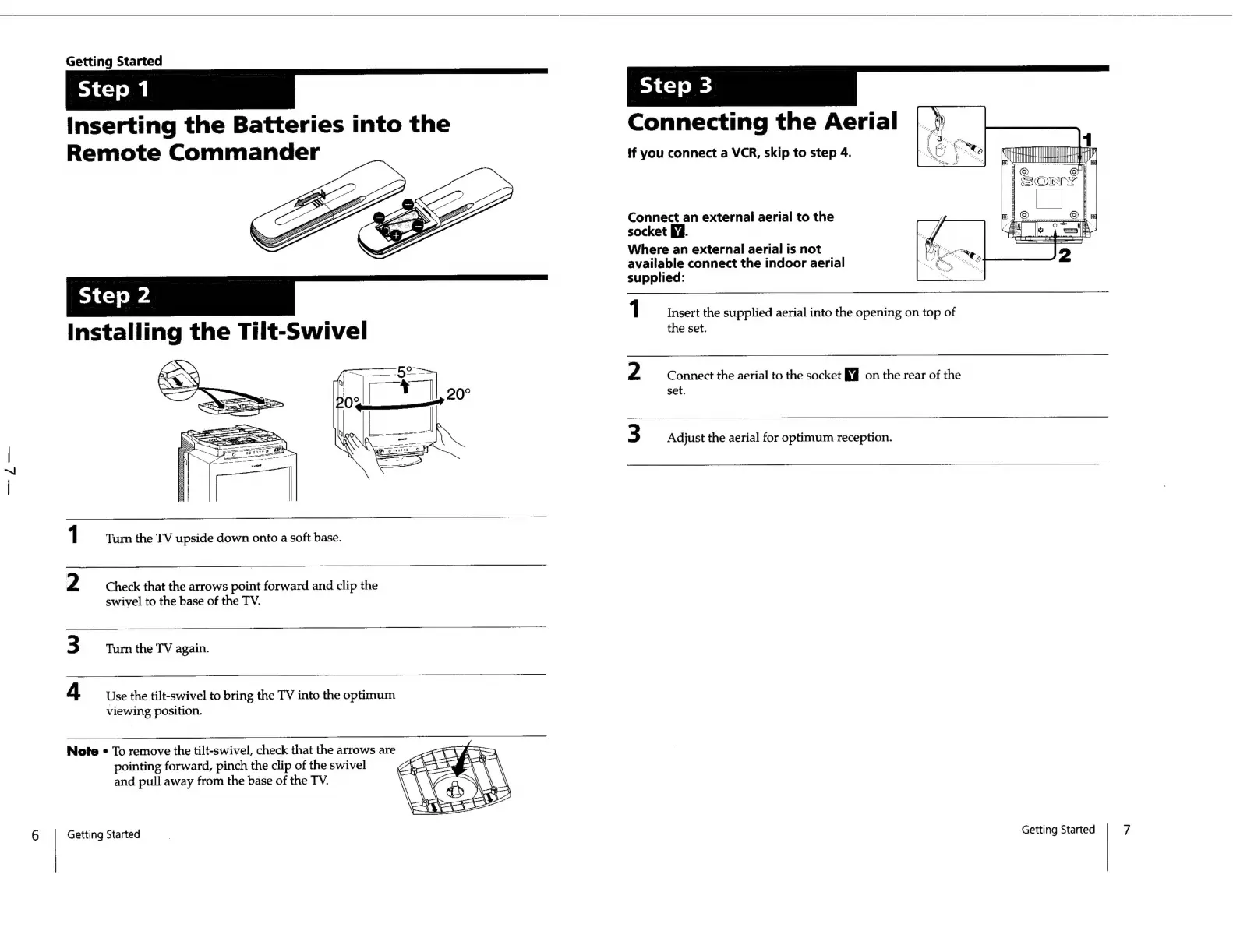
1
Turn
the
TV
upside
down
onto
a
soft
base.
2
Check
that
the
arrows
point
forward
and
clip
the
swivel
to
the
base
of
the
TV.
3
Turn
the
TV
again.
4
Use
the
tilt-swivel
to
bring
the
TV
into
the
optimum
viewing
position.
Note
«
To
remove
the
tilt-swivel,
check
that
the
arrows
are
pointing
forward,
pinch
the
clip
of
the
swivel
and
pull
away
from
the
base
of
the
TV.
Getting
Started
Connecting
the
Aerial
if
you
connect
a
VCR,
skip
to
step
4.
ri
Mt
ETI
H
FR
{eG
tl),
fi
Connect
an
external
aerial
to
the
socket
ff.
Where
an
external
aerial
is
not
available
connect
the
indoor
aerial
supplied:
1
Insert
the
supplied
aerial
into
the
opening
on
top
of
the
set.
2
Connect
the
aerial
to
the
socket
K@
on
the
rear
of
the
set.
3
Adjust
the
aerial
for
optimum
reception.
Getting
Started
7

Related product manuals