EasyManua.ls Logo

Sony TRINITRON KV-21M3D - Optional Connections and Troubleshooting

Sony TRINITRON KV-21M3D
10 pages
Print Icon
To Previous Page IconTo Previous Page
Loading...
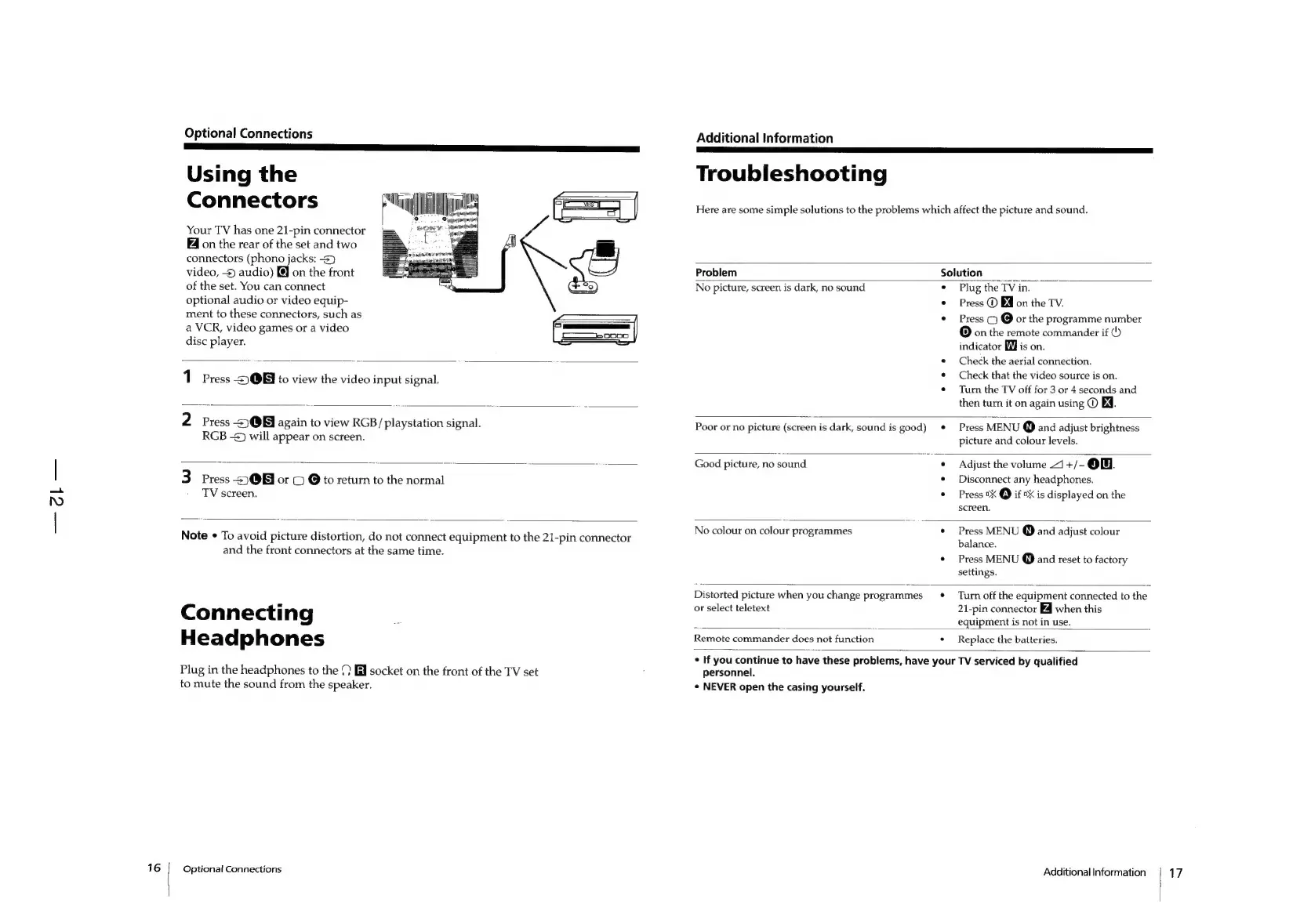
Optional
Connections
Using
the
Connectors
ull
jw
o
.
&
Your
TV
has
one
21-pin
connector
sony)
on
the
rear
of
the
set
and
two
connectors
(phono
jacks:
3}
video,
-4
audio)
@
on
the
front
of
the
set.
You
can
connect
optional
audio
or
video
equip-
ment
to
these
connectors,
such
as
a
VCR,
video
games
or
a
video
disc
player.
ay
jainenr
es
1
Press
-£)Q@B
to
view
the
video
input
signal.
2.
Press
<3
@B
again
to
view
RGB/
playstation
signal.
RGB
-s)
will
appear
on
screen.
3
Press
-5)3@Bi
or
©
@
to
return
to
the
normal
TV
screen,
Note
¢
To
avoid
picture
distortion,
do
not
connect
equipment
to
the
21-pin
connector
and
the
front
connectors
at
the
same
time.
Connecting
Headphones
Plug
in
the
headphones
to
the
(7
fi
socket
on
the
front
of
the
TV
set
to
mute
the
sound
from
the
speaker.
Optional
Connections
Additional
Information
Troubleshooting
Here
are
some
simple
solutions
to
the
problems
which
affect
the
picture
and
sound.
Problem
Solution
No
picture,
screen
is
dark,
no
sound
¢
Plug
the
TV
in.
¢
Press
@
EQ
on
the
TV.
Press
()
@
or
the
programme
number
(D]
on
the
remote
commander
if
()
indicator
Mi
is
on.
Check
the
aerial
connection.
Check
that
the
video
source
is
on.
Turn
the
TV
off
for
3
or
4
seconds
and
then
turn
it
on
again
using
©
BY.
Poor
or
no
picture
(screen
is
dark,
sound
is
good)
Press
MENU
@
and
adjust
brightness
picture
and
colour
levels.
Good
picture,
no
sound
Adjust
the
volume
44
+/-
ow.
Disconnect
any
headphones.
Press
0X
@
if
0X
is
displayed
on
the
screen.
No
colour
on
colour
programmes
Press
MENU
@
and
adjust
colour
balance.
Press
MENU
@
and
reset
to
factory
settings.
Distorted
picture
when
you
change
programmes
or
select
teletext
Turn
off
the
equipment
connected
to
the
21-pin
connector
Z4
when
this
equipment
is
not
in
use.
Remote
commander
does
not
function
Replace
the
batteries.
personnel.
¢
NEVER
open
the
casing
yourself,
Additional
Information
17