EasyManua.ls Logo

Sony TRINITRON KV-21M3D - Channel Management; Fine-Tuning and Exchanging Channels

Sony TRINITRON KV-21M3D
10 pages
Print Icon
To Next Page IconTo Next Page
To Previous Page IconTo Previous Page
Loading...
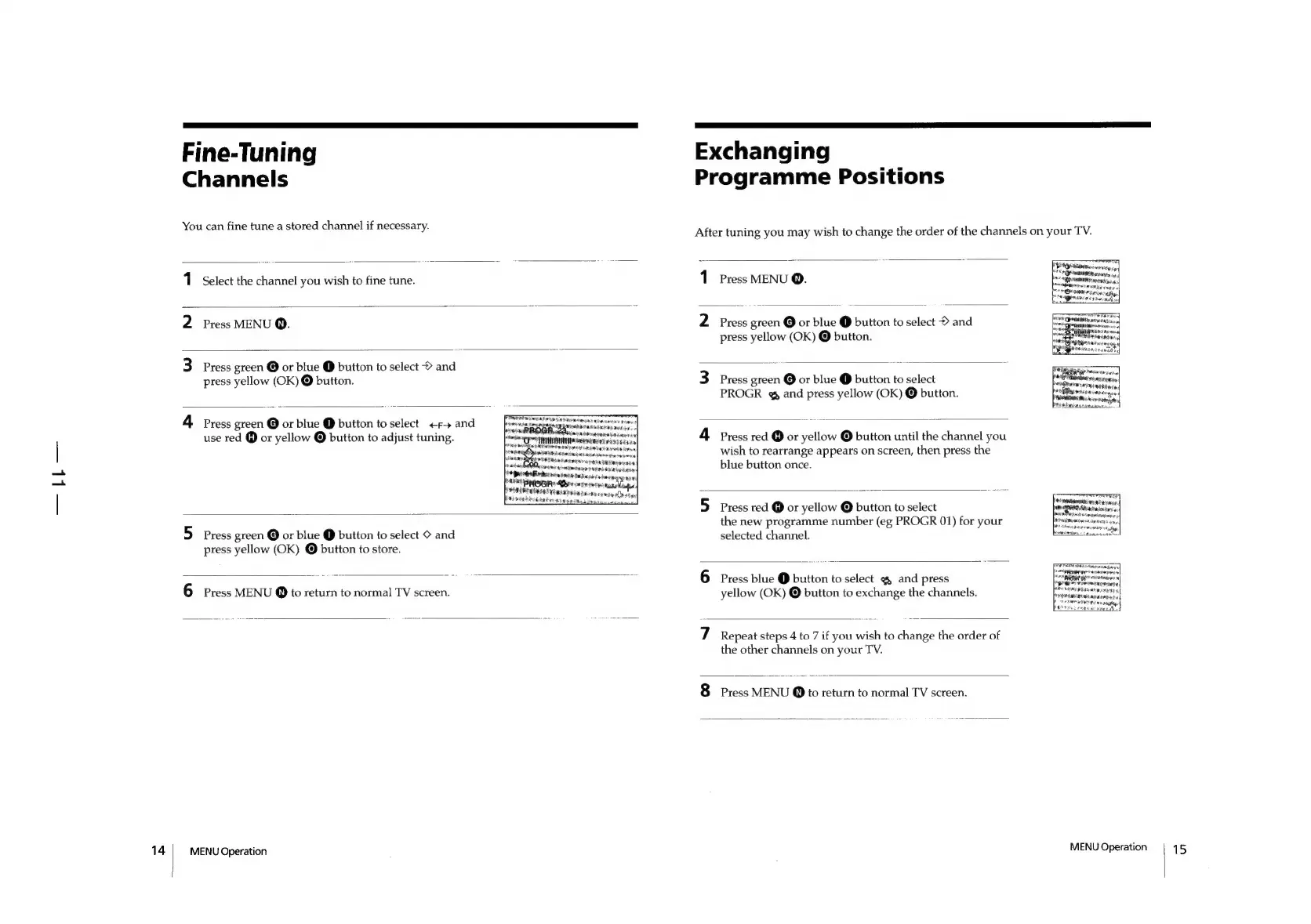
Fine-Tuning
Channels
You
can
fine
tune
a
stored
channel
if
necessary.
1
Select
the
channel
you
wish
to
fine
tune.
2
Press
MENU
Q.
3
Press
green
©
or
blue
@
button
to
select
©
and
press
yellow
(OK)
@
button.
4
Press
green
©
or
blue
@
button
to
select
+f
and
use
red
@
or
yellow
©
button
to
adjust
tuning.
phkaidoteieo
ee
Hee
S
ATED
BLS
=|
ars
5
Press
green
@
or
blue
@
button
to
select
©
and
press
yellow
(OK)
@
button
to
store.
6
Press
MENU
@
to
return
to
normal
TV
screen.
MENU
Operation
Exchanging
Programme
Positions
After
tuning
you
may
wish
to
change
the
order
of
the
channels
on
your
TV.
Press
MENU
Q.
—_
|
2
Press
green
@
or
blue
@
button
to
select
©
and
press
yellow
(OK)
©
button.
3
Press
green
@
or
blue
@
button
to
select
PROGR
@
and
press
yellow
(OK)
@
button.
4
Press
red
@
or
yellow
©
button
until
the
channel
you
wish
to
rearrange
appears
on
screen,
then
press
the
blue
button
once.
5
Press
red
@
or
yellow
@
button
to
select
the
new
programme
number
(eg
PROGR
01)
for
your
selected
channel.
6
Press
blue
@
button
to
select
@&
and
press
yellow
(OK)
©
button
to
exchange
the
channels.
7
Repeat
steps
4
to
7
if
you
wish
to
change
the
order
of
the
other
channels
on
your
TV.
8
Press
MENU
@
to
return
to
normal
TV
screen.
Sr
PIO
iinterureycy
7AM
SH
os
aeiiiebebar
he
ee
[erm
ower
rien
cubhy:
EAGAN
Oya
MENU
Operation
15

Other manuals for Sony TRINITRON KV-21M3D

Related product manuals