EasyManua.ls Logo

Sony TRINITRON KV-21M3D - Teletext Operation; Viewing Teletext; Advanced Teletext Functions

Sony TRINITRON KV-21M3D
10 pages
Print Icon
To Next Page IconTo Next Page
To Previous Page IconTo Previous Page
Loading...
12
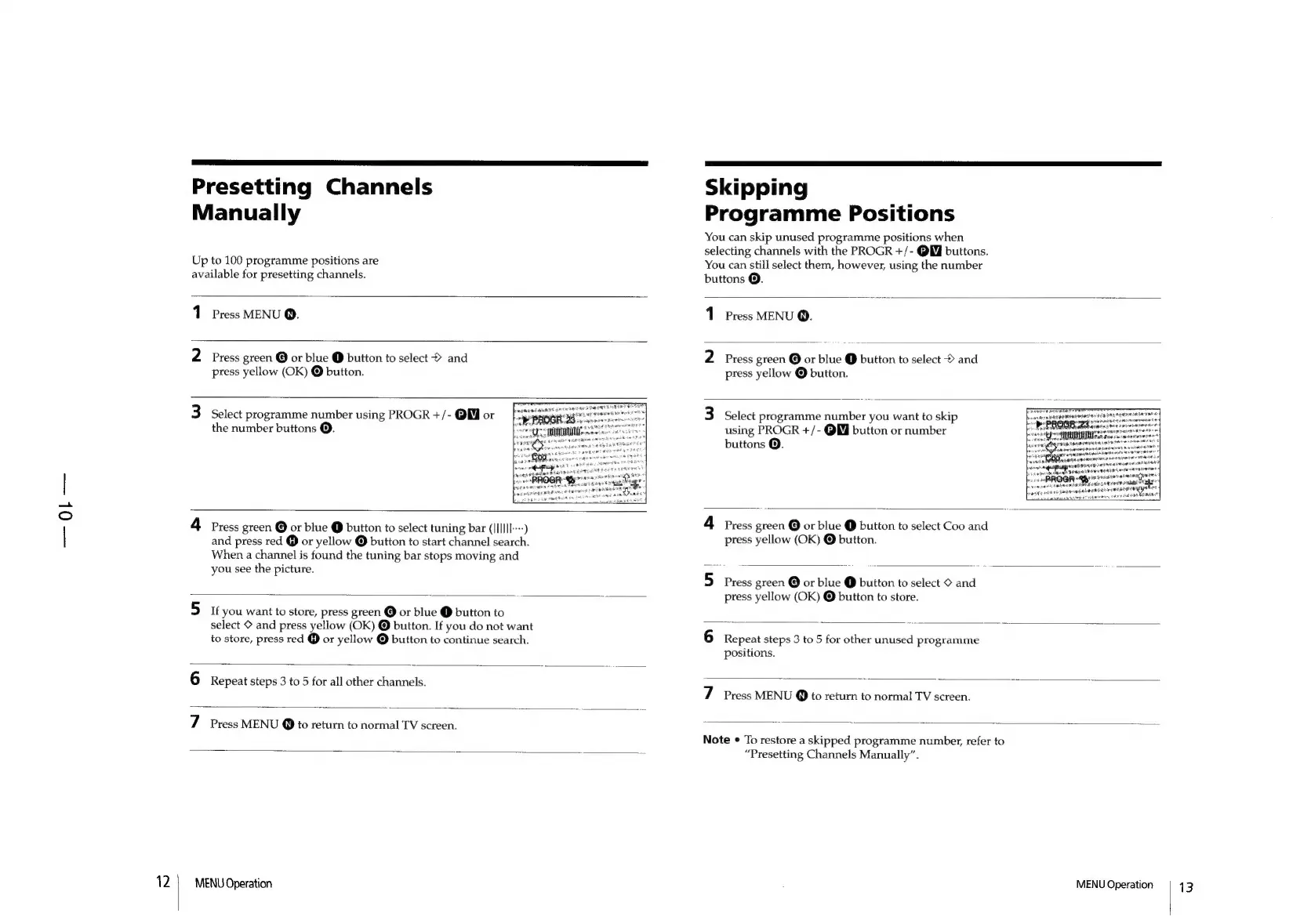
Presetting
Channels
Manually
Up
to
100
programme
positions
are
available
for
presetting
channels.
1
Press
MENU
@.
2
Press
green
@
or
blue
@
button
to
select
©
and
press
yellow
(OK)
@
button.
3
Select
programme
number
using
PROGR
+/-
QM
or
the
number
buttons
@.
4
Press
green
@
or
blue
@
button
to
select
tuning
bar
(IIIIlI---)
and
press
red
@
or
yellow
@
button
to
start
channel
search.
When
a
channel
is
found
the
tuning
bar
stops
moving
and
you
see
the
picture.
5
i
you
want
to
store,
press
green
@
or
blue
@
button
to
select
©
and
press
yellow
(OK)
©
button.
If
you
do
not
want
to
store,
press
red
@
or
yellow
©
button
to
continue
search.
6
Repeat
steps
3
to
5
for
all
other
channels.
7
Press
MENU
@
to
return
to
normal
TV
screen.
MENU
Operation
Skipping
Programme
Positions
You
can
skip
unused
programme
positions
when
selecting
channels
with
the
PROGR
+/-
QM
buttons.
You
can
still
select
them,
however,
using
the
number
buttons
@.
1
Press
MENU
Q.
2
Press
green
@
or
blue
@
button
to
select
©
and
press
yellow
©
button.
3
Select
programme
number
you
want
to
skip
using
PROGR
+/-
QW
button
or
number
buttons
©.
Panaie
qa
ryahieieare
een
res
4
sine
vse
REMAP
NANT
|
ee
ke
“ol
We
beg
OE
meeen”
4
Press
green
@
or
blue
@
button
to
select
Coo
and
press
yellow
(OK)
@
button.
5
Press
green
©
or
blue
@
button
to
select
©
and
press
yellow
(OK)
©
button
to
store.
6
Repeat
steps
3
to
5
for
other
unused
programme
positions.
7
Press
MENU
@
to
return
to
normal
TV
screen.
Note
¢
To
restore
a
skipped
programme
number,
refer
to
“Presetting
Channels
Manually”.
MENU
Operation
13

Other manuals for Sony TRINITRON KV-21M3D

Related product manuals