EasyManua.ls Logo

Sony TRINITRON KV-21M3D - Menu Navigation and Picture Adjustment; Sleep Timer and Auto Standby

Sony TRINITRON KV-21M3D
10 pages
Print Icon
To Next Page IconTo Next Page
To Previous Page IconTo Previous Page
Loading...
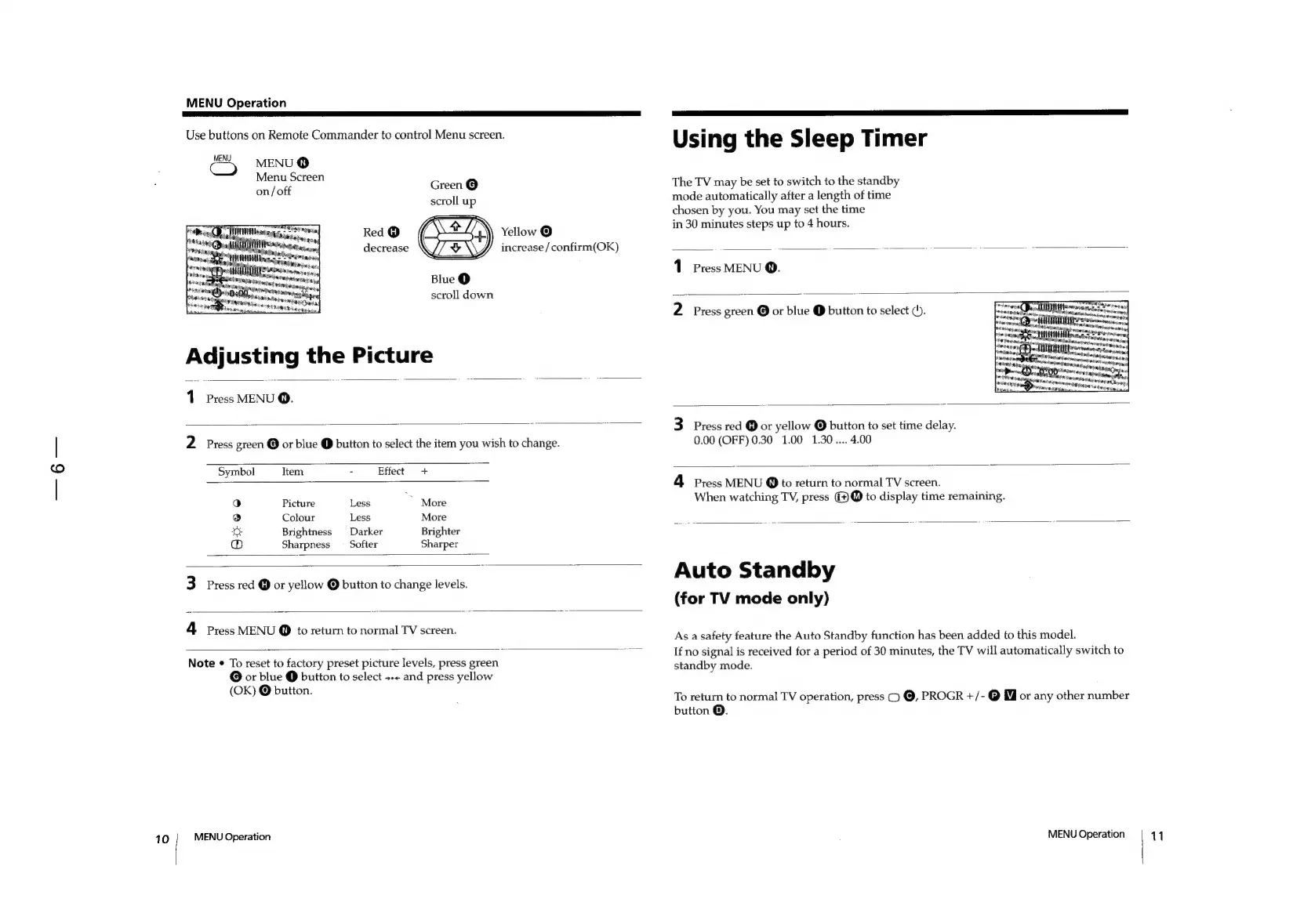
MENU
Operation
Use
buttons
on
Remote
Commander
to
control
Menu
screen.
ve
MENU
®
Menu
Screen
on/
off
Green
©
scroll
up
Red
@
a.
Yellow
©
decrease
\//
&\\Y
increase
/confirm(OK)
Blue
@
scroll
down
pees
anem
Teh
Siwracgang
ee
sete
sctataas
Adjusting
the
Picture
Press
MENU
@.
2
Press
green
©
or
blue
@
button
to
select
the
item
you
wish
to
change.
Symbol
Item
-
Effect
+
a)
Picture
Less
*
More
®
Colour
Less
More
©:
Brightness
Darker
Brighter
®
Sharpness
_
Softer
Sharper
3
Press
red
@
or
yellow
@
button
to
change
levels.
4
Press
MENU
@
to
return
to
normal
TV
screen.
Note
«
To
reset
to
factory
preset
picture
levels,
press
green
@
or
blue
@
button
to
select
+<
and
press
yellow
(OK)
©
button.
10
MENU
Operation
Using
the
Sleep
Timer
The
TV
may
be
set
to
switch
to
the
standby
mode
automatically
after
a
length
of
time
chosen
by
you.
You
may
set
the
time
in
30
minutes
steps
up
to
4
hours.
Press
MENU
Q.
2
Press
green
or
blue
@
button
to
select
(b.
3
Press
red
@
or
yellow
@
button
to
set
time
delay.
0.00
(OFF)
0.30
1.00
1.30....
4.00
4
Press
MENU
@
to
return
to
normal
TV
screen.
When
watching
TV,
press
G9
to
display
time
remaining.
Auto
Standby
(for
TV
mode
only)
As
a
safety
feature
the
Auto
Standby
function
has
been
added
to
this
model.
If
no
signal
is
received
for
a
period
of
30
minutes,
the
TV
will
automatically
switch
to
standby
mode.
To
return
to
normal
TV
operation,
press
()
@,
PROGR
+/-@
or
any
other
number
button
@.
MENU
Operation
11

Other manuals for Sony TRINITRON KV-21M3D

Related product manuals