EasyManua.ls Logo

Sony TRINITRON KV-21M3D - TV Operation; Basic Operations; Channel and Input Management

Sony TRINITRON KV-21M3D
10 pages
Print Icon
To Next Page IconTo Next Page
To Previous Page IconTo Previous Page
Loading...
TV
Operation
Sea
a
a
a
a
a
TV
Operation
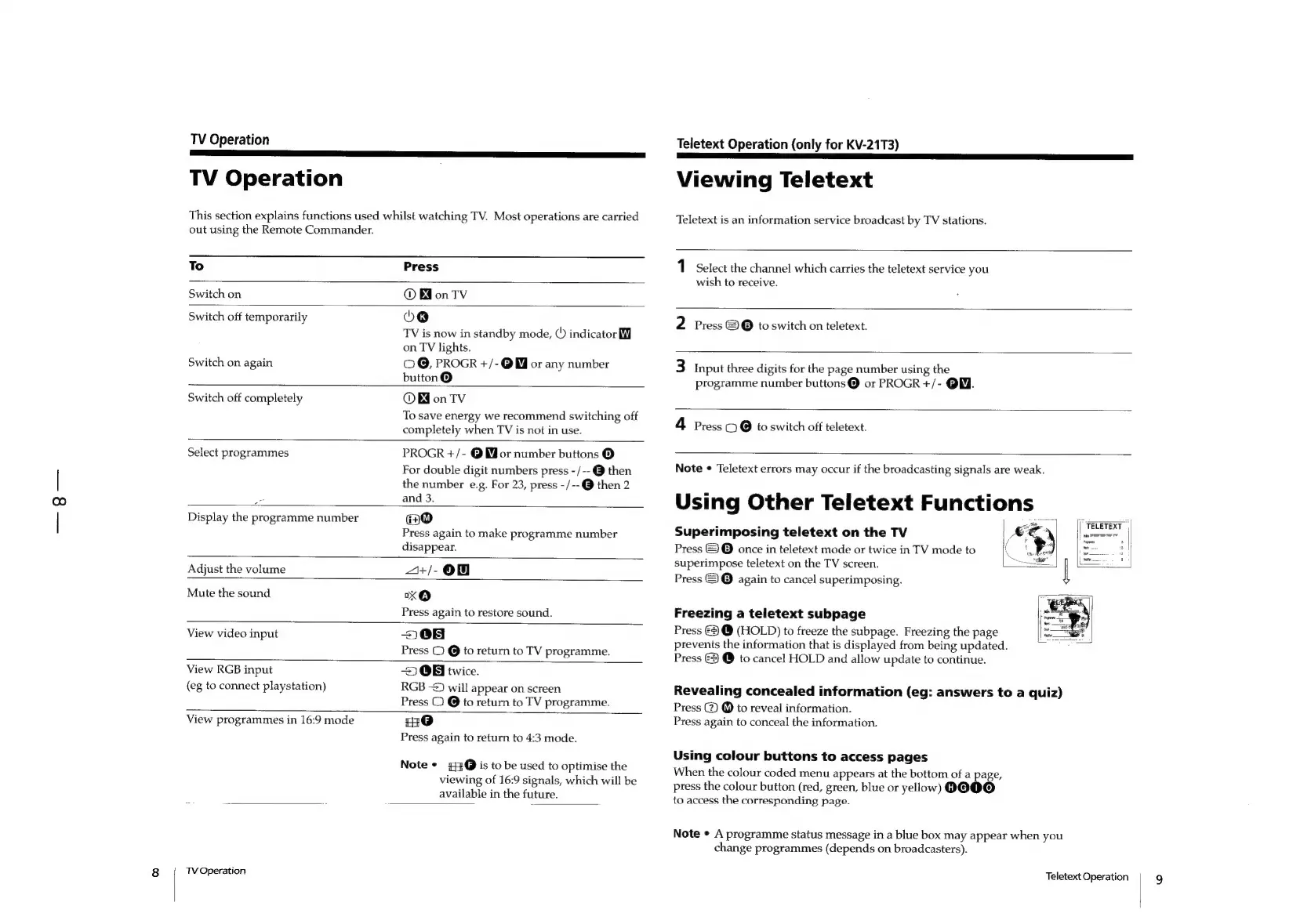
This
section
explains
functions
used
whilst
watching
TV.
Most
operations
are
carried
out
using
the
Remote
Commander.
To
Press
Switch
on
®
WonTv
Switch
off
temporarily
Xk)
TV
is
now
in
standby
mode,
(©)
indicator
Mf
on
TV
lights.
Switch
on
again
O@,
PROGR
+/-@W
or
any
number
button@
Switch
off
completely
Bd
on
TV
To
save
energy
we
recommend
switching
off
completely
when
TV
is
not
in
use.
PROGR
+/-
@
Mor
number
buttons
@
For
double
digit
numbers
press
-/--@
then
the
number
e.g.
For
23,
press
-/--@
then
2
=
and
3.
Display
the
programme
number
ao
Press
again
to
make
programme
number
disappear.
a+/-@
Mute
the
sound
xO
Press
again
to
restore
sound.
208
Press
2
@
to
return
to
TV
programme.
2
OB
twice.
RGB
-2)
will
appear
on
screen
Press
O
@
to
return
to
TV
programme.
Select
programmes
Adjust
the
volume
View
video
input
View
RGB
input
(eg
to
connect
playstation)
View
programmes
in
16:9
mode
HO
Press
again
to
return
to
4:3
mode.
Note
¢
£3@
is
to
be
used
to
optimise
the
viewing
of
16:9
signals,
which
will
be
available
in
the
future.
TV
Operation
Teletext
Operation
(only
for
KV-21T3)
Viewing
Teletext
Teletext
is
an
information
service
broadcast
by
TV
stations.
1
Select
the
channel
which
carries
the
teletext
service
you
wish
to
receive.
2
Press
©
@
to
switch
on
teletext.
3
Input
three
digits
for
the
page
number
using
the
programme
number
buttons@®
or
PROGR
+/-
@W.
4
Press
CO
@
to
switch
off
teletext.
Note
¢
Teletext
errors
may
occur
if
the
broadcasting
signals
are
weak.
Using
Other
Teletext
Functions
|
Superimposing
teletext
on
the
TV
Press
©
©
once
in
teletext
mode
or
twice
in
TV
mode
to
superimpose
teletext
on
the
TV
screen.
Press
&)
@
again
to
cancel
superimposing.
|j
TELETEXT
|
Hi
hiatadad
|
Freezing
a
teletext
subpage
Press
€2
@
(HOLD)
to
freeze
the
subpage.
Freezing
the
page
prevents
the
information
that
is
displayed
from
being
updated.
Press
3
@
to
cancel
HOLD
and
allow
update
to
continue.
Revealing
concealed
information
(eg:
answers
to
a
quiz)
Press
@
@
to
reveal
information.
Press
again
to
conceal
the
information.
Using
colour
buttons
to
access
pages
When
the
colour
coded
menu
appears
at
the
bottom
of
a
page,
press
the
colour
button
(red,
green,
blue
or
yellow)
9OOO
to
access
the
corresponding
page.
Note
¢
A
programme
status
message
in
a
blue
box
may
appear
when
you
change
programmes
(depends
on
broadcasters).
Teletext
Operation
9

Other manuals for Sony TRINITRON KV-21M3D

Related product manuals