EasyManua.ls Logo

Sony TRINITRON KV-21M3D - Getting Started Guide

Sony TRINITRON KV-21M3D
10 pages
Print Icon
To Next Page IconTo Next Page
To Previous Page IconTo Previous Page
Loading...
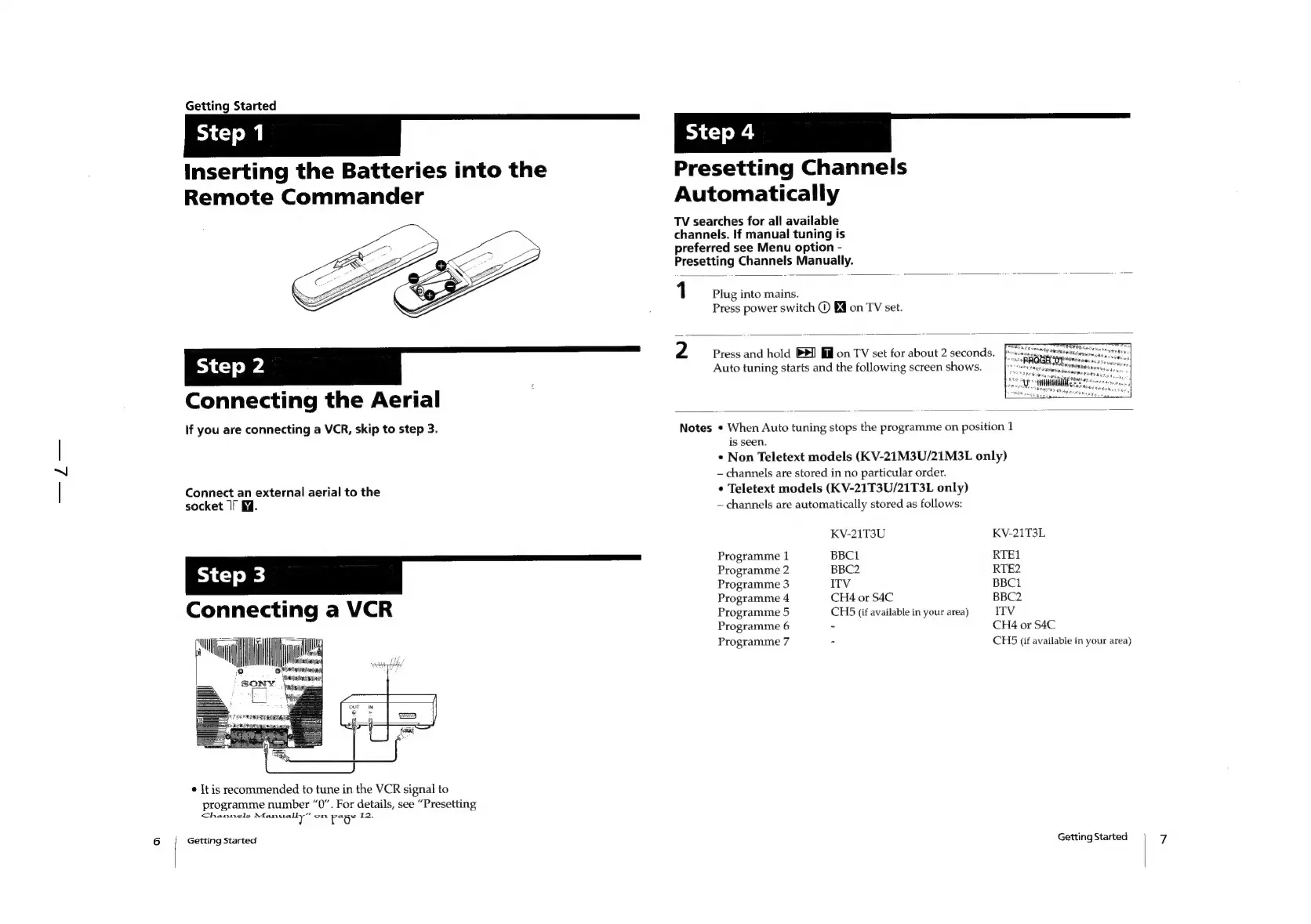
Getting
Started
Inserting
the
Batteries
into
the
Remote
Commander
Presetting
Channels
Automatically
TV
searches
for
all
available
channels.
If
manual
tuning
is
preferred
see
Menu
option
-
Presetting
Channels
Manually.
1
Plug
into
mains.
Press
power
switch
©
§@
on
TV
set.
kk
=_<=—_—_
°°”
2
Connecting
the
Aerial
Press
and
hold
BP
fil
on
TV
set
for
about
2
seconds.
Auto
tuning
starts
and
the
following
screen
shows.
lf
you
are
connecting
a
VCR,
skip
to
step
3.
is
seen.
Notes
*
When
Auto
tuning
stops
the
programme
on
position
1
*
Non
Teletext
models
(KV-21M3U/21M3L
only)
channels
are
stored
in
no
particular
order.
Connect
an
external
aerial
to
the
socket
If
M7.
Connecting
a
VCR
ies
Programme
1
Programme
2
Programme
3
Programme
4
Programme
5
Programme
6
Programme
7
ay
¢
It
is
recommended
to
tune
in
the
VCR
signal
to
programme
number
“0”.
For
details,
see
“Presetting
Channels
Aaasseeally
on
ror
12.
Getting
Started
¢
Teletext
models
(KV-21T3U/21T3L
only)
~
channels
are
automatically
stored
as
follows:
KV-21T3U
BBC1
BBC2
ITV
CH4
or
S4C
CH5
(if
available
in
your
area)
KV-21T3L
RTE1
RTE2
BBC1
BBC2
ITV
CH4
or
S4C
CH45
(if
available
in
your
area)
Getting
Started

Other manuals for Sony TRINITRON KV-21M3D

Related product manuals