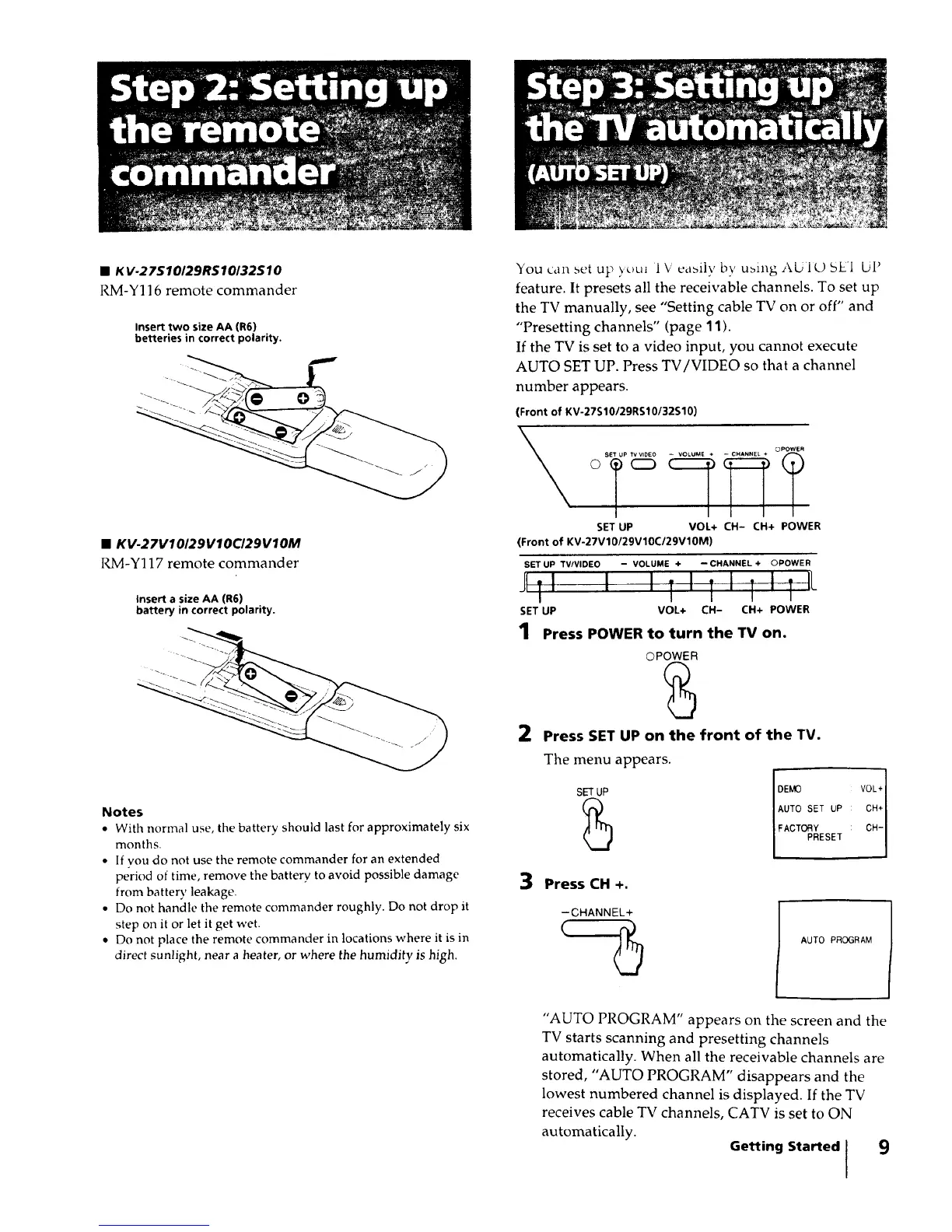
• K V-27S10/29RS10/32SlO
RM-Y116 remote commander
Insert two size AA (R6)
betteries in correct polarity.
• KV-27V10129V10CI29V10M
RM-Y117 remote commander
Insert a size AA (R6)
battery in correct polarity.
You can set up )_}uJ 1V eabilv by ubing AUIO 5EI UI}
feature. It presets all the receivable channels. To set up
the TV manually, see "Setting cable TV on or off" and
"Presetting channels" (page 11).
If the TV is set to a video input, you cannot execute
AUTO SET UP. Press TV/VIDEO so that a channel
number appears.
(Front of KV-27S10129RS10132S10)
SET UP TV VIDEO
© C_
SET UP VOL+ CH- CH+ POWER
(Front of KV-27V10/29V10C/29V10M)
SET UP TV/VIDEO - VOLUME + -- CHANNEL + OPOWER
I . I I . I
Jill i , ll, ,L
SET UP VOL+ CH- CH+ POWER
_.......? 1
Press POWER to turn the TV on.
Notes
• With normal use, the battery should last for approximately six
months.
• If you do not use the remote commander for an extended
period of time, remove the battery to avoid possible damage
from batter}' leakage.
• Do not handle the remote commander roughly. Do not drop it
step on it or let it get wet.
• Do not place the remote commander in locations where it is in
direct sunlight, near a heater, or where the humidity is high.
OPOWER
2 Press SET UP on the front of the TV.
3
The menu appears.
SET UP
DEMO VOL+]
AUTO SET UP CH+ I
FACTORY CH- 1
PRESET
Press CH +.
-CHANNEL+
AUTO PROGRAM
"AUTO PROGRAM" appears on the screen and the
TV starts scanning and presetting channels
automatically. When all the receivable channels are
stored, "AUTO PROGRAM" disappears and the
lowest numbered channel is displayed. If the TV
receives cable TV channels, CATV is set to ON
automatically.
Getting Started ] 9
I






 To Next Page