EasyManua.ls Logo

Sony TRINITRON KV-A2121D - Page 10

Sony TRINITRON KV-A2121D
70 pages
Print Icon
To Next Page IconTo Next Page
To Previous Page IconTo Previous Page
Loading...
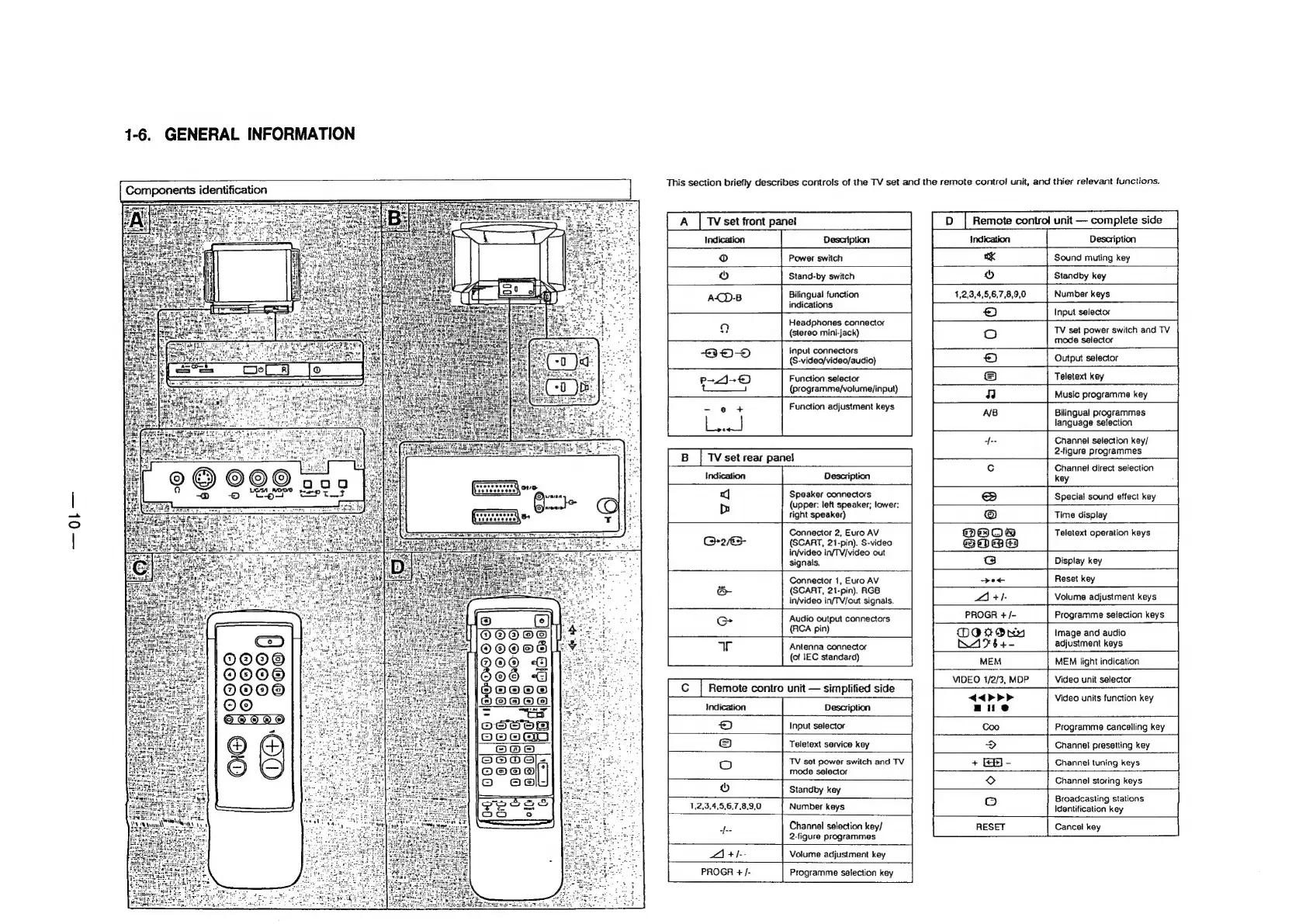
1-6.
GENERAL
INFORMATION
Components
identification
O@O®@
OO@
Qe
©6
Oe
oO
©
This
section
briefly
describes
controls
of
the
TV
set
and
the
remote
control
unit,
and
thier
relevant
functions.
TV
set
front
panel
ion
od
Power
switch
|p
|
Remote
control
unit
complete
side
Description
Sound
muting
key
Stand-by
switch
Bilingual
function
indications
Headphones
connector
(stereo
mini-jack)
Input
connectors
(S-video/video/audio)
Function
selector
(programme/volume/input)
Function
adjustment
keys
|
BY
TV
set
rear
panel
ion
val
Speaker
connectors
Db
(upper:
left
speaker;
lower:
right
speaker)
Connector
2,
Euro
AV
(SCART,
21-pin).
S-video
in/video
in/TV/video
out
signals.
Connector
1,
Euro
AV
(SCART,
21-pin).
RGB
in/video
in/TV/out
signals.
Audio
output
connectors
(RCA
pin)
Antenna
connector
(of
IEC
standard)
Description
Standby
key
1,2,3,4,5,6,7,8,9,0
Number
keys
&)
Input
selector
oO
TV
set
power
switch
and
TV
mode
selector
.)
Output
selector
©
Teletext
key
Music
programme
key
AB
Bilingual
programmes
language
selection
-f--
Channel
selection
key/
2-figure
programmes
MaO8
ooee
G
Channel
direct
selection
key
:
Special
sound
effect
key
Time
display
Teletext
operation
keys
Display
key
Reset
key
Volume
adjustment
keys
poe
21
+/-
PROGR
+
/-
Programme
selection
keys
MOOrOnn
Image
and
audio
BK2964+-
adjustment
keys
MEM
VIDEO
1/2/3,
MDP
MEM
light
indication
Video
unit
selector
Video
units
function
key
Input
selector
Programme
cancelling
key
Teletext
service
key
Channel
presetting
key
TV
set
power
switch
and
TV
mode
selector
Standby
key
1,2,3,4,5,6,7,8,9,0
Number
keys
Channel
tuning
keys
Channel
storing
keys
Broadcasting
stations
identification
key
“ye
Channel
selection
key/
2-figure
programmes
a
+1--
Volume
adjustment
key
PROGR
+/-
Programme
selection
key
Cancel
key

Related product manuals