EasyManua.ls Logo

Sony TRINITRON KV-A2121D - Page 9

Sony TRINITRON KV-A2121D
70 pages
Print Icon
To Next Page IconTo Next Page
To Previous Page IconTo Previous Page
Loading...
1-5.
CONNECTIONS
AND
OPTIONAL
FUNCTIONS
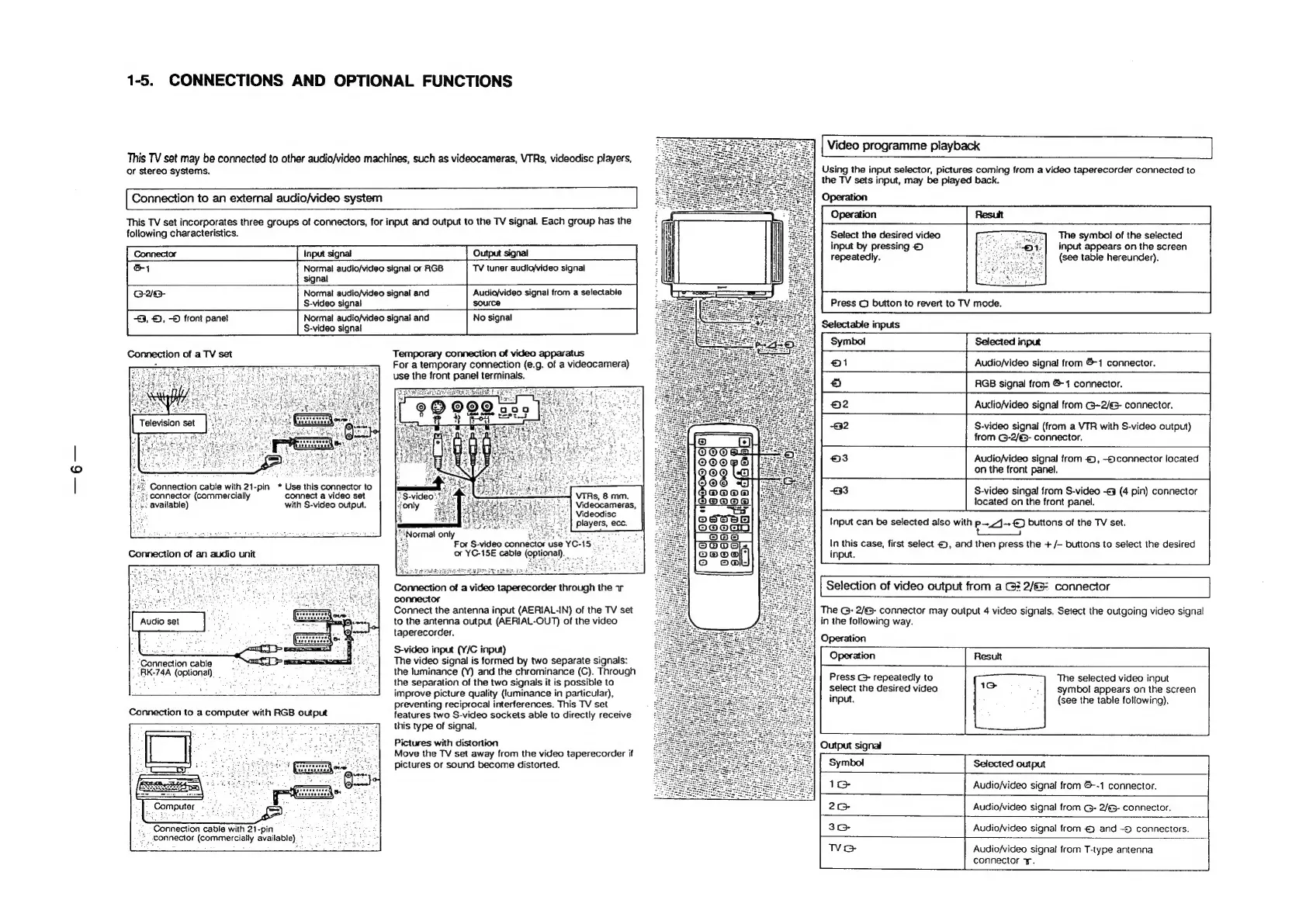
Video
programme
playback
Using
the
input
selector,
pictures
coming
from
a
video
taperecorder
connected
to
the
TV
sets
input,
may
be
played
back.
Operation
This
TV
set
may
be
connected
to
other
audio/video
machines,
such
as
videocameras,
VTRs,
videodisc
players,
or
stereo
systems.
Connection
to
an
external
audio/video
system
This
TV
set
incorporates
three
groups
of
connectors,
for
input
and
output
to
the
TV
signal.
Each
group
has
the
following
characteristics.
Select
the
desired
video
ven
The
symbol
of
the
selected
input
by
pressing
2
'4:|
input
appears
on
the
screen
repeatedly.
.
(see
table
hereunder).
Normal
audio/video
signal
or
RGB
TV
tuner
audio/video
signal
signal
Normal
audio/video
signal
and
Audio/video
signal
from
a
selectable
S-video
signal
source
+3,
©,
-S
front
pane!
Normal
audio/video
signal
and
No
signal
S-video
signal
Press
©
button
to
revert
to
TV
mode.
Selectable
inputs
Selected
input
Connection
of
a
TV
set
Temporary
connection
of
video
apparatus
-
-
For
a
temporary
connection
(e.g.
of
a
videocamera)
use
the
front
panel
terminals.
Audio/video
signal
from
&-1
connector.
RGB
signal
from
&1
connector.
Auclio/video
signal
from
~2/6-
connector.
Television
set
S-video
signal
(from
a
VTR
with
S-video
output)
from
G-2/6-
connector.
Audio/video
signal
from
©,
-connector
located
on
the
front
panel.
Connection
cabie
with
21-pin
*
Use
this
connector
to
connector
(commercially
connect
a
video
set
¢
available)
with
S-video
output.
S-video
singal
from
S-video
-¢3
(4
pin)
connector
located
on
the
front
panel.
VTRs,
8
mm.
Videocameras,
Videodisc
players,
ecc.
|
Input
can
be
selected
also
with
p_J--
€)
buttons
of
the
TV
set.
tos
lormal
only
:
as
For
S-video
connector
use
YC-15
or
YC-15E
cable
(optional).
In
this
case,
first
select
<),
and
then
press
the
+
/—
buttons
to
select
the
desired
input.
Connection
of
an
audio
unit
Connection
of
a
video
taperecorder
through
the
1r
Selection
of
video
output
from
a
GE
2/G
connector
connector
Connect
the
antenna
input
(AERIAL-IN)
of
the
TV
set
to
the
antenna
output
(AERIAL-OUT)
of
the
video
taperecorder.
S-video
input
(Y/C
input)
The
video
signal
is
formed
by
two
separate
signals:
the
luminance
(Y)
and
the
chrominance
(C).
Through
the
separation
of
the
two
signals
it
is
possible
to
improve
picture
quality
(jiuminance
in
particular),
preventing
reciprocal
interferences.
This
TV
set
features
two
S-video
sockets
able
to
directly
receive
this
type
of
signal.
Pictures
with
distortion
Move
the
TV
set
away
from
the
video
taperecorder
if
The
G:
2/&-
connector
may
output
4
video
signals.
Setect
the
outgoing
video
signal
Audio
set
in
the
following
way.
Operation
“Connection
cable
{eee
:RK-74A
(optional)
_ 3
Press
G+
repeatedly
to
select
the
desired
video
input.
The
selected
video
input
symbol
appears
on
the
screen
(see
the
table
following).
Output
signal
pictures
or
sound
become
distorted.
Selected
output
1G
Audio/Video
signal
from
&--1
connector.
=)
Ea
2G
Audio/video
signal
from
G-
2/63-
connector.
Connection
cable
wih
21-pin
Ae
30°
Audio/video
signal
from
and
~)
connectors.
connector
(commercially
available).
*
:
5
fee
Wo
Audio/video
signal
from
T-type
antenna
connector
+.

Related product manuals