EasyManua.ls Logo

Sony TRINITRON KV-A2121D - Page 8

Sony TRINITRON KV-A2121D
70 pages
Print Icon
To Next Page IconTo Next Page
To Previous Page IconTo Previous Page
Loading...
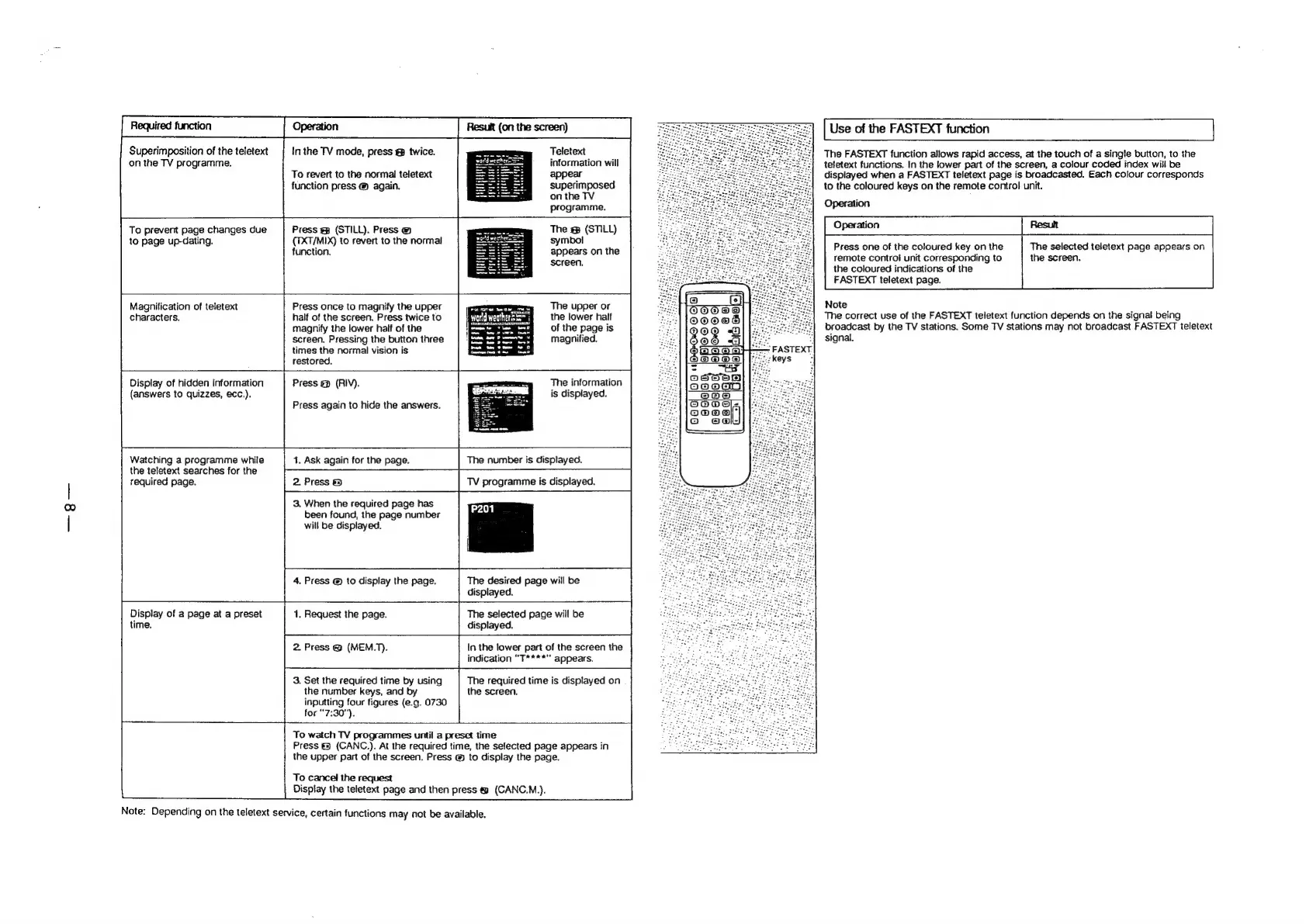
Required
function
Superimposition
of
the
teletext
on
the
TV
programme.
In
the
TV
mode,
press
@&
twice.
To
revert
to
the
normal
teletext
function
press
@
again.
To
prevent
page
changes
due
to
page
up-dating.
Teletext
information
will
appear
superimposed
on
the
TV
programme.
Press
g
(STILL).
Press
(TXT/MIX)
to
revert
to
the
normal
function.
Magnification
of
teletext
characters.
Display
of
hidden
information
(answers
to
quizzes,
ecc.).
Watching
a
programme
while
the
teletext
searches
for
the
required
page.
The
(STILL)
symbol
appears
on
the
screen.
Press
once
to
magnify
the
upper
half
of
the
screen.
Press
twice
to
magnify
the
lower
half
of
the
screen,
Pressing
the
button
three
times
the
normal
vision
is
restored.
Press
@
(RIV).
Press
again
to
hide
the
answers.
14.
Ask
again
for
the
page.
2.
Press
&
3.
When
the
required
page
has
been
found,
the
page
number
will
be
displayed.
4.
Press
@
to
display
the
page.
Display
of
a
page
at
a
preset
time.
The
upper
or
the
lower
half
of
the
page
is
magnified.
The
information
is
displayed.
The
number
is
displayed.
TV
programme
is
displayed.
The
desired
page
will
be
displayed.
1.
Request
the
page.
The
selected
page
will
be
displayed.
2
Press
@
(MEM.T).
3.
Set
the
required
time
by
using
the
number
keys,
and
inputting
four
figures
(e.g.
0730
for
“7:30").
In
the
lower
part
of
the
screen
the
indication
“T****"
appears.
The
required
time
is
displayed
on
the
screen,
[
To
watch
TV
programmes
until
a
preset
time
Press
@
(CANC.).
At
the
required
time,
the
selected
page
appears
in
the
upper
part
of
the
screen.
Press
@
to
display
the
page.
To
cancel
the
request
Display
the
teletext
page
and
then
press
@
(CANC.M.).
Note:
Depending
on
the
teletext
service,
certain
functions
may
not
be
available.
Use
of
the
FASTEXT
function
The
FASTEXT
function
allows
rapid
access,
at
the
touch
of
a
single
button,
to
the
teletext
functions.
In
the
lower
part
of
the
screen,
a
colour
coded
index
will
be
displayed
when
a
FASTEXT
teletext
page
is
broadcasted.
Each
colour
corresponds
to
the
coloured
keys
on
the
remote
control
unit.
Operation
Operation
Result
Press
one
of
the
coloured
key
on
the
The
selected
teletext
page
appears
on
remote
control
unit
corresponding
to
the
screen.
the
coloured
indications
of
the
FASTEXT
teletext
page.
Note
The
correct
use
of
the
FASTEXT
teletext
function
depends
on
the
signal
being
broadcast
by
the
TV
stations.
Some
TV
stations
may
not
broadcast
FASTEXT
teletext
signal.

Related product manuals