EasyManua.ls Logo

Sony TRINITRON KV-A2121D - Page 7

Sony TRINITRON KV-A2121D
70 pages
Print Icon
To Next Page IconTo Next Page
To Previous Page IconTo Previous Page
Loading...
[
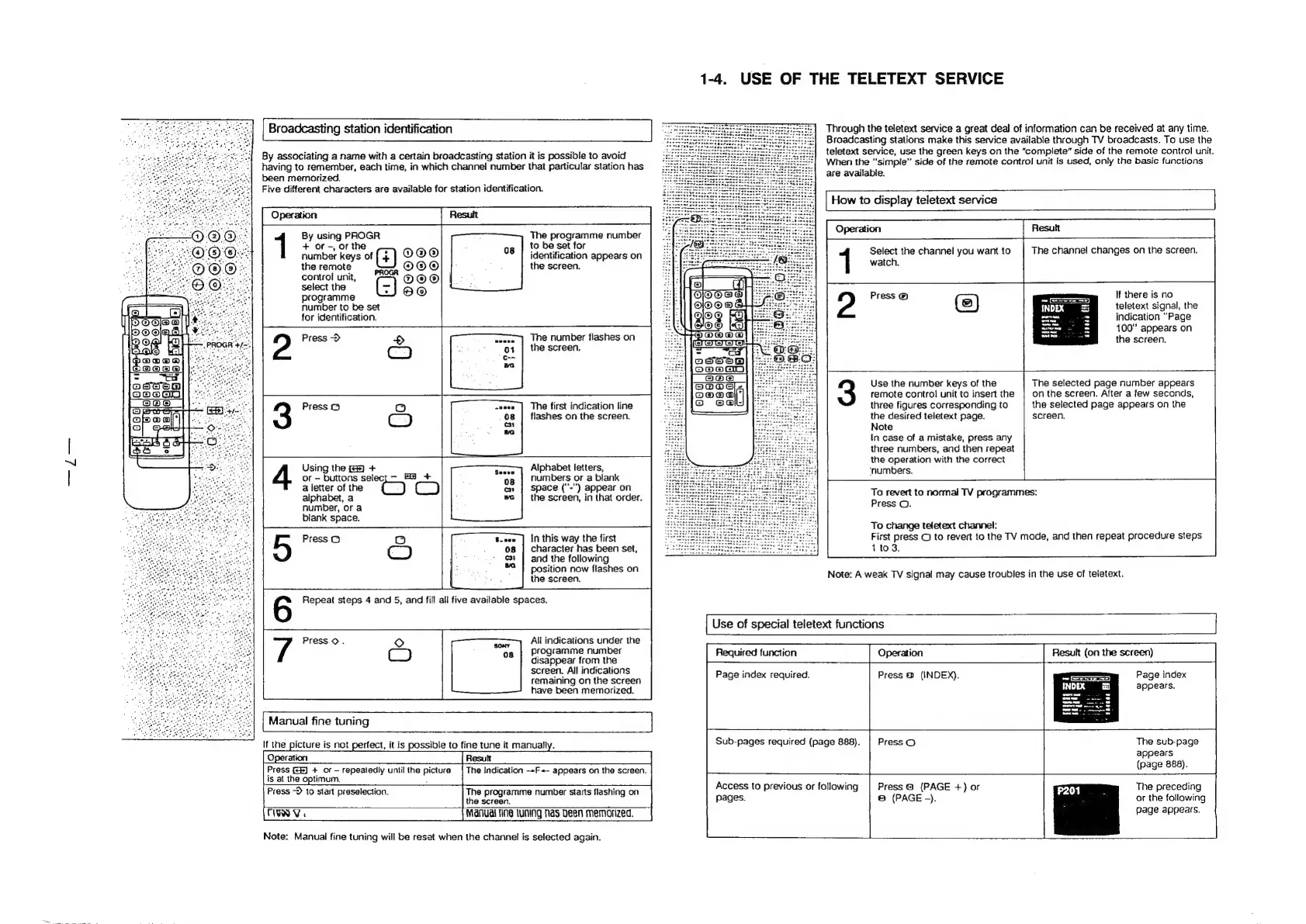
Broadcasting
station
identification
By
associating
a
name
with
a
certain
broadcasting
station
it
is
possible
to
avoid
having
to
remember,
each
time,
in
which
channel
number
that
particular
station
has
been
memorized.
Five
different
characters
are
available
for
station
identification.
By
using
PROGR
+
or
-,
or
the
The
programme
number
to
be
set
for
number
keys
of
(4)
OO®
identification
appears
on
the
remote
OOO
the
screen.
control
unit,
O@O®
select
the
(=)
programme
number
to
be
set
for
identification.
The
number
flashes
on
the
screen.
Press
>
The
first
indication
line
flashes
on
the
screen.
Using
the
+
or
buttons
select
FS
+
a
letter
of
the
alphabet,
a
number,
or
a
blank
space.
Alphabet
letters,
numbers
or
a
blank
space
("'-")
appear
on
the
screen,
in
that
order.
in
this
way
the
first
character
has
been
set,
and
the
following
position
now
flashes
on
the
screen.
All
indications
under
the
og
}
Programme
number
disappear
from
the
screen.
All
indications
remaining
on
the
screen
have
been
memorized.
|
Manual
fine
tuning
If
the
picture
is
not
p
Operation
Press
(8)
+
of
repeatedly
uniil
the
picture
is
at
the
optimum.
:
Press
-D
to
start
preselection.
The
programme
number
starts
flashing
on
the
screen.
TIEN
V.
Manual
fine
tuning
fas
been
memorized.
Note:
Manual
fine
tuning
will
be
reset
when
the
channel
is
selected
again.
tect,
it
is
possible
to
fine
tune
it
manually.
The
indication
--F
appears
on
the
screen.
1-4.
USE
OF
THE
TELETEXT
SERVICE
Through
the
teletext
service
a
great
deal
of
information
can
be
received
at
any
time.
Broadcasting
stations
make
this
service
available
through
TV
broadcasts.
To
use
the
teletext
service,
use
the
green
keys
on
the
“complete”
side
of
the
remote
control
unit.
When
the
“simple”
side
of
the
remote
control
unit
is
used,
only
the
basic
functions
are
available.
|
How
to
display
teletext
service
Operation
The
channel
changes
on
the
screen.
watch,
a
Press
@
1
Select
the
channel
you
want
to
If
there
is
no
teletext
signal,
the
indication
“Page
100”
appears
on
the
screen.
it
The
selected
page
number
appears
on
the
screen.
After
a
few
seconds,
the
selected
page
appears
on
the
screen.
Use
the
number
keys
of
the
remote
control
unit
to
insert
the
three
figures
corresponding
to
the
desired
teletext
page.
Note
In
case
of
a
mistake,
press
any
three
numbers,
and
then
repeat
the
operation
with
the
correct
‘numbers,
To
revert
to
normal
TV
programmes:
Press
©.
To
change
teletext
channel:
First
press
©
to
revert
to
the
TV
mode,
and
then
repeat
procedure
steps
1
to
3.
Note:
A
weak
TV
signal
may
cause
troubles
in
the
use
of
teletext.
[
Use
of
special
teletext
functions
Required
function
Operation
Result
(on
the
screen)
Page
index
required.
Press
®
(INDEX).
Page
index
appears.
Sub-pages
required
(page
888).
|
Press
O
The
sub-page
appears
|
(page
888).
Access
to
previous
or
following
Press
@
(PAGE
+)
or
The preceding
Pages.
©
(PAGE
-).
or
the
following
Gage
appears.

Related product manuals