EasyManua.ls Logo

Sony TRINITRON KV-A2121D - Page 6

Sony TRINITRON KV-A2121D
70 pages
Print Icon
To Next Page IconTo Next Page
To Previous Page IconTo Previous Page
Loading...
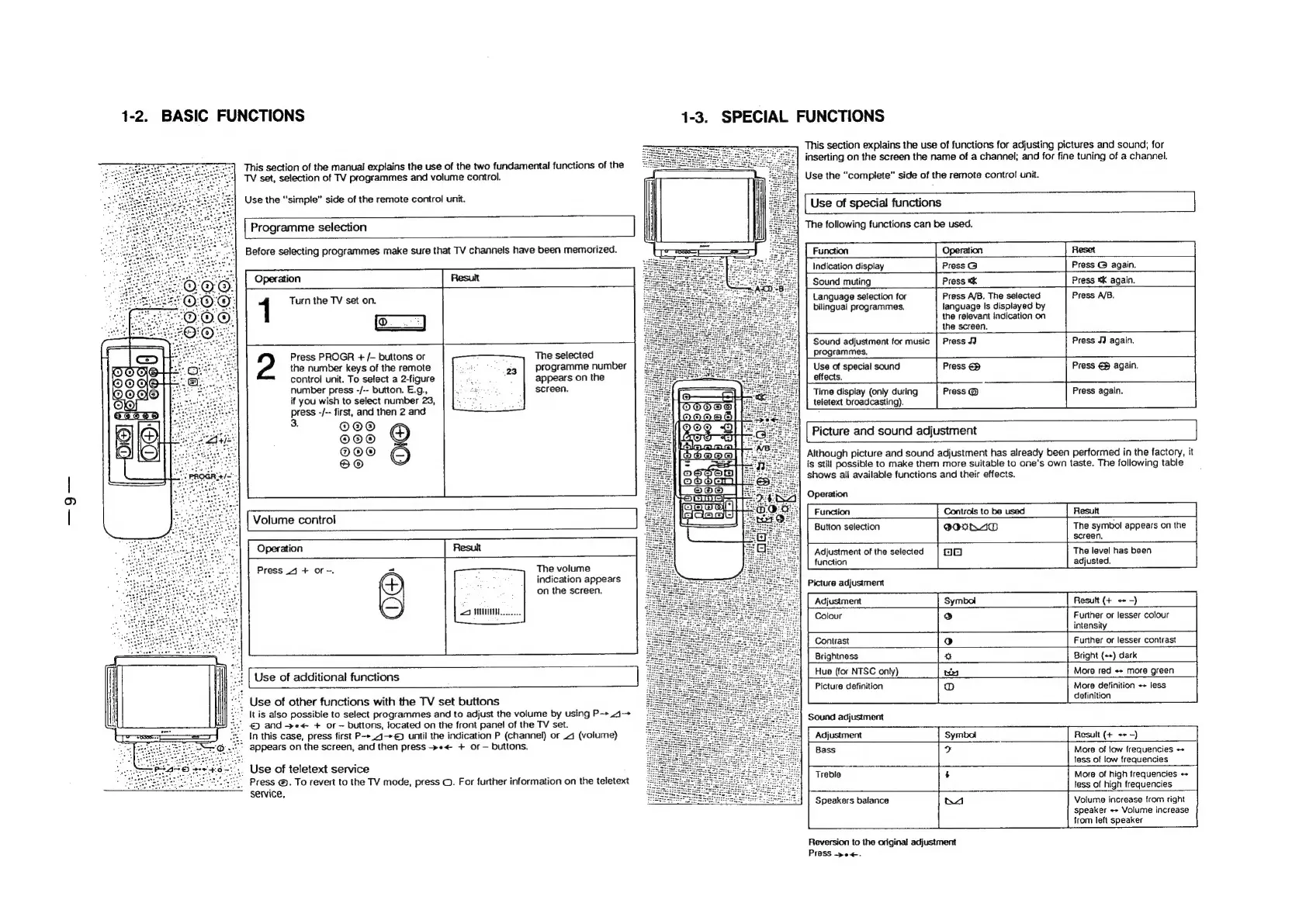
1-2.
BASIC
FUNCTIONS
This
section
of
the
manual
explains
the
use
of
the
two
fundamental
functions
of
the
TV
set,
selection
of
TV
programmes
and
volume
control.
Use
the
“simple”
side
of
the
remote
control
unit.
|
Programme
selection
Before
selecting
programmes
make
sure
that
TV
channels
have
been
memorized.
Operation
1
Turn
the
TV
set
on.
Press
PROGR
+
/—
buttons
or
The
selected
the
number
keys
of
the
remote
programme
number
control
unit.
To
select
a
2-figure
appears
on
the
number
press
-/--
button.
E.g.,
screen.
if
you
wish
to
select
number
23,
press
-/--
first,
and
then
2
and
3.
©@®
©O®
®O®
KO)
Volume
control
Operation
The
volume
indication
appears
on
the
screen.
Press
41
+
or.
=r
Use
of
additional
functions
Use
of
other
functions
with
the
TV
set
buttons
It
is
also
possible
to
select
programmes
and
to
adjust
the
volume
by
using
P->
.4—>
|
and
-»e<
+
or
buttons,
located
on
the
front
panel
of
the
TV
set.
In
this
case,
press
first
P--.4—+©
until
the
indication
P
(channel)
or
4
(volume)
°
appears
on
the
screen,
and
then
press
»e<
+
of
buttons.
Use
of
teletext
service
_
Press
@.
To
revert
to
the
TV
mode,
press
©.
For
further
information
on
the
teletext
service,
1-3.
SPECIAL
FUNCTIONS
This
section
explains
the
use
of
functions
for
adjusting
pictures
and
sound;
for
inserting
on
the
screen
the
name
of
a
channel;
and
for
fine
tuning
of
a
channel.
Use
the
“complete”
side
of
the
remote
control
unit.
|
Use
of
special
functions
The
following
functions
can
be
used.
Operation
Press
G
Press
ak
Press
A/B.
The
selected
language
Is
displayed
by
the
relavant
indication
on
the
screen.
Press
JJ
Press
@
again.
Press
*k
again.
Press
A/B.
Indication
display
Sound
muting
Language
selection
for
bilingual
programmes.
Sound
adjustment
for
music
Press
JJ
again.
programmes.
Use
of
specia!
sound
effects.
Time
display
(only
during
teletext
broadcasting).
Picture
and
sound
adjustment
Although
picture
and
sound
adjustment
has
already
been
performed
in
the
factory,
it
is
still
possible
to
make
them
more
suitable
to
one’s
own
taste.
The
following
table
shows
all
available
functions
and
their
effects.
Press
€2
Press
€@
again.
Press
@
Press
again.
Operation
Controls
to
be
used
Button
selection
The
symbol
appears
on
the
screen,
Adjustment
of
the
selected
The
level
has
been
function
adjusted.
Picture
adjustment
Adjustment
Resutt
(+
+
-)
Colour
Further
or
lesser
colour
intensity
Contrast
Further
or
lesser
contrast
Brightness
Bright
(++)
dark
Hue
(for
NTSC
only)
More
red
++
more
green
Picture
definition
More
definition
++
less
definition
Sound
adjustment
Adjustment
Bass
Result
(+
++
-)
More
of
low
frequencies
+
less
of
low
frequencies
More
of
high
frequencies
+
tess
of
high
frequencies
Speakers
balance
K4
Volume
increase
from
right
speaker
«>
Volume
increase
from
left
speaker
Reversion
to
the
original
adjustment
Press
-pe<.

Related product manuals