EasyManua.ls Logo

Sony TRINITRON KV-A2121D - Page 5

Sony TRINITRON KV-A2121D
70 pages
Print Icon
To Next Page IconTo Next Page
To Previous Page IconTo Previous Page
Loading...
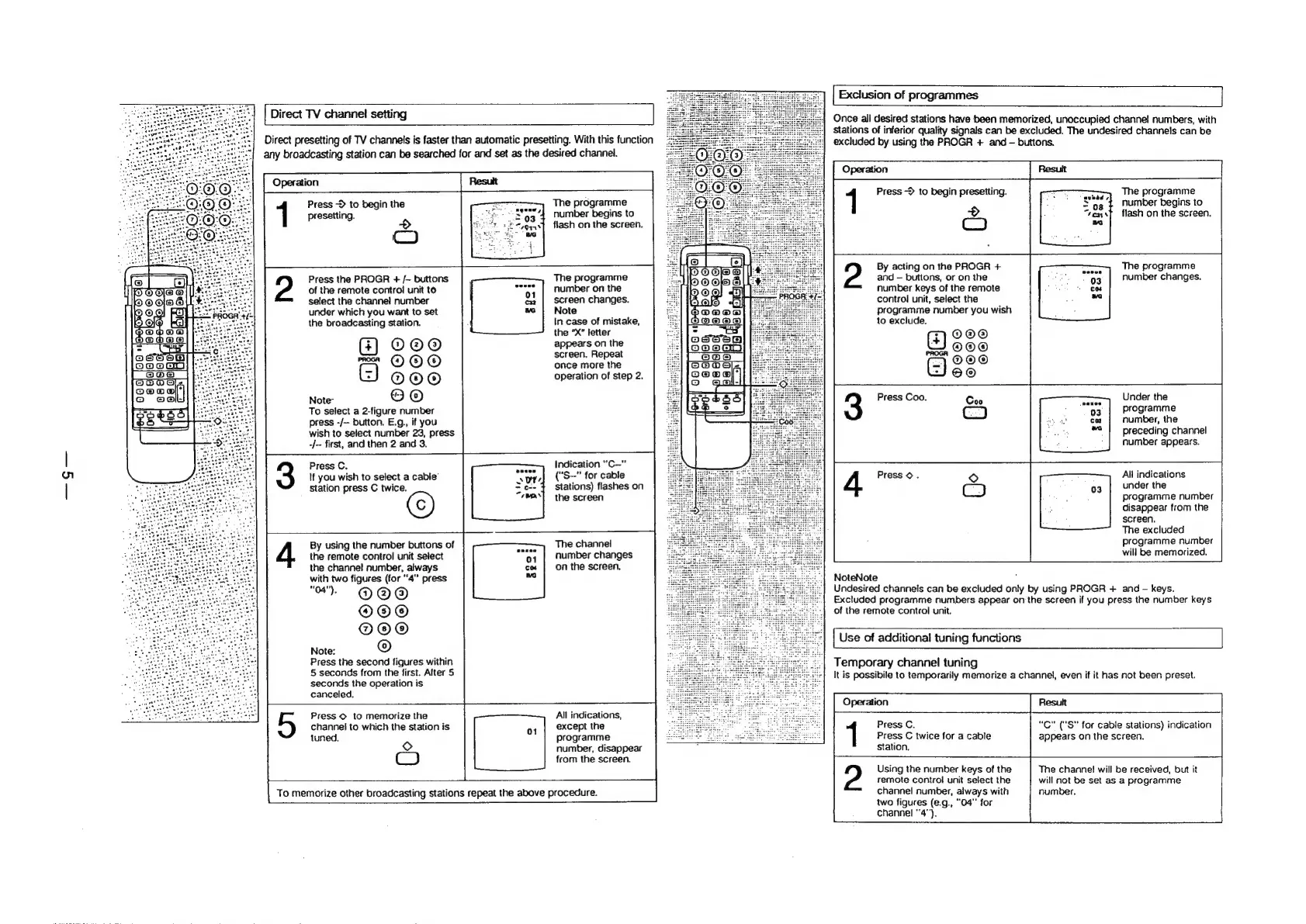
Exclusion
of
programmes
|
Direct
TV
channel
setting
Once
all
desired
stations
have
been
memorized,
unoccupied
channel
numbers,
with
stations
of
inferior
quality
signals
can
be
excluded.
The
undesired
channels
can
be
Direct
presetting
of
TV
channels
is
faster
than
automatic
presetting.
With
this
function
excluded
by
using
the
PROGR
+
and
buttons.
any
broadcasting
station
can
be
searched
for
and
set
as
the
desired
channel.
Press
->
to
begin
presetting.
SETS
ars
The
programme
:
number
begins
to
>
.
flash
on
the
screen.
Co
The
programme
number
begins
to
flash
on
the
screen.
1
Press
~
to
begin
the
presetting.
ESS
Co
By
acting
on
the
PROGR
+
The
programme
and
buttons,
or
on
the
Ss
ly
number
changes.
number
keys
of
the
remote
se
control
unit,
select
the
The
programme
number
on
the
screen
changes.
of
the
remote
control
unit
te
2
Press
the
PROGR
+
/-
buttons
select
the
channel
number
under
which
you
want
to
set
Note
programme
number
you
wish
the
broadcasting
station.
In
case
of
mistake,
to
exclude.
the
’X”
letter
O@O®
©O®
fom
MOLOLO)
appears
on
the
screen,
Repeat
once
more
the
operation
of
step
2.
©@@
mm
©
©
®
G)
o00
Note”
©
©
To
select
a
2-figure
number
press
-/--
button.
E.g.,
if
you
wish
to
select
number
23,
press
-/--
first,
and
then
2
and
3.
Press
C.
If
you
wish
to
select
a
cabie’
station
press
C
twice.
By
using
the
number
buttons
of
4
the
remote
control
unit
select
the
channel
number,
always
with
two
figures
(for
"4"
press
"#
@@@
@O@
©
@O@O®
Note:
©
Press
the
second
figures
within
5
seconds
from
the
first.
After
5
seconds
the
operation
is
canceled.
5
Press
©
to
memorize
the
0G)
Joo"
aGalas
jaa
@
i
eer"
be
S
Per
ee
a
‘>
XO)
Press
Coo.
Coo
ic
ase
7
number,
the
preceding
channel
number
appears.
E
Indication
“C-~"
("S--"
for
cable
stations)
flashes
on
the
screen
All
indications
under
the
programme
number
disappear
from
the
screen.
The
excluded
programme
number
will
be
memorized.
The
channel
number
changes
on
the
screen,
NoteNote
Undesired
channels
can
be
excluded
only
by
using
PROGR
+
and
-
keys.
Excluded
programme
numbers
appear
on
the
screen
if
you
press
the
number
keys
of
the
remote
control
unit.
Use
of
additional
tuning
functions
Temporary
channel
tuning
It
is
possibile
to
temporarily
memorize
a
channel,
even
if
it
has
not
been
preset.
All
indications,
except
the
programme
number,
disappear
from
the
screen.
channel
to
which
the
station
is
Press
C.
“C"
("S"
for
cable
stations)
indication
tuned.
Press
C
twice
for
a
cable
appears
on
the
screen.
Station.
©
OC
Using
the
number
keys
of
the
The
channel
will
be
received,
but
it
remote
control
unit
select
the
will
not
be
set
as
a
programme
channel
number,
always
with
number.
two
figures
(e.g.,
“04”
for
channel
“4").
To
memorize
other
broadcasting
stations
repeat
the
above
procedure.

Related product manuals