EasyManua.ls Logo

Sony TRINITRON KV-A2121D - Page 4

Sony TRINITRON KV-A2121D
70 pages
Print Icon
To Next Page IconTo Next Page
To Previous Page IconTo Previous Page
Loading...
SECTION
1
GENERAL
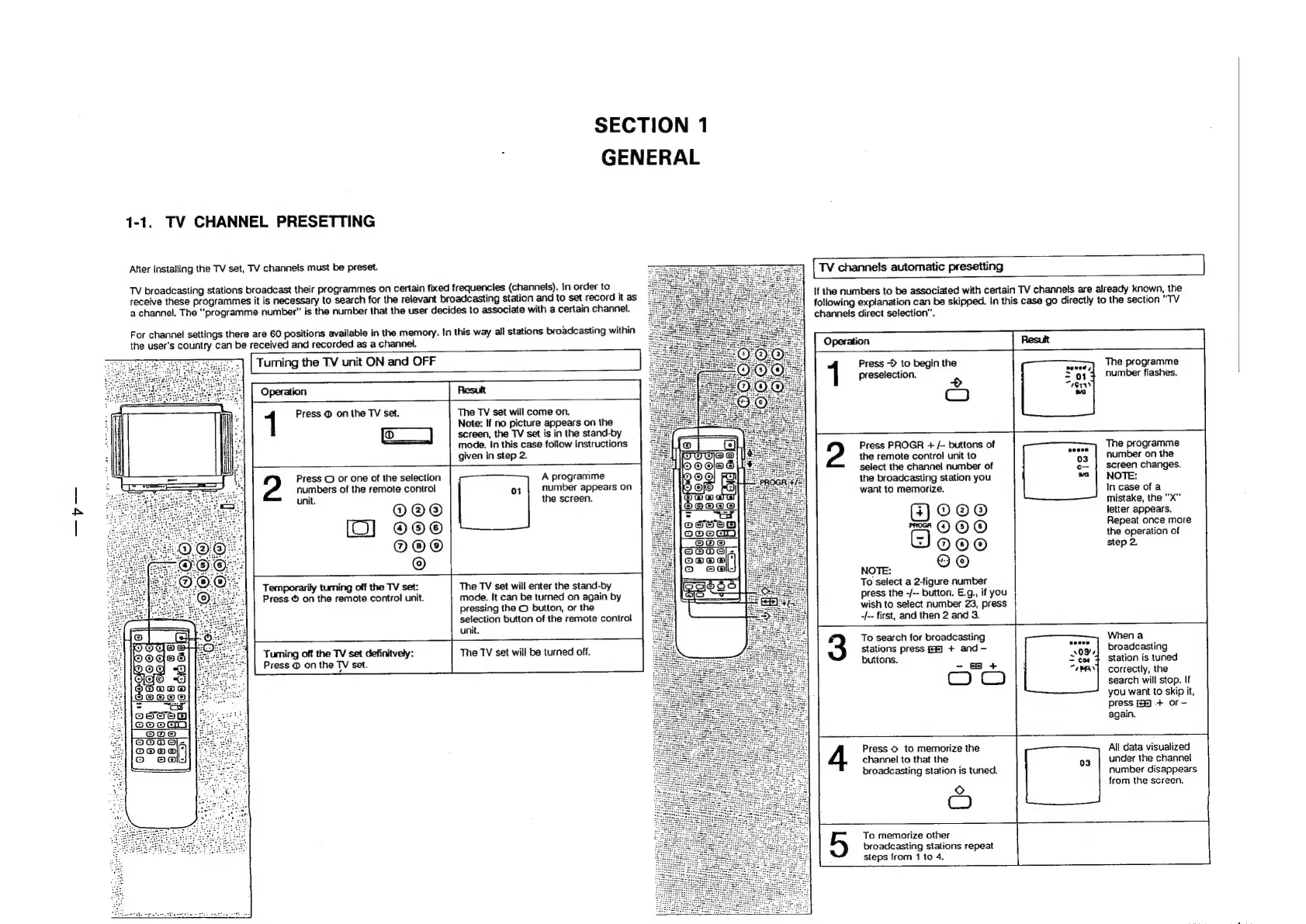
1-1.
TV
CHANNEL
PRESETTING
After
installing
the
TV
set,
TV
channels
must
be
preset.
[
TV
channels
automatic
presetting
TV
broadcasting
stations
broadcast
their
programmes
on
certain
fixed
frequencies
(channels).
In
order
to
receive
these
programmes
it
is
necessary
to
search
for
the
relevant
broadcasting
station
and
to
set
record
it
as
a
channel.
The
“programme
number”
is
the
number
that
the
user
decides
to
associate
with
a
certain
channel.
If
the
numbers
to
be
associated
with
certain
TV
channels
are
already
known,
the
following
explanation
can
be
skipped.
In
this
case
go
directly
to
the
section
"TV
channels
direct
selection”.
For
channel
settings
there
are
60
positions
available
in
the
memory.
In
this
way
all
stations
broadcasting
within
the
user’s
country
can
be
received
and
recorded
as
a
channel.
[
Tuming
the
TV
unit
ON
and
OFF
2
Press
@
on
the
TV
set.
Press
©
or
one
of
the
selection
numbers
of
the
remote
control
unit.
@@@
[CO]
Oo
O@O®
©
The
TV
set
will
come
on.
Note:
If
no
picture
appears
on
the
screen,
the
TV
set
is
in
the
stand-by
mode.
In
this
case
follow
instructions
given
in
step
2.
A
programme
number
appears
on
the
screen.
Temporarily
tuming
off
the
TV
set:
Press
©
on
the
remote
control
unit.
The
TV
set
wiil
enter
the
stand-by
mode.
It
can
be
turned
on
again
by
pressing
the
©
button,
or
the
selection
button
of
the
remote
control
unit.
Tuming
off
the
TV
set
definitvely:
Press
@
on
the
TV
set.
The
TV
set
will
be
turned
off.
Press
>
to
begin
the
preselection.
>
Co
Press
PROGR
+
/-
buttons
of
the
remote
control
unit
to
select
the
channel
number
of
the
broadcasting
station
you
want
to
memorize.
Ooo
rm
©
©
©
Goo0o
NOTE:
©
©
To
select
a
2-figure
number
press
the
-/--
button.
E.g.,
if
you
wish
to
select
number
23,
press
-/--
first,
and
then
2
and
3.
The
programme
number
flashes.
The
programme
number
on
the
screen
changes.
NOTE:
In
case
of
a
mistake,
the
"X”
letter
appears.
Repeat
once
more
the
operation
of
step
2.
To
search
for
broadcasting
Stations
press
fe)
+
and
—-
buttons.
-
+
When
a
broadcasting
station
is
tuned
correctly,
the
search
will
stop,
If
you
want
to
skip
it,
press
2)
+
or
-
again.
Press
©
to
memorize
the
channel
to
that
the
broadcasting
station
is
tuned.
Q
C)
All
data
visualized
under
the
channel
number
disappears
from
the
screen.
To
memorize
other
broadcasting
stations
repeat
steps
from
1
to
4.

Related product manuals