EasyManua.ls Logo

Sony TRINITRON KV-A2121D - Page 15

Sony TRINITRON KV-A2121D
70 pages
Print Icon
To Next Page IconTo Next Page
To Previous Page IconTo Previous Page
Loading...
SECTION
3
SET-UP
ADJUSTMENTS
@
The
following
adjustments
should
be
made
when
1.
Beam
Landing
a
complete
realignment
is
required
or
a
new
2.
Convergence
picture
tube
is
installed.
3.
Focus
@
These
adjustments
should
be
performed
with
4.
Screen
(G
2)
and
White
Balance
rated
power
supply
voltage
unless
otherwise
noted.
Note:
Test
Equipment
Required.
The
controls
and
switch
below
should
be
set
as
follows
1,
Color
bar/Pattern
Generator
unless
otherwise
noted
:
2.
Degausser
Q
CONTRASTcontrol--.-.--.-
80%(or
Normal
by
3.
DC
Power
Supply
commander)
4.
Digital
multimeter
<t
BRIGHTNESS
control-.-..
50%
5.
Oscilloscope
Perform
the
adjustments
in
order
as
follows:
Preparation:
(21
inch,
25
inch)
@
Set
the
side
of
the
unit
with
the
PICTUE
TUBE
so
that
it
faces
east
or
west
in
order
to
reduce
the
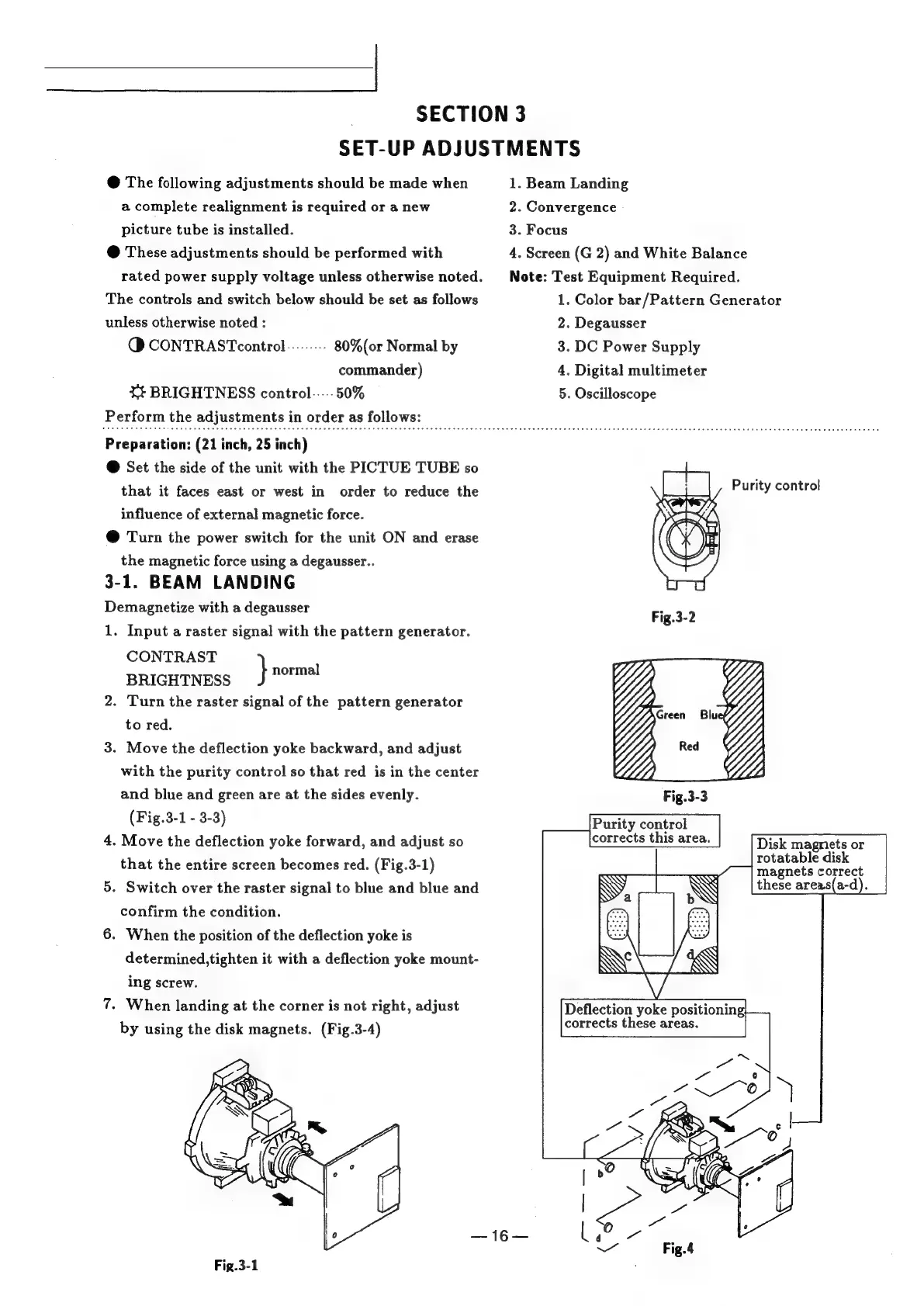
Purity
control
influence
of
external
magnetic
force.
@
Turn
the
power
switch
for
the
unit
ON
and
erase
the
magnetic
force
using
a
degausser..
3-1.
BEAM
LANDING
Demagnetize
with
a
degausser
1.
Input
a
raster
signal
with
the
pattern
generator.
CONTRAST
BRIGHTNESS
}
sah
2.
Turn
the
raster
signal
of
the
pattern
generator
to
red.
3.
Move
the
deflection
yoke
backward,
and
adjust
with
the
purity
control
so
that
red
is
in
the
center
and
blue
and
green
are
at
the
sides
evenly.
(Fig.3-1
-
3-3)
4.
Move
the
deflection
yoke
forward,
and
adjust
so
Disk
magnets
or
that
the
entire
screen
becomes
red.
(Fig.3-1)
eee
eee
aes
5.
Switch
over
the
raster
signal
to
blue
and
blue
and
N
WN
these
areas(a-d).
confirm
the
condition.
6.
When
the
position
of
the
deflection
yoke
is
determined,tighten
it
with
a
deflection
yoke
mount-
ing
screw.
7.
When
landing
at
the
corner
is
not
right,
adjust
by
using
the
disk
magnets.
(Fig.3-4)
D)
as
Fig.3-1

Related product manuals