EasyManua.ls Logo

Sony TRINITRON KV-A2121D - Page 16

Sony TRINITRON KV-A2121D
70 pages
Print Icon
To Next Page IconTo Next Page
To Previous Page IconTo Previous Page
Loading...
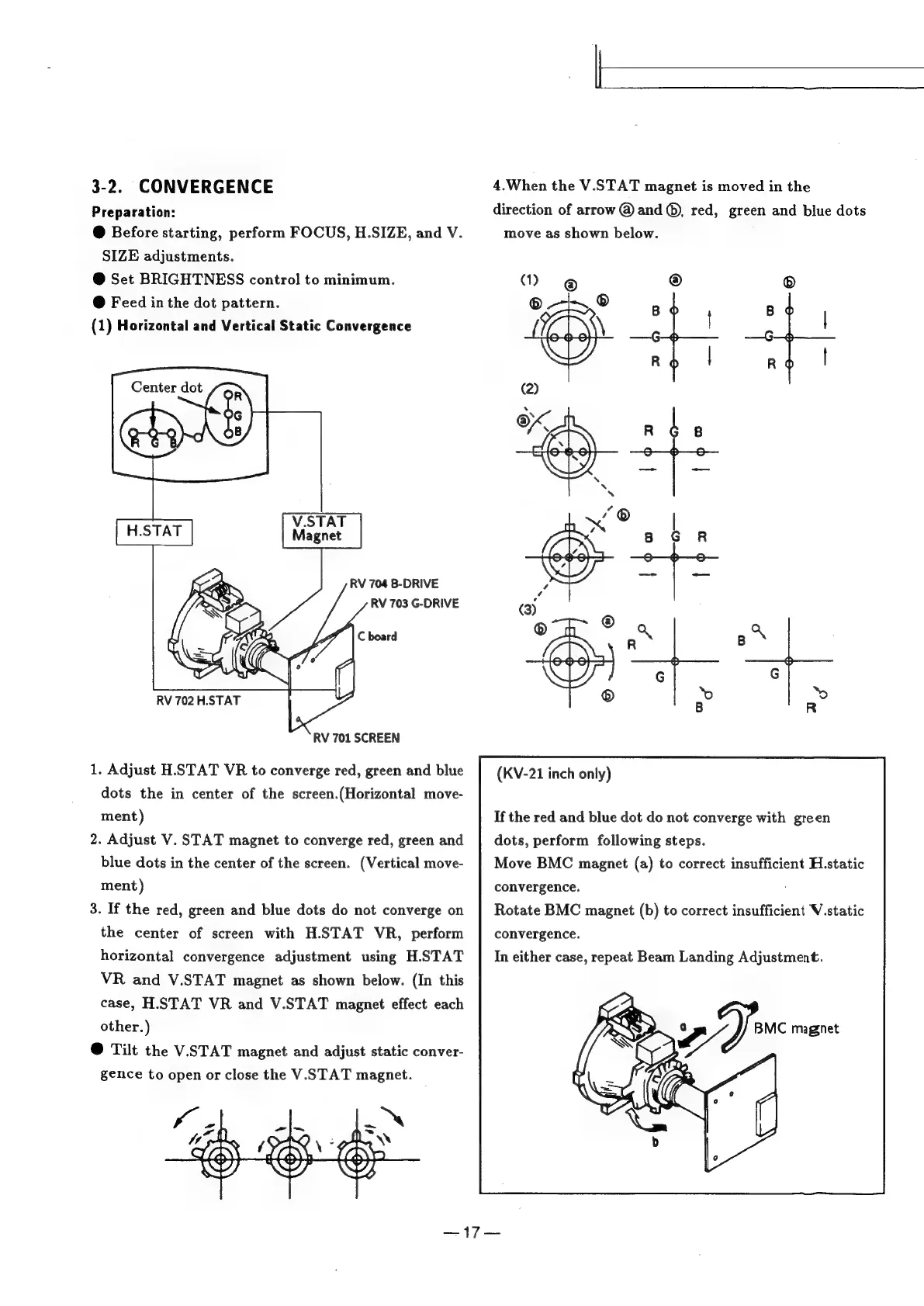
3-2.
CONVERGENCE
Preparation:
@
Before
starting,
perform
FOCUS,
H.SIZE,
and
V.
SIZE
adjustments.
@
Set
BRIGHTNESS
control
to
minimum.
@
Feed
in
the
dot
pattern.
(1)
Horizontal
and
Vertical
Static
Convergence
RV
704
B-DRIVE
RV
703
G-DRIVE
RV
702
H.STAT
RV
701
SCREEN
1.
Adjust
H.STAT
VR
to
converge
red,
green
and
blue
dots
the
in
center
of
the
screen.(Horizontal
move-
ment)
2.
Adjust
V.
STAT
magnet
to
converge
red,
green
and
blue dots
in
the
center
of
the
screen.
(Vertical
move-
ment)
3.
If
the
red,
green
and
blue dots
do
not
converge
on
the
center
of
screen
with
H.STAT
VR,
perform
horizontal
convergence
adjustment
using
H.STAT
VR
and
V.STAT
magnet
as
shown
below.
(In
this
case,
H.STAT
VR
and
V.STAT
magnet
effect
each
other.)
@
Tilt
the
V.STAT
magnet
and
adjust
static
conver-
gence
to
open
or
close
the
V.STAT
magnet.
4.When
the
V.STAT
magnet
is
moved
in
the
direction
of
arrow
@
and
®,
red,
green
and
blue
dots
move
as
shown
below.
(1)
®
®
®
an
®
fa
221
22
4
rd
|
ao
|
(2)
ads
(KV-21
inch
only)
If
the
red
and
blue
dot
do
not
converge
with
green
dots,
perform
following
steps.
Move
BMC
magnet
(a)
to
correct
insufficient
H.static
convergence.
Rotate
BMC
magnet
(b)
to
correct
insufficient
V.static
convergence.
In
either
case,
repeat
Beam
Landing
Adjustment.
ey
ee

Related product manuals