EasyManua.ls Logo

Sony TRINITRON KV-A2121D - Page 24

Sony TRINITRON KV-A2121D
70 pages
Print Icon
To Next Page IconTo Next Page
To Previous Page IconTo Previous Page
Loading...
ears
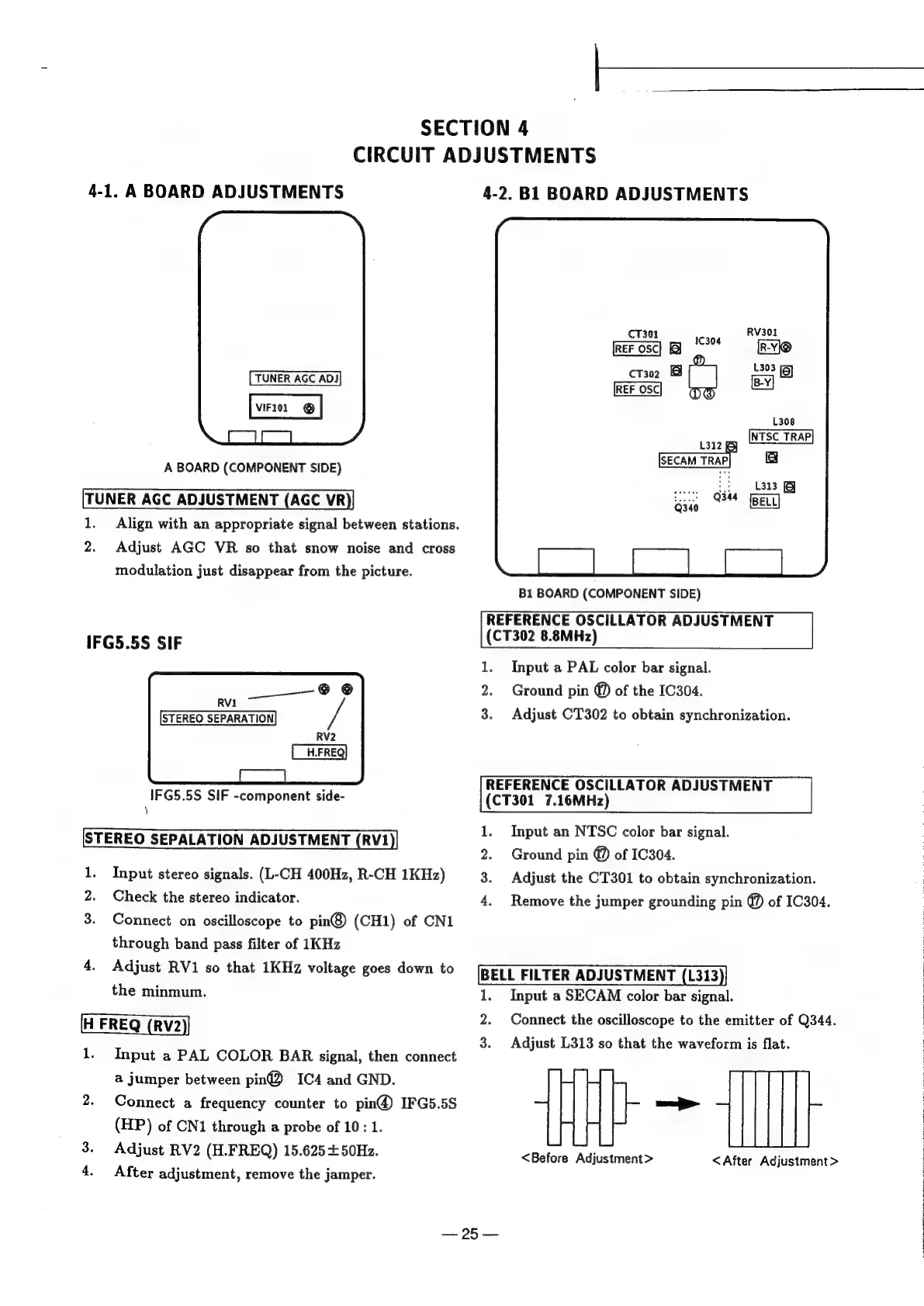
SECTION
4
CIRCUIT
ADJUSTMENTS
4-1.
ABOARD
ADJUSTMENTS
TUNER
AGC
ADJ
VIF101
©
A
BOARD
(COMPONENT
SIDE)
TUNER
AGC
ADJUSTMENT
(AGC
VR
1,
Align
with
an
appropriate
signal
between
stations.
2.
Adjust
AGC
VR
so
that
snow
noise
and
cross
modulation
just
disappear
from
the
picture.
IFG5.5S
SIF
@
©
RVI
STEREO
SEPARATION
RV2
IFG5.5S
SIF
-component
side-
STEREO
SEPALATION
ADJUSTMENT
(RV1
1.
Input
stereo
signals.
(L-CH
400Hz,
R-CH
1KHz)
Check
the
stereo
indicator.
Connect
on
oscilloscope
to
pin®@)
(CH1)
of
CN1
through
band
pass
filter
of
1KHz
4.
Adjust
RV1
so
that
1KHz
voltage
goes
down
to
the
minmum.
1.
Input
a
PAL
COLOR
BAR
signal,
then
connect
a
jumper
between
pin@®
IC4
and
GND.
2.
Connect
a
frequency
counter
to
pin@
IFG5.5S
(HP)
of
CN1
through
a
probe
of
10:
1.
3.
Adjust
RV2
(H.FREQ)
15.625
+50Hz.
4.
After
adjustment,
remove
the
jamper.
4-2.
B1
BOARD
ADJUSTMENTS
CT301
ane
RV301
REF
OSC
R-VK@
CT302
=
8
L308
tin
gq
NESCTRAP
SECAM
TRAP
f=
L313
B1
BOARD
(COMPONENT
SIDE)
REFERENCE
OSCILLATOR
ADJUSTMENT
(CT302
8.8MHz)
1.
Input
a
PAL
color
bar
signal.
2.
Ground
pin
@
of
the
IC304.
3.
Adjust
CT302
to
obtain
synchronization.
REFERENCE
OSCILLATOR
ADJUSTMENT
(CT301
7.16MHz)
.
Input
an
NTSC
color
bar
signal.
Ground
pin
@
of
1C304.
Adjust
the
CT301
to
obtain
synchronization.
Remove
the
jumper
grounding
pin
@
of
IC304.
Pe
N
o
BELL
FILTER
ADJUSTMENT
(L313
Input
a
SECAM
color
bar
signal.
Connect
the
oscilloscope
to
the
emitter
of
Q344.
Adjust
L313
so
that
the
waveform
is
flat.
{HU
>
<Before
Adjustment
>
Sin
es
<After
Adjustment
>
25

Related product manuals