EasyManua.ls Logo

Sony TRINITRON KV-A2121D - Page 25

Sony TRINITRON KV-A2121D
70 pages
Print Icon
To Next Page IconTo Next Page
To Previous Page IconTo Previous Page
Loading...
peace
ean
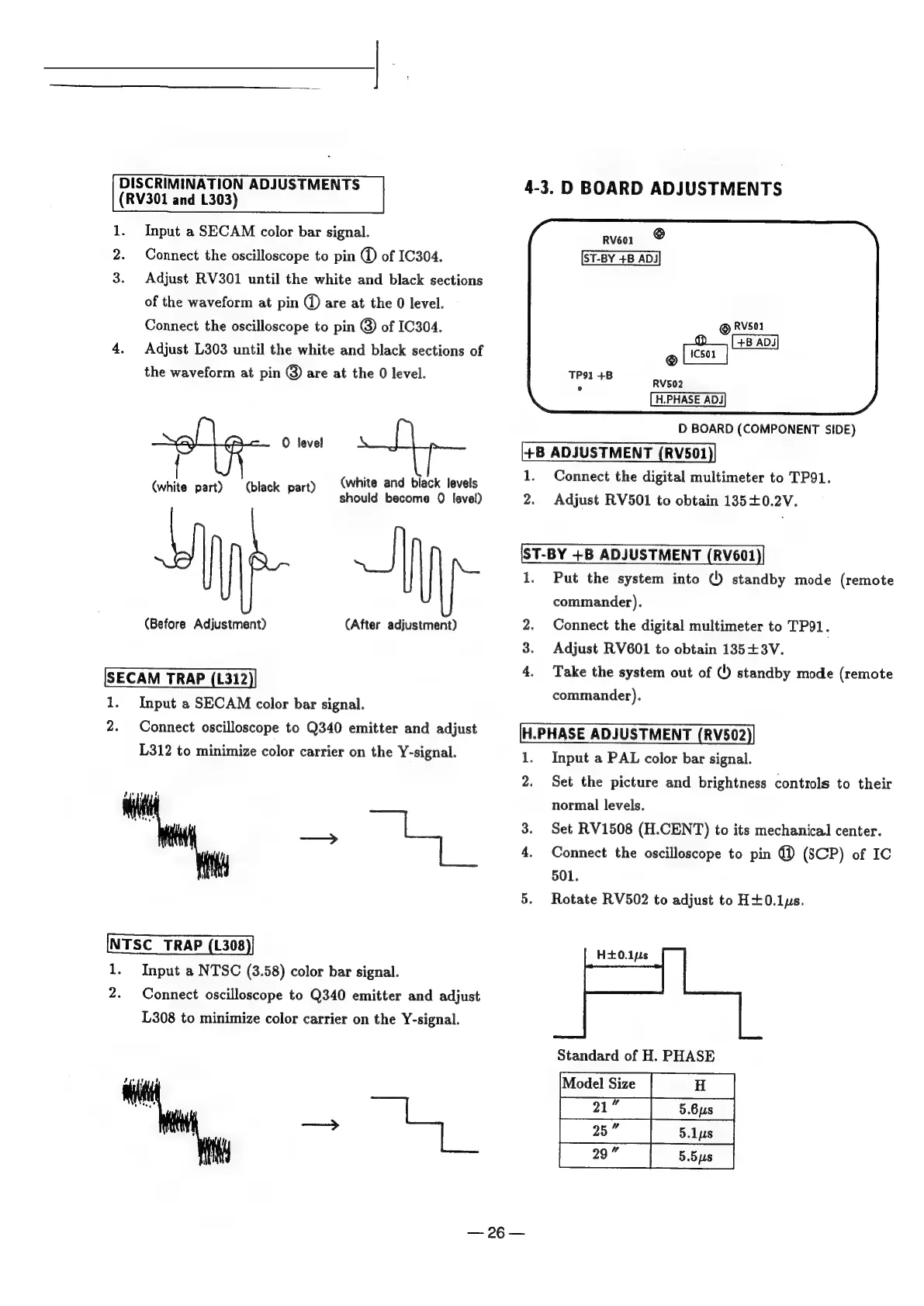
(RV301
and
L303)
1.
Input
a
SECAM
color
bar
signal.
Rveo1
@
Connect
the
oscilloscope
to
pin
of
IC304.
ST-BY
+B
ADJ
Adjust
RV301
until
the
white
and
black
sections
of
the
waveform
at
pin
@
are
at
the
0
level.
poet
the
cecilloseope
Ke
pin
@
of
mei
~_
©
he
4.
Adjust
L303
until
the
white
and
black
sections
of
©
the
waveform
at
pin
@
are
at
the
0
level.
RV502
H.PHASE
ADJ
D
BOARD
(COMPONENT
SIDE)
ae
+B
ADJUSTMENT
(RV501
{
1.
Connect
the
digital
multimeter
to
TP91.
(white
part)
(black.
part)
(white
and
black
levels
should
become
0
level)
2.
Adjust
RV501
to
obtain
135+0.2V.
1.
Put
the
system
into
()
standby
mode
(remote
commander).
(Before
Adjustment)
(After
adjustment)
2.
Connect
the
digital
multimeter
to
TP91.
3.
Adjust
RV601
to
obtain
135+3V.
a
Take
the
system
out
of
()
standby
mode
(remote
commander).
SECAM
TRAP
(L312
-
Input
a
SECAM
color
bar
signal.
Connect
oscilloscope
to
Q340
emitter
and
adjust
H.PHASE
ADJUSTMENT
(RV502
L312
to
minimize
color
carrier
on
the
Y-signal.
Input
a
PAL
color
bar
signal.
wo
no
eS
Set
the
picture
and
brightness
controls
to
their
normal
levels.
=%
ae.
.
Set
RV1508
(H.CENT)
to
its
mechanical
center.
4.
Connect
the
oscilloscope
to
pin
@
(SCP)
of
IC
501.
Rotate
RV502
to
adjust
to
H+0.1ys.
w
on
er
1.
Input
a
NTSC
(3.58)
color
bar
signal.
2.
Connect
oscilloscope
to
Q340
emitter
and
adjust
L308
to
minimize
color
carrier
on
the
Y-signal.
Standard
of
H.
PHASE
=
9G
Ss

Related product manuals