11
nN
Getting Started >
Locating Controls and Ports
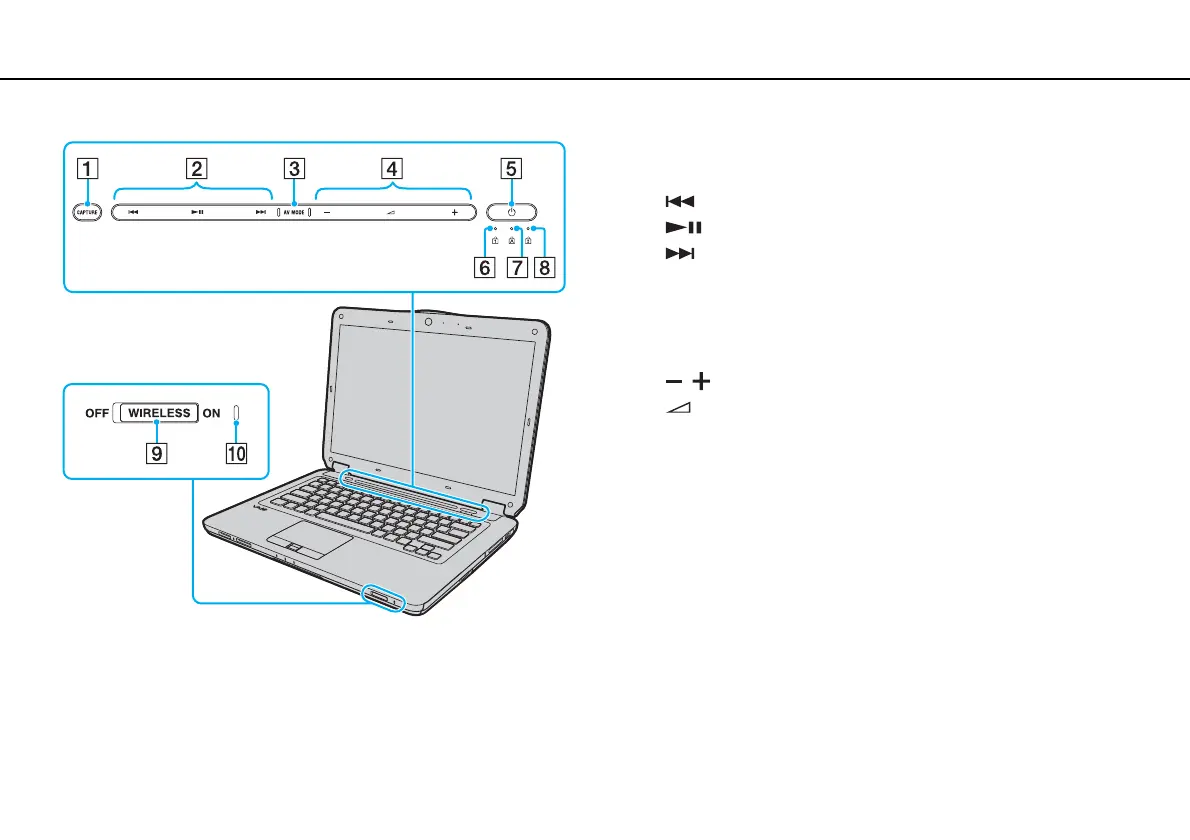
A CAPTURE button
*
(page 31)
B Playback control area
*
: Fast-rewind
: Play/Pause
: Fast-forward
For information on how to use the touch sensor buttons above,
see Controlling Music and Video Playback (page 33).
C AV MO DE button
*
(page 32)
D Volume control area
*
/: Volume
: Muting
For information on how to use the touch sensor buttons above,
see Controlling Music and Video Playback (page 33).
E Power button
F Num lock indicator (page 16)
G Caps lock indicator (page 16)
H Scroll lock indicator (page 16)
I WIRELESS switch (page 59), (page 66)
J WIRELESS indicator (page 16)
* On selected models only.


 To Next Page