17
nN
Getting Started >
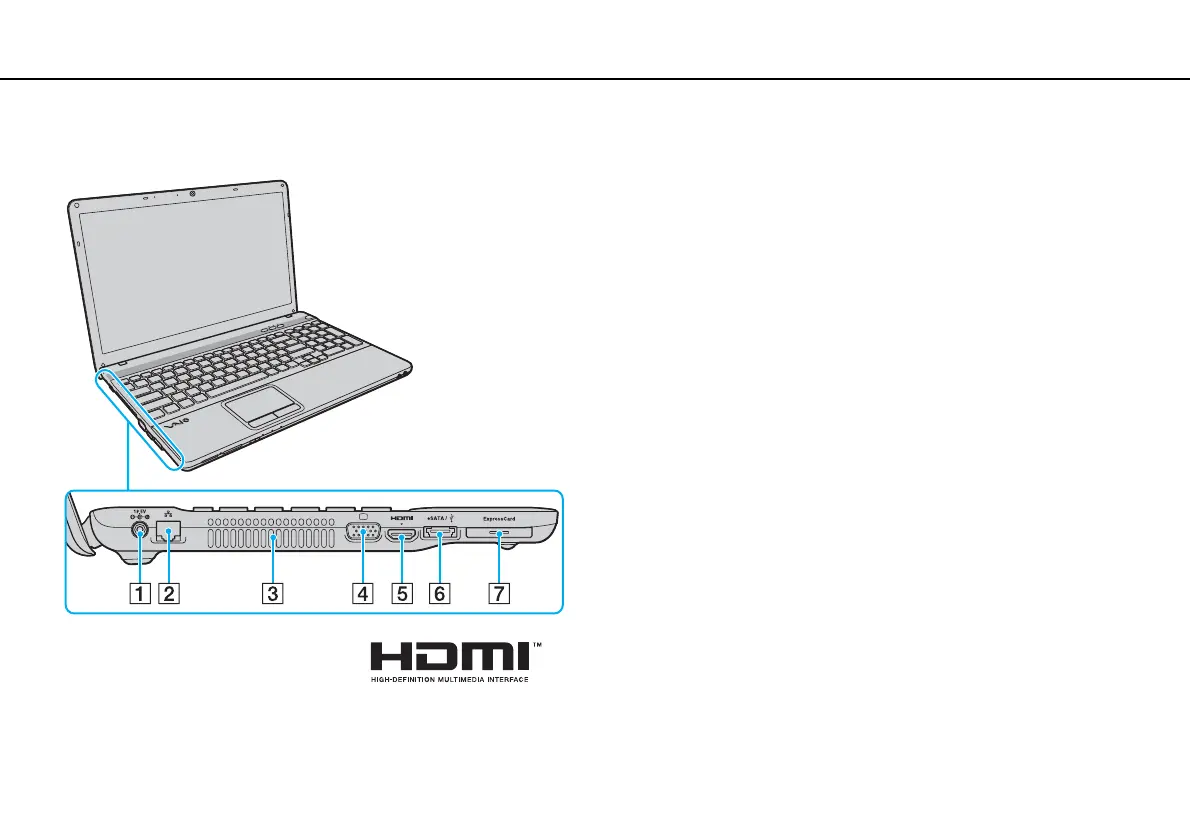
Locating Controls and Ports
Left
A DC IN port (page 20)
B Network (LAN) port (page 67)
C Air vent
D Monitor port (page 82)
E HDMI output port (page 85)
F eSATA/USB port
*
Connect an external device compliant with the eSATA or USB
standard.
G ExpressCard/34 slot (page 58)
* Compliant with the USB 2.0 standard and supports high-/full-/low- speeds.
!
Notes on using the eSATA/USB port:
- An eSATA device and a USB device cannot be connected to the port
simultaneously.
- The computer may not be able to recognize your USB device depending on the
plug shape of the device. In this case, use one of the USB dedicated ports.
- When disconnecting an eSATA device, click the Safely Remove
Hardware and Eject Media icon on the taskbar and select the device before
removal.
- The port does not support an eSATA port multiplier.






 To Next Page