EasyManua.ls Logo

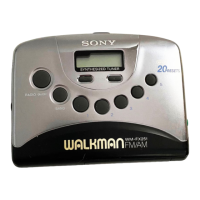
Sony Walkman WM-FX290 - User Manual

Sony Walkman WM-FX290
3 pages
Print Icon
To Next Page IconTo Next Page
Loading...
3-261-583-11 (1)
Radio
Cassette Player
© 2004 Sony Corporation Printed in China
W M -FX290
Operat ing Instruct ions
“WALKMAN” is a registered trademark of Sony Corporation to
represent Headphone Stereo products.
is a registered trademark of Sony
Corporation.
A
B
M ENU
SET
VOL*
C
SONY WM -FX290
Tested to Comply
With FCC Standards
FOR HOM E OR OFFICE USE
TV/W B (w eather)
FM / AM
RADIO OFF
PRESET/TUNING +/
HOLD
* There is a tactile dot beside VOL on the main unit to show the direction
to turn up the volume.
* * The button has a tactile dot.
The validity of the CE marking is restricted to only
those countries where it is legally enforced, mainly in
the countries EEA (European Economic Area).
i
Product regist rat ion
Please register this product on line at www.sony.com/
productregistration.
<http://www.sony.com/productregistration>
Proper registration will enable us to send you periodic
mailings about new products, services, and other
important announcements. Registering your product
will also allow us to contact you in the unlikely event
that the product needs adjustment or modification.
Thank you.
INFORM ATION
You are cautioned that any changes or modifications
not expressly approved in this manual could void your
authority to operate this equipment.
If you have any questions about this product, you may
call:
Sony Direct Response Center 1-(800)-222-7669
or write to: Sony Direct Response Center 12451
Gateway Blvd. Fort Myers, FL 33913
Specif ications
Frequency range
TV: 2 - 13 ch WB (Weather): 1 - 7 ch
FM: 87.5 - 108 MHz AM: 530 - 1 710 kHz
Output
Headphones (i) jack
Load impedance 8 – 300
Pow er requirements
1.5V DC, battery size AA (R6) x 1
Dimensions (w /h/ d)
Approx. 83.6 x 112.0 x 28.3 mm (3
3
8
× 4
1
2
× 1
1
8
inches)
excl. projecting parts and controls
M ass
Approx. 130 g (4.6 oz) (main unit only)
Supplied accessories
Stereo headphones or Stereo earphones (1)
Carrying case with belt clip(1)
Design and specifications are subject to change without notice.
Battery life* (approximate hours)
Sony alkaline LR6 (SG)* * Sony R6P (SR)
Tape playback 35 9
Radio reception 40 14
* Measured value by the standard of JEITA (Japan
Electronics and Information Technology Industries
Association). (Using a Sony HF series cassette tape)
**When using a Sony LR6 (SG) alkaline dry battery
(produced in Japan).
Note
The battery life may be shorter depending on the operating
condition, the surrounding temperature and battery type.
For cust om ers in the Unit ed St ates
Ow ners Record
The model number is located on the bottom and the
serial number is located inside the cassette holder.
Record these numbers in the space provided below.
Refer to them whenever you call upon your Sony
dealer regarding this product.
Model No. WM-FX290
Serial No.
Declaration of Conformity
Trade Name: SONY
Model No.: WM-FX290
Responsible Party: Sony Electronics Inc.
Address: 680 Kinderkamack Road, Oradell,
NJ 07649 USA
Telephone No.: 201-930-6972
This device complies with Part 15 of the FCC Rules.
Operation is subject to the following two conditions:
(1) This device may not cause harmful interference,
and (2) this device must accept any interference
received, including interference that may cause
undesired operation.
Preparations
To Insert Batt ery A
1 Slide open the battery compartment lid,
and insert one size AA (R6) dry battery
with correct polarity.
Replace the battery with new one when "
"
flashes in the display.
Playing a Tape
1 Insert a cassette. B
2 Press N PLAY.
Adjust the volume with VOL.
To Pr ess
Stop playback x STOP
Wind rapidly* M FF or m REW
* If you leave the unit after the tape has been wound or
rewound, the battery will be consumed rapidly. Be
sure to press x STOP.
Note
Do not open the cassette holder while the tape is
running.
Using Ot her Functions
Locking the Controls
Set the HOLD switch in the direction of the G mark
to lock the controls.
The HOLD function only locks the radio operation
buttons, MENU, SET, PRESET/TUNING + or – and
ENTER.
Emphasizing Bass Sound
Press MENU repeatedly to set “_” (the cursor) to
MB (mega bass) in the display. Then, press SET to
turn MB on. With each press, the indications change
as follows.
MB (mega bass) : emphasizes bass sound
No message: off (normal)
Notes
If the sound is distorted with the mode “MB”, turn
down the volume or select normal mode.
Bass emphasis may not show great effect if the
volume is turned up too high.
Prot ecting Your Hearing—AVLS
(Autom at ic Volum e Lim it er
Syst em )
Press MENU repeatedly to set the cursor to AVLS in
the display. Then press SET to show “
”.
The maximum volume is kept down to protect your
ears.
List ening to the Radio
1 If the HOLD function is turned on, set the
HOLD switch in the opposite direction of
the G mark to unlock the controls. Make
sure that the tape has stopped completely.
2 Press FM/AM or TV/WB (weather band)
repeatedly to select the desired band and to
turn on the radio.
3 For manual tuning:
1 Press MENU repeatedly to set the cursor
in the display to TUNE MODE and press
SET to choose “MANUAL”.
2 Press PRESET/TUNING + or –
repeatedly to tune in to the desired
station.
Hold down PRESET/TUNING + or – for
a few seconds to scan for stations.
For preset tuning:
1 Press MENU repeatedly to set the cursor
in the display to TUNE MODE and press
SET to choose “PRESET”.
2 Press PRESET/TUNING + or –
repeatedly to recall the desired preset
station.
To use preset tuning, preset the station
first (see “Presetting Radio Stations”).
To turn off t he radio
Press RADIO OFF.
To improve broadcast reception C
For TV/ WB/ FM : Extend the headphones/
earphones cord (antenna). If the reception is still
not good, press MENU repeatedly to set the cursor
in the display to FM MODE. Then press SET to
switch between “LOCAL” and none (DX) for best
reception.
For AM : Reorient the unit itself.
x STOP
M FF
N PLAY* *
m REW
ENTER
FM
AM
Downloaded from: https://www.usersmanualguide.com/
Question and Answer IconNeed help?

Do you have a question about the Sony Walkman WM-FX290 and is the answer not in the manual?

Summary

Product Preparation and Tape Playback

Insert Battery

Instructions for inserting a size AA battery into the compartment with correct polarity.

Play Tape

Steps for inserting a cassette and starting playback using the PLAY button.

Tape Control Functions

Details on adjusting volume, stopping playback, and winding tape.

Radio Operation

Listening to the Radio

How to select radio bands (FM, AM, TV/WB) and tune stations.

Tuning Modes

Setting up manual tuning or preset tuning for radio stations.

Improving Broadcast Reception

Tips to enhance radio reception quality for different bands.

Turn Off Radio

Procedure to stop radio playback and turn off the radio function.

Advanced Features

Protect Hearing with AVLS

Activate AVLS to limit maximum volume and protect your hearing.

Locking Controls

Use the HOLD function to prevent accidental operation of buttons.

Emphasizing Bass Sound

Activate Mega Bass mode for enhanced bass sound.

Radio Presetting

Presetting Stations Automatically

Automatically scan and preset receivable radio stations.

Presetting Stations Manually

Manually tune and store desired radio stations into memory.

Playing Preset Radio Stations

Recall and listen to previously stored radio stations.

Scanning Preset Radio Stations

Scan through preset radio stations for a short duration.

Cancel Stored Station

Remove a previously stored radio station from memory.

Precautions and Maintenance

Battery Precautions

Safety guidelines for handling and using batteries.

Handling Precautions

Advice on operating the unit in various environmental conditions.

Headphones;Earphones Use

Safety and hearing protection advice for headphone use.

Maintenance

Instructions for cleaning the tape head and exterior.

Overview

The device is a Sony WM-FX290 Walkman, a portable radio cassette player designed for personal audio enjoyment. It combines the functionality of a cassette player with a multi-band radio tuner, offering a versatile listening experience on the go.

Function Description

The primary function of the WM-FX290 is to play audio cassettes and receive radio broadcasts. As a cassette player, it supports standard audio cassettes, allowing users to listen to their pre-recorded music or audio content. The player features basic cassette transport controls including PLAY, STOP, fast forward (FF), and rewind (REW).

Beyond cassette playback, the device incorporates a comprehensive radio tuner. It can receive broadcasts across multiple bands: FM, AM, TV (channels 2-13), and Weather Band (WB, channels 1-7). This multi-band capability allows users to access a wide range of radio stations, including local music, news, and weather updates. The radio tuner supports both manual and preset tuning, providing flexibility in how users find and store their favorite stations.

An important safety feature is the AVLS (Automatic Volume Limiter System). This system automatically limits the maximum volume output to protect the user's hearing, a crucial consideration for portable audio devices used with headphones or earphones.

The device also includes a bass emphasis function, referred to as "Mega Bass" (MB). This feature enhances the low-frequency sounds, providing a richer and more powerful bass response for a more immersive listening experience.

Usage Features

The WM-FX290 is designed for ease of use with several intuitive features.

Power and Battery: The device operates on a single AA (R6) dry battery. A battery compartment lid allows for easy insertion and replacement of the battery. A low battery indicator ("") flashes on the display when the battery needs to be replaced, ensuring users are aware of the power status.

Cassette Playback: To play a cassette, the user simply inserts the cassette into the holder and presses the PLAY button. Volume adjustment is controlled via a dedicated VOL control, which has a tactile dot for easy identification of the "up" direction. The fast forward and rewind functions allow for quick navigation through the tape. A note of caution is provided: leaving the unit after winding or rewinding can rapidly consume battery, so users are advised to press STOP once done. It's also recommended not to open the cassette holder while the tape is running to prevent damage.

Radio Listening:

  1. Unlocking Controls: If the HOLD function is active, it must be disengaged first.
  2. Band Selection: Users can select the desired radio band (FM, AM, TV/WB) by repeatedly pressing the FM/AM or TV/WB button.
  3. Tuning Modes:
    • Manual Tuning: The user navigates to "TUNE MODE" in the menu and selects "MANUAL." Then, the PRESET/TUNING +/- buttons are used to manually tune to a station. Holding these buttons down initiates a scan for stations.
    • Preset Tuning: After selecting "TUNE MODE" and "PRESET" from the menu, users can recall stored stations using the PRESET/TUNING +/- buttons. This requires stations to be preset first.
  4. Turning Off Radio: A dedicated RADIO OFF button allows users to turn off the radio function.

Presetting Radio Stations: The device can store up to 40 stations (7 TV, 4 WB, 24 FM, 5 AM).

  • Automatic Scanning (DAPS - Digital Auto Preset Scanning): Users can press and hold ENTER for more than 3 seconds to initiate an automatic scan. The device will scan for stations and pause for about 5 seconds when a station is found. Pressing ENTER again during this pause stores the station. This process continues until all receivable stations are preset. If stations are already stored, new presets will overwrite old ones.
  • Manual Presetting: Users can manually tune to a desired station, then press ENTER to make the frequency digits flash. While flashing, they can select a preset number using PRESET/TUNING +/- and press ENTER again to store the station.

Improving Broadcast Reception:

  • TV/WB/FM: The headphones/earphones cord acts as an antenna. Extending it can improve reception. If reception is still poor, users can switch between "LOCAL" and "DX" (none) modes via the FM MODE setting in the menu for optimal reception.
  • AM: For AM reception, reorienting the unit itself can improve signal quality.

Locking Controls (HOLD function): A HOLD switch is provided to lock the controls. When engaged, it prevents accidental button presses, specifically for radio operation buttons, MENU, SET, PRESET/TUNING +/-, and ENTER. This is useful to prevent unintended changes to settings or playback during transport.

Emphasizing Bass Sound (Mega Bass - MB): To activate the bass emphasis, users navigate to "MB" in the menu and press SET. The indication "MB" will appear in the display. Pressing SET again will turn off the feature. Users are advised to turn down the volume or select normal mode if the sound becomes distorted with MB activated. The effect of bass emphasis may also be less noticeable at very high volumes.

Protecting Hearing (AVLS): To activate AVLS, users navigate to "AVLS" in the menu and press SET. The "" indicator will appear. This limits the maximum volume to protect hearing.

Precautions:

  • Batteries: Avoid carrying dry batteries with metallic objects to prevent short circuits and heat generation. Remove batteries if the Walkman will not be used for a long time to prevent leakage and corrosion.
  • Handling: Avoid exposing the unit to heat sources, direct sunlight, excessive dust, sand, moisture, rain, mechanical shock, or leaving it in a closed car.
  • Tape Usage: Tapes longer than 90 minutes are not recommended as they are thin and prone to stretching, which can cause malfunction or sound deterioration.
  • LCD Display: The LCD display may become difficult to read or slow down in extreme temperatures (above 40°C/104°F or below 0°C/32°F), but it will return to normal at room temperature.
  • Long-term Storage: If the unit has not been used for a long time, it's advised to warm it up in playback mode for a few minutes before regular use.

On Headphones/Earphones:

  • Road Safety: Do not use headphones/earphones while driving, cycling, or operating motorized vehicles, as it can create a traffic hazard and may be illegal in some areas. Extreme caution is advised when walking, especially near pedestrian crossings.
  • Hearing Damage: Avoid using headphones/earphones at high volume continuously. Reduce volume or discontinue use if ringing in the ears occurs.
  • Caring for Others: Maintain a moderate volume to hear outside sounds and be considerate of others.

Maintenance Features

Regular maintenance is crucial for optimal performance and longevity of the device.

  • Tape Head and Path Cleaning: After every 10 hours of use, the tape head and tape path should be cleaned using a cotton swab and a commercially available cleaning solvent. This prevents dirt and tape residue buildup, which can degrade sound quality.
  • Exterior Cleaning: The exterior of the unit can be cleaned with a soft cloth slightly moistened in water. Harsh chemicals like alcohol, benzine, or thinner should not be used as they can damage the finish.
  • Headphones/Earphones Plugs: The plugs of the headphones or earphones should be cleaned periodically to ensure good electrical contact and prevent audio interruptions.

Sony Walkman WM-FX290 Specifications

General IconGeneral
Display typeLCD
Battery typeAA
Battery life (max)35 h
Battery technologyAlkaline
AM band range535 - 1602 kHz
Digital tunerYes
FM band range87.5 - 108 MHz
Preset stations quantity40
Weight and Dimensions IconWeight and Dimensions
Weight130 g
Dimensions (WxDxH)83.6 x 28.3 x 112 mm

Related product manuals