EasyManua.ls Logo

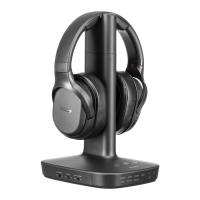
Sony WH-L600 - User Manual

Sony WH-L600
66 pages
Print Icon
To Next Page IconTo Next Page
Loading...
Help Guide
Digital Surround Headphone System
WH-L600
Use this manual if you encounter any problems, or have any questions.
Getting started
Checking the package contents
Parts and controls
WH-L600R Headphones
TMR-L600 Processor
Power
Charging the headphones/Connecting the processor to the wall outlet
Turning on the processor
Setting the processor to standby mode
Turning off the processor
Turning on the headphones
Turning off the headphones
Making connections
1

Other manuals for Sony WH-L600

Question and Answer IconNeed help?

Do you have a question about the Sony WH-L600 and is the answer not in the manual?

Summary

Getting Started and System Overview

Checking the Package Contents

Verify all items are included after opening the package.

Parts and Controls Overview

Details the components and controls of the WH-L600 headphones and TMR-L600 processor.

Power Management and Charging

Charging the Headphones and Processor

Instructions for charging the system's headphones and connecting the processor to power.

Turning the System On and Off

Procedures for powering the processor and headphones on and off.

Connections and Audio Setup

HDMI Connections and ARC Functionality

Information on using HDMI cables, ARC, and related notes.

Connection Examples: TV Setup

Step-by-step guides for connecting the system to different types of TVs.

Enjoying Audio and Video Content

Guide on listening to TV programs and other connected devices.

Customizing Audio Effects

How to select sound field modes, matrix decoder, and dynamic range.

System Information and Maintenance

Supported Audio Formats

Lists the audio formats compatible with the processor.

Safety and Care Instructions

Important safety guidelines, placement recommendations, and maintenance advice.

Customer Support Resources

Websites and contact information for customer support.

Troubleshooting Common Issues

Troubleshooting Overview and Guidance

Steps to follow when the system does not function as expected.

Sound and Audio Playback Problems

Solutions for issues like no sound, distorted audio, or incorrect format playback.

Power, Charging, and Connectivity Problems

Solutions for issues related to power, battery charging, and wireless connectivity.

System Operation Errors

How to resolve general system malfunctions or operating errors.

Summary

Getting Started and System Overview

Checking the Package Contents

Verify all items are included after opening the package.

Parts and Controls Overview

Details the components and controls of the WH-L600 headphones and TMR-L600 processor.

Power Management and Charging

Charging the Headphones and Processor

Instructions for charging the system's headphones and connecting the processor to power.

Turning the System On and Off

Procedures for powering the processor and headphones on and off.

Connections and Audio Setup

HDMI Connections and ARC Functionality

Information on using HDMI cables, ARC, and related notes.

Connection Examples: TV Setup

Step-by-step guides for connecting the system to different types of TVs.

Enjoying Audio and Video Content

Guide on listening to TV programs and other connected devices.

Customizing Audio Effects

How to select sound field modes, matrix decoder, and dynamic range.

System Information and Maintenance

Supported Audio Formats

Lists the audio formats compatible with the processor.

Safety and Care Instructions

Important safety guidelines, placement recommendations, and maintenance advice.

Customer Support Resources

Websites and contact information for customer support.

Troubleshooting Common Issues

Troubleshooting Overview and Guidance

Steps to follow when the system does not function as expected.

Sound and Audio Playback Problems

Solutions for issues like no sound, distorted audio, or incorrect format playback.

Power, Charging, and Connectivity Problems

Solutions for issues related to power, battery charging, and wireless connectivity.

System Operation Errors

How to resolve general system malfunctions or operating errors.

Sony WH-L600 Specifications

General IconGeneral
Quantity1
Cables includedOptical
Driver typeDynamic
Driver unit40 mm
Ear couplingSupraaural
Headphone frequency20 - 22000 Hz
2.5 mm connectorNo
Number of products included1 pc(s)
Wireless range30 m
3.5 mm connectorYes
Connectivity technologyWired & Wireless
Battery recharge time6 h
Continuous audio playback time17 h
Headset typeBinaural
Product typeHeadset
Product colorBlack
Wearing styleHead-band
Recommended usageMusic
Microphone typeNot available
Weight and Dimensions IconWeight and Dimensions
Depth188 mm
Width145 mm
Height278 mm
Weight320 g

Related product manuals