1
2
3
stored content
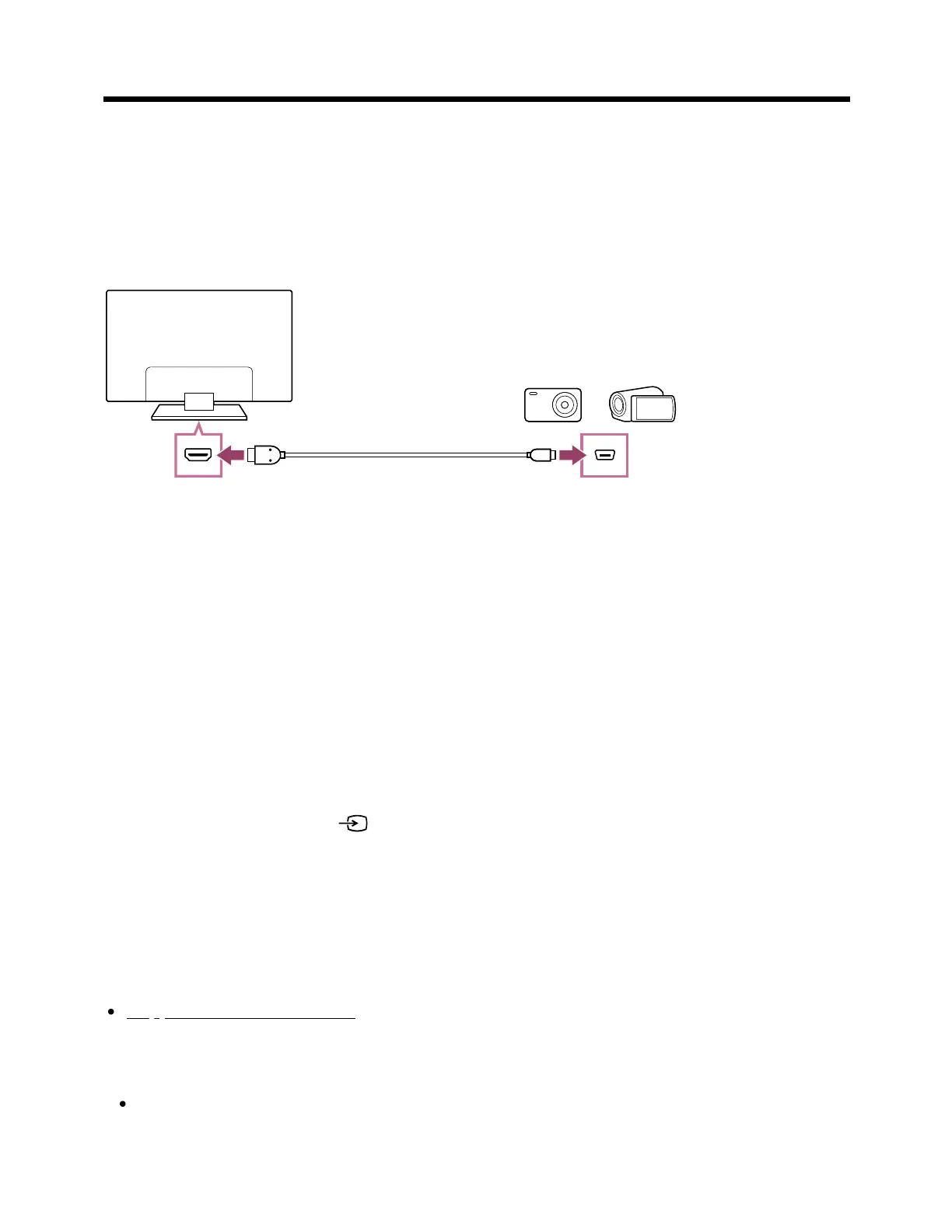
To connect a camera or camcorder
Connect your Sony digital still camera or camcorder using an HDMI cable. Use a cable
that has an HDMI mini jack (socket) for the digital still camera/camcorder end, and a
standard HDMI jack (socket) for the TV end.
(A) Digital still camera
(B) Camcorder
(C) HDMI cable (not supplied)
Be sure to use an authorized Premium High Speed HDMI Cable(s) bearing the HDMI
logo.
To view content stored on a digital still camera/camcorder
After connecting the digital still camera/camcorder, turn it on.
Press the INPUT or (Input) button repeatedly to select the connected
digital still camera/camcorder.
Start playback on the connected digital still camera/camcorder.
To check the supported file formats
Supported files and formats
Hint
If you connect a BRAVIA Sync-compatible device, you can operate it by simply using
the TV’s remote control. Make sure that the device is BRAVIA Sync-compatible.
*
* ™



 To Next Page