19GB
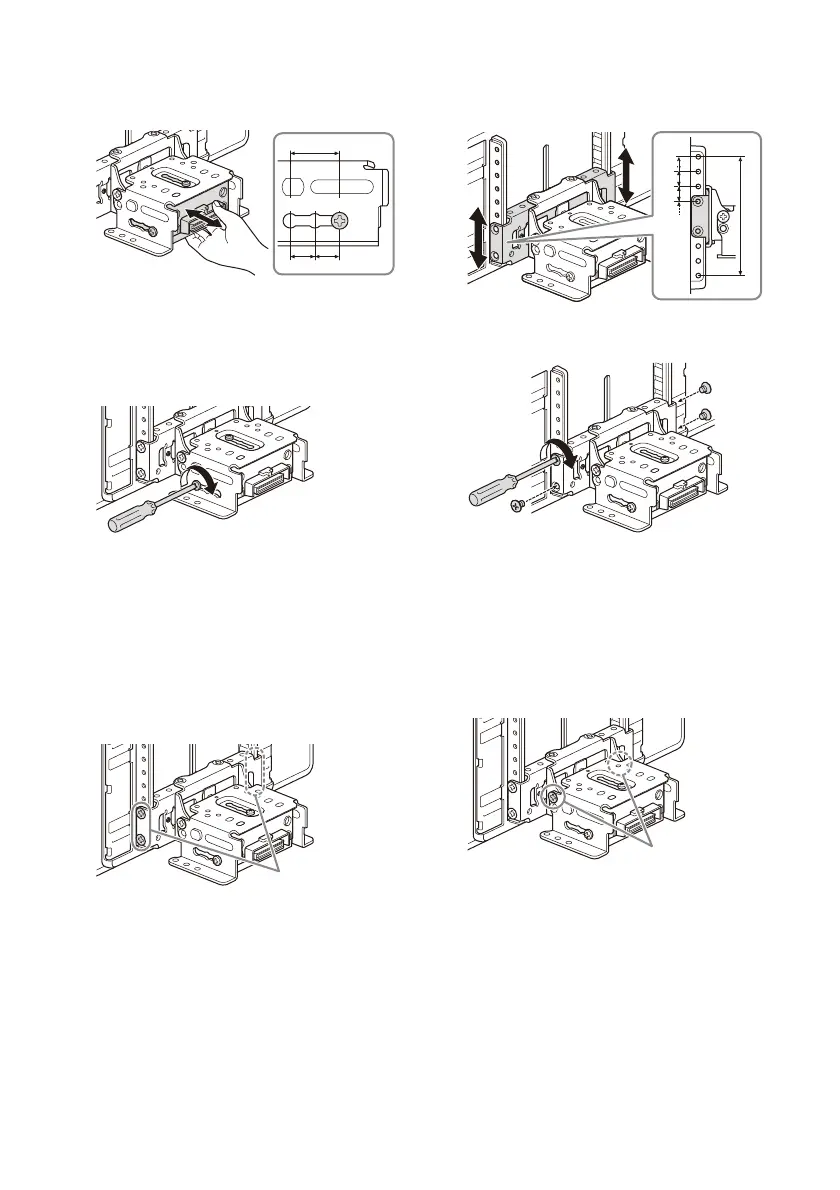
2 Slide the connector bracket to decide the
appropriate depth position.
Adjustable depth: within 20 mm (
13
/16 in) (), in
3 steps, in 10 mm (
13
/32 in) pitch ().
Bracket positions 1 to 3 for the display:
1: Slide-out position
2: Intermediate position
3: Slide-in position
3 At the desired position, tighten the 3 screws
firmly to secure the connector bracket.
Tighten the screws firmly.
When you tighten a screw, be careful not to
apply too much torque as doing so may damage
the screw (the torque value should be from
1.5 N•m to 2.0 N•m).
Adjusting the height of the display
position
1
Remove the 4 pre-installed screws for
height adjustment (on both sides).
2 Slide the connector bracket up or down to
decide the appropriate height position.
Adjustable height: within 60 mm (2
3
/8 in) (),
in 7 steps, in 10 mm (
13
/32 in) pitch ().
3 At the desired position, tighten the 4 screws
firmly to secure the connector bracket.
Tighten the screws firmly.
When you tighten a screw, be careful not to
apply too much torque as doing so may damage
the screw (the torque value should be from
1.5 N•m to 2.0 N•m).
Adjusting the display angle (tilt)
1
Remove the 2 pre-installed screws for angle
adjustment (on both sides).


 To Next Page