ZV-E10
5-027-835-31(1)
GB
7
C:\Users\gotanda\Desktop\50 27835311_RKSG GB book\5027835311ZVE10CE C\01GB-ZVE10CEC\01GB.indd
DTP data saved: 2021/03/10 18:13
PDF file created: 2021/03/10 18:16
GB
Shooting
Shooting movies
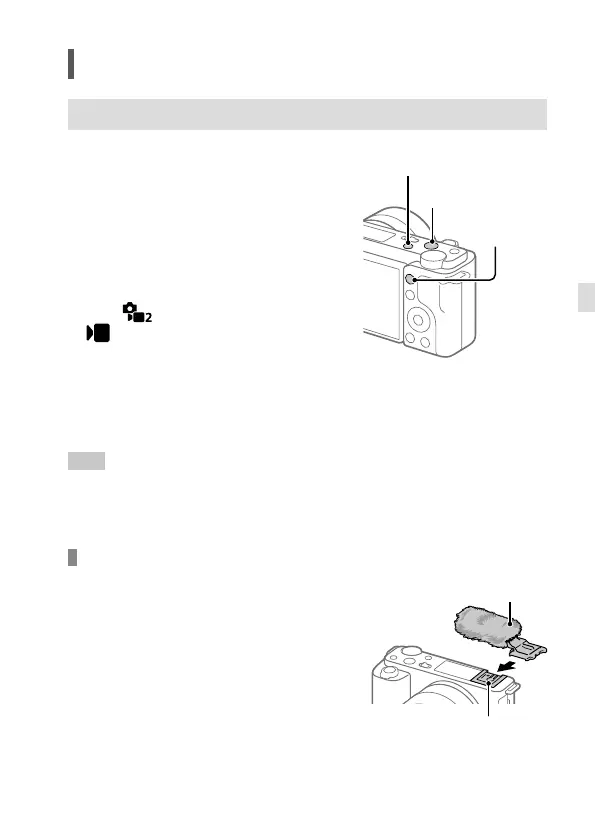
1 Press the Still/Movie/S&Q button to
select the movie recording mode.
Each time you press the button, the
shooting mode switches in the order
of still image shooting mode, movie
recording mode, and slow-motion/quick-
motion shooting mode.
2 Press the MENU button and
select (Camera Settings2)
[ Shoot Mode] the desired
shooting mode.
Still/Movie/S&Q
button
MOVIE (Movie)
button
MENU button
3 Press the MOVIE (Movie) button to start recording.
4 Press the MOVIE (Movie) button again to stop recording.
Hint
• The start/stop movie recording function is assigned to the MOVIE (Movie)
button in the default settings. Even without switching shooting modes in
Step 1, you can start movie recording from still image shooting mode by
pressing the MOVIE (Movie) button.
Using the wind screen (supplied)
Use the wind screen to reduce wind noise
picked up by the internal microphone
when recording a movie.
Attach the wind screen to the Multi
Interface Shoe.
Wind screen
Multi Interface Shoe



 To Next Page