ZV-E10
5-063-277-11(1)
EN
5
C:\01EN-ZVE10CEC\01EN.indd
DTP data saved: 2024/07/05 12:43
PDF file created: 2024/07/05 12:43
EN
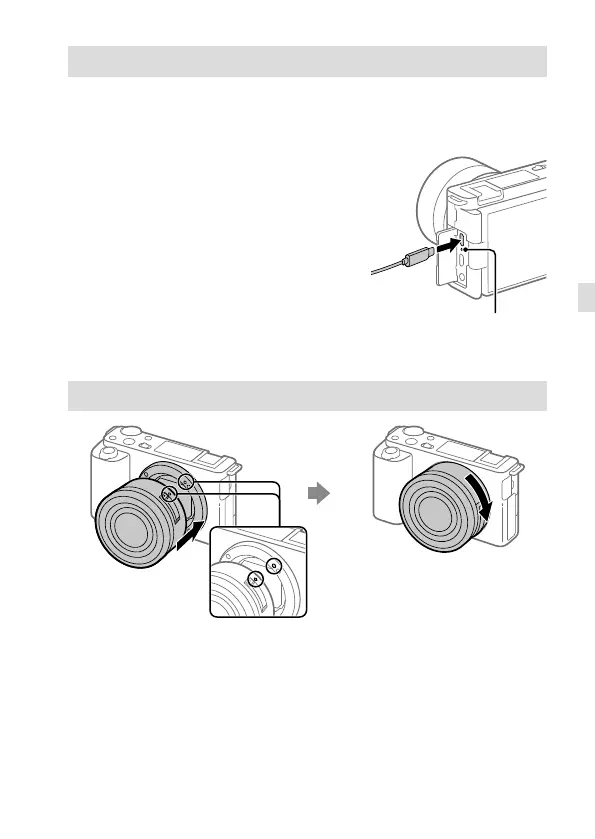
Charging the battery pack
1 Turn the power off.
If the camera is turned on, the battery pack will not be charged.
2 Using the USB Type-C cable (supplied),
connect the USB Type-C terminal on
the camera to an external power
source, such as a commercially
available USB AC adaptor or mobile
battery.
The charge lamp will light up when
charging starts. When the charge lamp
turns off, charging is completed.
Charge lamp
• When you use an AC adaptor, use one with a rated output of 1.5 A or higher.
Attaching a lens
Mounting indexes
1 Remove the body cap from the camera and the rear lens cap from the
rear of the lens.
2 Mount the lens by aligning the two white index marks (mounting
indexes) on the lens and camera.
3 While pushing the lens lightly toward the camera, turn the lens slowly
in the direction of the arrow until it clicks into the locked position.



 To Next Page