552 User Guide and Technical Information
3
Quickstart
Quick Start Guide
This Quick Start Guide provides a brief overview for first use of the 552.
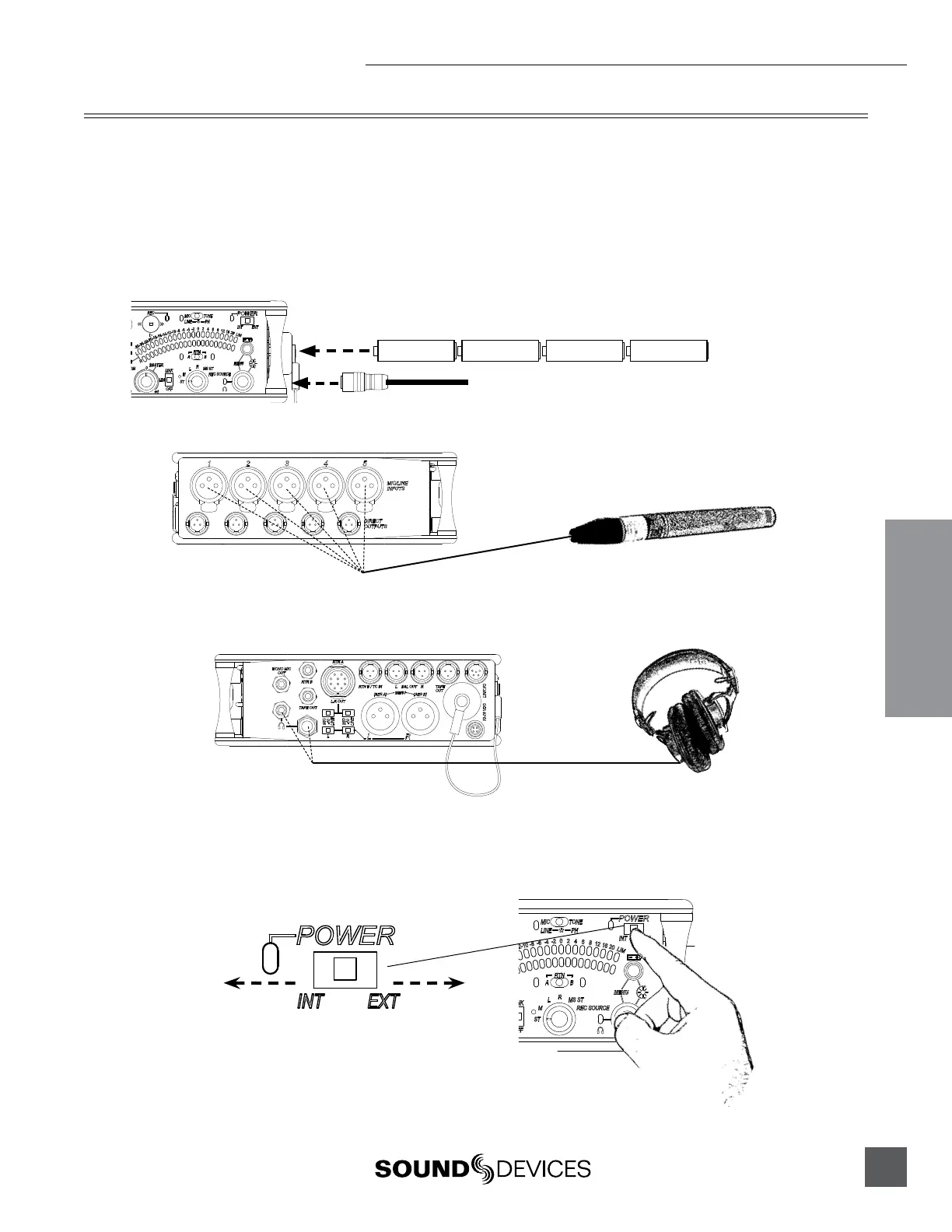
1) Connect power.
For internal powering from AA batteries, unscrew the battery cap (counter-clock-
wise), insert four AA batteries (not included) positive (+) side first into the battery
tube. Thread the battery cap back on (clockwise). For external powering, connect a
DC powering source (not included) to the DC connector on the Right Panel.
External Power Supply (not included)
AA
+
-
AA
+
-
AA
+
-
AA
+
-
2) Connect analog microphone or line sources to the XLR inputs.
552 Left Panel
3) Connect headphones to either the 1/4-inch or the 3.5 mm headphone outputs.
552 Right Panel
4) Power On the mixer.
Slide the power switch to the INT position to power the mixer from AA batteries.
Slide the power switch to the EXT position to power the mixer from external DC.
Slide left for Internal AA Battery
Slide right for External DC Power


 To Next Page