The Soundavo NSA-250 is a versatile 2 x 50W network streaming audio amplifier designed for both residential and commercial audio installations. Its compact size and Class D circuit allow for easy mounting in various indoor areas. The amplifier can be integrated into a stereo system with a dedicated subwoofer output.
Function Description:
The NSA-250 serves as a central hub for audio playback, supporting multiple input sources including wireless streaming (Wi-Fi), Bluetooth, S/PDIF (optical), USB, and RCA Aux input. It features a Class D digital amplifier, delivering clear and powerful sound. The device is controlled via a dedicated "Soundavo Player" app available on Apple App Store and Google Play, as well as an included IR remote control. The app allows for multi-room audio setups, connecting up to four NSA-250 amplifiers simultaneously for synchronized or independent audio playback across different zones.
Important Technical Specifications:
- Power Output: 25W x 2 RMS @ 8 Ohms, 50W x 2 RMS @ 4 Ohms.
- THD (Total Harmonic Distortion): <1% (Rated power: 25W @ 8 Ohms).
- S/N (Signal-to-Noise Ratio): >90 dB A WTD.
- Frequency Response: 20Hz~22KHz +0/-2dB @ 8 Ohms.
- RCA Input Sensitivity: 700mV.
- Thermal Protection: Yes.
- Short Protection: Yes.
- Bluetooth Version: 4.2.
- USB Version: 2.0.
- Music File Formats Supported: MP3, WMA, AAC, AAC+, ALAC, FLAC, APE, WAV.
- Wireless Network: Supports 802.11b/g/n, compatible with Apple Airplay and DLNA.
- Dimensions (WxHxD): 200mm x 47.5mm x 160mm.
- Weight: 1.5 Kgs.
- AC Input: 100V-240V, 50/60Hz 100W.
Usage Features:
- Input Selection: Users can select input sources (AUX RCA, Optical, Bluetooth, USB, Wi-Fi) via the front panel SOURCE button or the remote control.
- Volume/EQ Control: A rotary encoder on the front panel allows adjustment of Volume (Red LED), Treble (Yellow LED), and Bass (Blue LED). These functions are toggled by momentarily pressing the knob.
- Wi-Fi Streaming: Connects to local Wi-Fi networks for streaming. The Wi-Fi LED flashes during connection and lights steady when successful. The "Soundavo Player" app guides the setup process.
- Bluetooth Connectivity: Pressing the SOURCE button to select Bluetooth puts the amplifier in pairing mode (flashing BT LED). Once connected, the LED lights steady, and a prompt tone is heard.
- USB Playback: A USB input on the front panel allows connection of USB storage devices for music playback through the streaming app.
- IR Sensor: Located on the front panel for receiving signals from the remote control.
- Rear Panel Connections:
- AUX INPUT (RCA): For analog audio devices like CD players.
- SUB OUTPUT: For connecting to a sub amplifier or active/powered subwoofer.
- OPTICAL INPUT: For digital audio devices like TVs or digital preamplifiers.
- ETHERNET: For wired network connection, preferred for stable streaming via the "Soundavo Player" app. Supports UPnP and DHCP, with static IP configuration possible via Advanced_IP_Scanner software.
- SPEAKER OUT: For connecting passive speakers. Users must ensure correct polarity (+/-) and connect speakers before plugging in the power cable.
- Wi-Fi RESET: A button to configure wireless network settings, useful for first-time setup or changing Wi-Fi networks.
- Wi-Fi ANTENNA & BT ANTENNA: External antennas for optimal wireless connection.
- "Soundavo Player" App:
- Device List Screen: Displays connected NSA-250 amplifiers, allowing selection of different audio for different zones in multi-room setups.
- Music Player Screen: Allows playback of selected audio from various apps, skipping tracks, playing/pausing, and saving favorites.
- Dashboard Screen: Provides access to various audio apps (Spotify, Pandora, vTuner, TIDAL, iHeartRadio, tunein, Napster, etc.) and saved favorite audio. Users can add or remove apps from the dashboard.
- Streaming Service Accounts: The manual provides detailed steps for configuring accounts for services like TuneIn and iHeartRadio within the "Soundavo Player" app.
- AirPlay Streaming: Supports Apple's AirPlay technology, allowing users to stream audio from iTunes libraries or other AirPlay-enabled iOS devices. Volume control is linked between the iOS device and the NSA-250.
- Multi-Room Mode: Up to four NSA-250 amplifiers can be connected to a smartphone/tablet via the "Soundavo Player" app. Amplifiers can be synchronized to play the same audio by dragging their icons together in the app, or separated for independent playback. The app remembers configurations when devices are turned off.
Maintenance Features:
- Cleaning: Only clean the unit with a dry cloth.
- Power Protection: Unplug the unit during lightning storms or extended periods of disuse. A surge protector is strongly recommended. Protect the power cord from being walked on or pinched.
- Ventilation: Do not obstruct the unit's ventilation openings to prevent overheating and electrical shock/fire hazards.
- Heat Sources: Do not install near any heat sources.
- Qualified Personnel: Refer all servicing to qualified personnel. The unit has no user-serviceable parts inside; do not remove the cover.
- Troubleshooting Guide: The manual includes a comprehensive troubleshooting section addressing common issues such as connection failures, app responsiveness, buffering, and Wi-Fi connectivity problems, offering solutions like restarting apps, checking network settings, or resetting the amplifier. For example, if Wi-Fi buffering occurs, users are advised to try a different audio source, move closer to the router, or install a Wi-Fi repeater. If the Wi-Fi router is connecting at 5.0 GHz, it should be changed to 2.4 GHz band as the NSA-250 only supports 2.4G networks. If the router uses Enterprise Encryption Mode (EEM), it should be disabled or the router changed, as the NSA-250 does not support EEM. If the router has disabled IGMP, it should be enabled.

 Need help?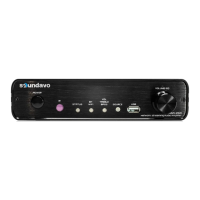

 To Next Page
 General